
Turn on suggestions
Auto-suggest helps you quickly narrow down your search results by suggesting possible matches as you type.
Showing results for
EN
Turn on suggestions
Auto-suggest helps you quickly narrow down your search results by suggesting possible matches as you type.
Showing results for
- English
- :
- Forum
- :
- Documentation
- :
- Re: Objects from BIM-Cloud are appearing green in ...
Options
- Subscribe to RSS Feed
- Mark Topic as New
- Mark Topic as Read
- Pin this post for me
- Bookmark
- Subscribe to Topic
- Mute
- Printer Friendly Page

Amalie
Newcomer
Options
- Mark as New
- Bookmark
- Subscribe
- Mute
- Subscribe to RSS Feed
- Permalink
- Report Inappropriate Content
2022-04-18 03:38 PM - edited 2022-04-18 03:49 PM
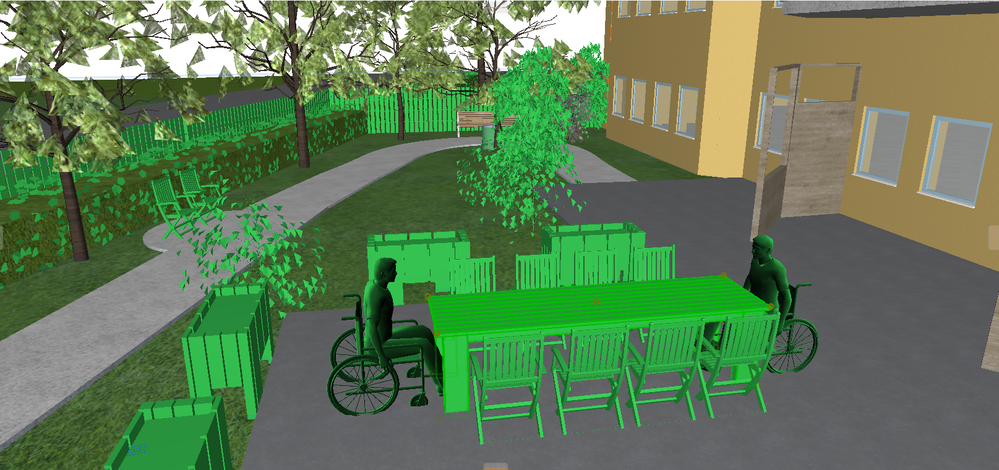
Objects from BIM-Cloud are appearing green in 3D and in renders.
2022-04-18
03:38 PM
As the topic says I have an issue that objects downloaded from BIM-Cloud are always appearing green in renders and in 3D-view. The attached image is from the 3D-model view. I have tried renovation filters and different graphic overrides, and unchecked "Show contours" in 3D Styles, but none have worked. Any idea how to fix these settings? not sure if it matters here, but I'm using Archicad 25
Thanks in advance!
Read-Only
1 Reply 1

Aaron Bourgoin
Rockstar
Options
- Mark as New
- Bookmark
- Subscribe
- Mute
- Subscribe to RSS Feed
- Permalink
- Report Inappropriate Content
2022-04-18 04:02 PM
2022-04-18
04:02 PM
could be that the surface attributes are missing and Archicad is applying a "General" surface instead.
Think Like a Spec Writer
MacBook M4Pro - 24Gb RAM
AC4.55 through 29 / AC29.2.1 USA
Rhino 8.35 Mac
MacOS Tahoe 26.6.2
MacBook M4Pro - 24Gb RAM
AC4.55 through 29 / AC29.2.1 USA
Rhino 8.35 Mac
MacOS Tahoe 26.6.2

Still looking?

Suggested topics
- Archicad 29 Teamwork changes not syncing and reverting when reserved by another user in Teamwork & BIMcloud
- Issue with updating libraries and missing objects on BIMcloud SaaS in Teamwork & BIMcloud
- BIMx messaging connection issue in BIMx
- Objects from BIM-Cloud are appearing green in 3D and in renders. in Documentation
- BIMcloud appears with a yellow icon in Teamwork & BIMcloud
