
Turn on suggestions
Auto-suggest helps you quickly narrow down your search results by suggesting possible matches as you type.
Showing results for
EN
Turn on suggestions
Auto-suggest helps you quickly narrow down your search results by suggesting possible matches as you type.
Showing results for
- English
- :
- Forum
- :
- Documentation
- :
- Teamwork Recovery File Issue
Options
- Subscribe to RSS Feed
- Mark Topic as New
- Mark Topic as Read
- Pin this post for me
- Bookmark
- Subscribe to Topic
- Mute
- Printer Friendly Page

JCCARLOS91
Enthusiast
Options
- Mark as New
- Bookmark
- Subscribe
- Mute
- Subscribe to RSS Feed
- Permalink
- Report Inappropriate Content
2022-04-11 07:29 AM
Teamwork Recovery File Issue
2022-04-11
07:29 AM
Hi,
This is the first time we are encounter this issue. Here's the screenshot.
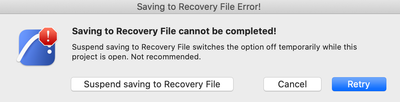
We tried all options but this message pops up every time we try to save or send/receive. The project is also stuck right but without any loading bar anywhere.
We're a bit lost at this point.
John Carlos
AC25 | iMac 2019
AC25 | iMac 2019
Read-Only
1 Reply 1

hybrid
Enthusiast
Options
- Mark as New
- Bookmark
- Subscribe
- Mute
- Subscribe to RSS Feed
- Permalink
- Report Inappropriate Content
2022-04-11 06:49 PM
2022-04-11
06:49 PM
Hello. Do you only have this on one PC? Or on several?
If on one, then you can try to delete Local data from the computer.
Open a new Archicad
Local Data Manager (Teamwork > Project > Local Data Manager)
Select the project that won't load and delete it. Then you can reconnect to the project.
AMD R7 2700 3.8@GHz | 32 Gb RAM | SSD | GTX 1050Ti

Still looking?

Suggested topics
- Need Archicad Drafting? I Can Help! in General discussions
- Missing Attributes in Library Elements – Teamwork File / Educational Version in Libraries & objects
- Can not connect to BIMCloud in Teamwork & BIMcloud
- Attributes acting weird in Project data & BIM
- Archicad 29 crashes when updating drawings linked to another Teamwork project in Teamwork & BIMcloud
