
Turn on suggestions
Auto-suggest helps you quickly narrow down your search results by suggesting possible matches as you type.
Showing results for
EN
Turn on suggestions
Auto-suggest helps you quickly narrow down your search results by suggesting possible matches as you type.
Showing results for
- English
- :
- Forum
- :
- Documentation
- :
- Re: Wall Tags
Options
- Subscribe to RSS Feed
- Mark Topic as New
- Mark Topic as Read
- Pin this post for me
- Bookmark
- Subscribe to Topic
- Mute
- Printer Friendly Page

Steve Jepson
Virtuoso
Options
- Mark as New
- Bookmark
- Subscribe
- Mute
- Subscribe to RSS Feed
- Permalink
- Report Inappropriate Content
2021-11-12 06:36 PM - edited 2021-11-12 06:37 PM
Wall Tags
2021-11-12
06:36 PM
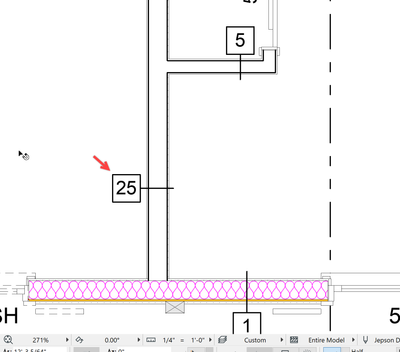
Why is it so difficult to place a Wall Tag/label with this sort of readable orientation?
How are you doing it? What Label are you using ?
ArchiCAD 25 7000 USA - Windows 10 Pro 64x - Dell 7720 64 GB 2400MHz ECC - Xeon E3 1535M v6 4.20GHz - (2) 1TB M.2 PCIe Class 50 SSD's - 17.3" UHD IPS (3840x2160) - Nvidia Quadro P5000 16GB GDDR5 - Maxwell Studio/Render 5.2.1.49- Multilight 2 - Adobe Acrobat Pro - ArchiCAD 6 -25
Solved! Go to Solution.
1 Solution
Accepted Solutions

David Maudlin
Rockstar
Options
- Mark as New
- Bookmark
- Subscribe
- Mute
- Subscribe to RSS Feed
- Permalink
- Report Inappropriate Content
2021-11-13 02:49 PM
2021-11-13
02:49 PM
Steve:
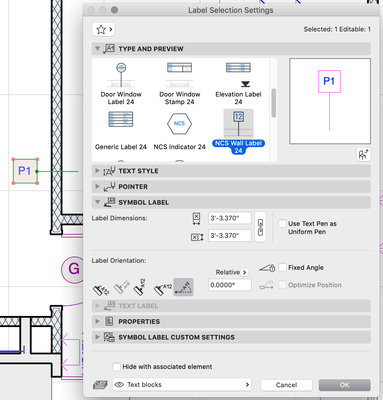
This can work. Note the Label Orientation is set to Custom Angle, although the angle itself does not matter.
David
David Maudlin / Architect
www.davidmaudlin.com
Digital Architecture
AC29 USA Perpetual • Mac mini M4 Pro OSX15 | 64 gb ram • MacBook Pro M3 Pro OSX14 | 36 gb ram
www.davidmaudlin.com
Digital Architecture
AC29 USA Perpetual • Mac mini M4 Pro OSX15 | 64 gb ram • MacBook Pro M3 Pro OSX14 | 36 gb ram
3 Replies 3

Aaron Bourgoin
Rockstar
Options
- Mark as New
- Bookmark
- Subscribe
- Mute
- Subscribe to RSS Feed
- Permalink
- Report Inappropriate Content
2021-11-12 06:45 PM
2021-11-12
06:45 PM
what I've learned is that AC walls like to be drawn in a clockwise orientation. when I'm tagging walls I turn the wall reference vectors on and use the "Invert Wall Direction" and or "Modify Wall Reference Line" to mirror in place. I do this instead of trying to make the labels do too many gymnastics. The only downside to this is to try and do this before you have too many dimensions set. They'll require attention as well.
Think Like a Spec Writer
MacBook M4Pro - 24Gb RAM
AC4.55 through 29 / AC29.2.1 USA
Rhino 8.35 Mac
MacOS Tahoe 26.6.2
MacBook M4Pro - 24Gb RAM
AC4.55 through 29 / AC29.2.1 USA
Rhino 8.35 Mac
MacOS Tahoe 26.6.2
David Maudlin
Rockstar
Options
- Mark as New
- Bookmark
- Subscribe
- Mute
- Subscribe to RSS Feed
- Permalink
- Report Inappropriate Content
2021-11-13 02:49 PM
2021-11-13
02:49 PM
Steve:
This can work. Note the Label Orientation is set to Custom Angle, although the angle itself does not matter.
David
David Maudlin / Architect
www.davidmaudlin.com
Digital Architecture
AC29 USA Perpetual • Mac mini M4 Pro OSX15 | 64 gb ram • MacBook Pro M3 Pro OSX14 | 36 gb ram
www.davidmaudlin.com
Digital Architecture
AC29 USA Perpetual • Mac mini M4 Pro OSX15 | 64 gb ram • MacBook Pro M3 Pro OSX14 | 36 gb ram
Steve Jepson
Virtuoso
Options
- Mark as New
- Bookmark
- Subscribe
- Mute
- Subscribe to RSS Feed
- Permalink
- Report Inappropriate Content
2021-11-16 01:04 AM
2021-11-16
01:04 AM
Thanks. That works easy enough. I was having a difficult time getting that specific orientation with the other Labels I was using. Composite Profile Name 25 and Property Label 25. Not sure why I was not using the NCS Wall Label. I usually do.
ArchiCAD 25 7000 USA - Windows 10 Pro 64x - Dell 7720 64 GB 2400MHz ECC - Xeon E3 1535M v6 4.20GHz - (2) 1TB M.2 PCIe Class 50 SSD's - 17.3" UHD IPS (3840x2160) - Nvidia Quadro P5000 16GB GDDR5 - Maxwell Studio/Render 5.2.1.49- Multilight 2 - Adobe Acrobat Pro - ArchiCAD 6 -25

Still looking?

Suggested topics
- After 3 years with Archicad, I'm honestly disappointed in General discussions
- Missing Walls in projects migrated to Archicad 30 in Installation & update
- if else if in expressions in Project data & BIM
- Archicad Doors and Windows with IfcOpeningElement in Project data & BIM
- Rounded Wall Corner displays correctly in Floor Plan but glitches in 3D Document in Modeling
