
Turn on suggestions
Auto-suggest helps you quickly narrow down your search results by suggesting possible matches as you type.
Showing results for
EN
Turn on suggestions
Auto-suggest helps you quickly narrow down your search results by suggesting possible matches as you type.
Showing results for
- English
- :
- Forum
- :
- Documentation
- :
- dimensions mark
Options
- Subscribe to RSS Feed
- Mark Topic as New
- Mark Topic as Read
- Pin this post for me
- Bookmark
- Subscribe to Topic
- Mute
- Printer Friendly Page

Anonymous
Not applicable
Options
- Mark as New
- Bookmark
- Subscribe
- Mute
- Subscribe to RSS Feed
- Permalink
- Report Inappropriate Content
2020-06-18
12:20 AM
- last edited on
2023-05-22
11:52 PM
by
 Gordana Radonic
Read-Only
Labels:
- Labels:
-
Dimension Tools
4 Replies 4

DGSketcher
Legend
Options
- Mark as New
- Bookmark
- Subscribe
- Mute
- Subscribe to RSS Feed
- Permalink
- Report Inappropriate Content
2020-06-18 12:26 AM
2020-06-18
12:26 AM
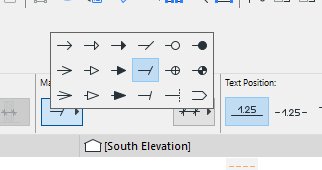
It is already a pretty good range, what are you wanting to do instead?
Apple iMac Intel i9 / macOS Sonoma / AC27UKI (most recent builds.. if they work)
Anonymous
Not applicable
Options
- Mark as New
- Bookmark
- Subscribe
- Mute
- Subscribe to RSS Feed
- Permalink
- Report Inappropriate Content
2020-06-18 12:38 AM
2020-06-18
12:38 AM
DGSketcher wrote:yes it's very good and usually enough
It is already a pretty good range, what are you wanting to do instead?
but this time I need rectangle ones .same as circle one

Barry Kelly
Moderator
Options
- Mark as New
- Bookmark
- Subscribe
- Mute
- Subscribe to RSS Feed
- Permalink
- Report Inappropriate Content
2020-06-18 03:50 AM
2020-06-18
03:50 AM
The dimension markers are hard coded into the software.
There is no way that I know of to amend them.
Barry.
There is no way that I know of to amend them.
Barry.
One of the forum moderators.
Versions 6.5 to 27
i7-10700 @ 2.9Ghz, 32GB ram, GeForce RTX 2060 (6GB), Windows 10
Lenovo Thinkpad - i7-1270P 2.20 GHz, 32GB RAM, Nvidia T550, Windows 11
Versions 6.5 to 27
i7-10700 @ 2.9Ghz, 32GB ram, GeForce RTX 2060 (6GB), Windows 10
Lenovo Thinkpad - i7-1270P 2.20 GHz, 32GB RAM, Nvidia T550, Windows 11
DGSketcher
Legend
Options
- Mark as New
- Bookmark
- Subscribe
- Mute
- Subscribe to RSS Feed
- Permalink
- Report Inappropriate Content
2020-06-18 11:34 AM
2020-06-18
11:34 AM
Obvious what was missing really.  I agree, it would complete the set if there was a solid & open square option.
I agree, it would complete the set if there was a solid & open square option.
Apple iMac Intel i9 / macOS Sonoma / AC27UKI (most recent builds.. if they work)
Still looking?

Suggested topics
