
Turn on suggestions
Auto-suggest helps you quickly narrow down your search results by suggesting possible matches as you type.
Showing results for
EN
Turn on suggestions
Auto-suggest helps you quickly narrow down your search results by suggesting possible matches as you type.
Showing results for
- English
- :
- Forum
- :
- Documentation
- :
- Re: elevation markers don't have second line
Options
- Subscribe to RSS Feed
- Mark Topic as New
- Mark Topic as Read
- Pin this post for me
- Bookmark
- Subscribe to Topic
- Mute
- Printer Friendly Page

Anonymous
Not applicable
Options
- Mark as New
- Bookmark
- Subscribe
- Mute
- Subscribe to RSS Feed
- Permalink
- Report Inappropriate Content
2020-11-27
05:52 AM
- last edited on
2023-05-23
03:04 AM
by
 Gordana Radonic
elevation markers don't have second line
2020-11-27
05:52 AM
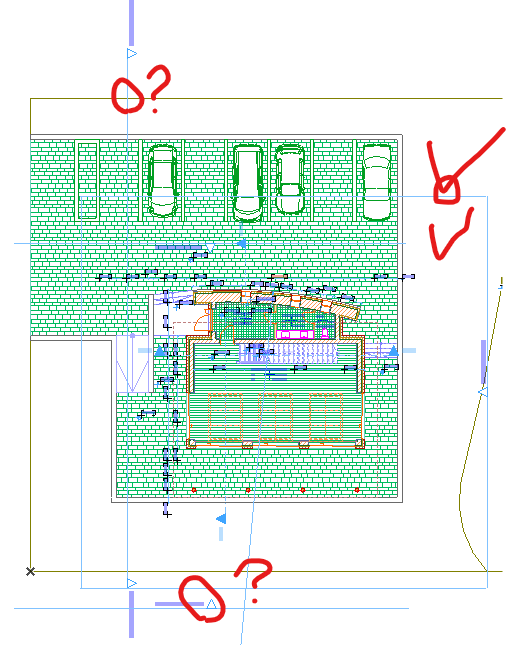
- one elevation line has "second line" which control the view distance, but
- the orthers don't have and unable to adjust the view distance
Please advice how to set the second lines back
Thanks
Solved! Go to Solution.
1 Solution
Accepted Solutions

Barry Kelly
Moderator
Options
- Mark as New
- Bookmark
- Subscribe
- Mute
- Subscribe to RSS Feed
- Permalink
- Report Inappropriate Content
2020-11-27 06:30 AM
2020-11-27
06:30 AM
In the settings you need to set it as a limited depth elevation.
It is the same for sections - but they also have a zero depth option.
Barry.
It is the same for sections - but they also have a zero depth option.
Barry.
One of the forum moderators.
Versions 6.5 to 27
i7-10700 @ 2.9Ghz, 32GB ram, GeForce RTX 2060 (6GB), Windows 10
Lenovo Thinkpad - i7-1270P 2.20 GHz, 32GB RAM, Nvidia T550, Windows 11
Versions 6.5 to 27
i7-10700 @ 2.9Ghz, 32GB ram, GeForce RTX 2060 (6GB), Windows 10
Lenovo Thinkpad - i7-1270P 2.20 GHz, 32GB RAM, Nvidia T550, Windows 11

Solution
2 Replies 2
Barry Kelly
Moderator
Options
- Mark as New
- Bookmark
- Subscribe
- Mute
- Subscribe to RSS Feed
- Permalink
- Report Inappropriate Content
2020-11-27 06:30 AM
2020-11-27
06:30 AM
In the settings you need to set it as a limited depth elevation.
It is the same for sections - but they also have a zero depth option.
Barry.
It is the same for sections - but they also have a zero depth option.
Barry.
One of the forum moderators.
Versions 6.5 to 27
i7-10700 @ 2.9Ghz, 32GB ram, GeForce RTX 2060 (6GB), Windows 10
Lenovo Thinkpad - i7-1270P 2.20 GHz, 32GB RAM, Nvidia T550, Windows 11
Versions 6.5 to 27
i7-10700 @ 2.9Ghz, 32GB ram, GeForce RTX 2060 (6GB), Windows 10
Lenovo Thinkpad - i7-1270P 2.20 GHz, 32GB RAM, Nvidia T550, Windows 11
Solution
Anonymous
Not applicable
Options
- Mark as New
- Bookmark
- Subscribe
- Mute
- Subscribe to RSS Feed
- Permalink
- Report Inappropriate Content
2020-11-27 08:49 AM
2020-11-27
08:49 AM
done
thanks Barry
thanks Barry
Still looking?

Suggested topics
- Detail marker as plan in Documentation
- Surface texture in elevation won't publish to pdf in Documentation
- Spanish Tile Roof Eave Modeling Help in Modeling
- Walls visible in cross sections are disappearing in interior elevations in Modeling
- Missing elevations of doors when making a door schedule in Documentation
