
Turn on suggestions
Auto-suggest helps you quickly narrow down your search results by suggesting possible matches as you type.
Showing results for
EN
Turn on suggestions
Auto-suggest helps you quickly narrow down your search results by suggesting possible matches as you type.
Showing results for
- English
- :
- Forum
- :
- Documentation
- :
- Re: "Pick Up View Settings" function does not work...
Options
- Subscribe to RSS Feed
- Mark Topic as New
- Mark Topic as Read
- Pin this post for me
- Bookmark
- Subscribe to Topic
- Mute
- Printer Friendly Page

k_zsuzsa
Participant
Options
- Mark as New
- Bookmark
- Subscribe
- Mute
- Subscribe to RSS Feed
- Permalink
- Report Inappropriate Content
2023-11-03
10:29 AM
- last edited on
2023-11-06
03:07 AM
by
 Laszlo Nagy
"Pick Up View Settings" function does not work at all
2023-11-03
10:29 AM
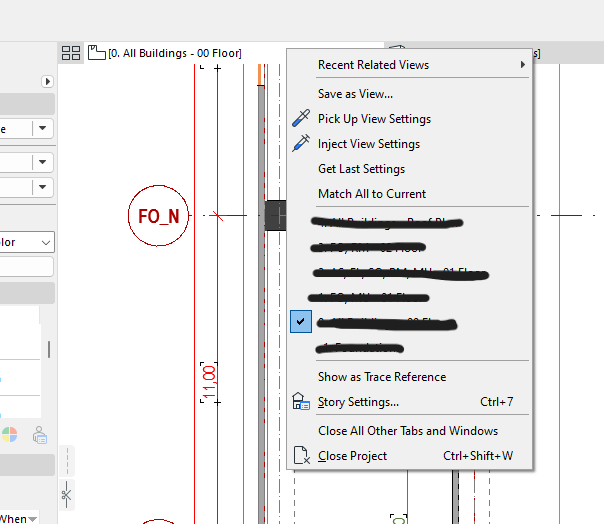
In AC 26, the right-click menu option of "Pick Up View Settings" does not work at all. I want to copy temporary view settings among different views, and in previous AC versions it worked.... more or less!
Here, I do the temporary changes in the view settings (2D or 3D, doesn't matter), showing some layers, hiding some layers, whatever. The layer settings at the bottom turns to "Custom", as it should. Then I go to the menu, supposedly """""pick this setting up""""" with the option, then I switch to another view. I go to the menu, click on "Inject View Settings", and nothing at all happens! It doesn't change the layer settings, it doesn't change rotation, graphical override, it doesn't change anything!
Please tell me where the "Allow copying view settings" option hides in ArchiCAD. Or if it's a bug, then please fix it, because it's getting really annoying when I have to jump around a massive modell with a specific task in mind, and I have to redo over and over and over again all the temporary view settings for that task.
Thank you.
Solved! Go to Solution.
10 Replies 10

Kumar Jo
Contributor
Options
- Mark as New
- Bookmark
- Subscribe
- Mute
- Subscribe to RSS Feed
- Permalink
- Report Inappropriate Content
2026-05-12 01:46 AM
2026-05-12
01:46 AM
Since we are in AC 29, I just want to update this thread with the feature "Redefine with Current Window Settings".
It works for just any view maps but it doesn't work between tabs of Floor Plans as we can not open multiple Floor Plans at the same time.
Process...
1. Open the source view map with all the desired view settings.
2. Either from the docked or floating navigator, scroll to the target view map.
3. Right click the target view map (do not open by double clicking) and select the "Redefine with Current Window Settings".
I hope this will help the new AC users too.
|| AC 29 USA ||
|| AMD Ryzen 9 6900HX 32GB || Win 11 Pro || PNY nVIDIA RTX 4060Ti 16GB XLR8 ||
|| AMD Ryzen 9 6900HX 32GB || Win 11 Pro || PNY nVIDIA RTX 4060Ti 16GB XLR8 ||

- « Previous
-
- 1
- 2
- Next »
- « Previous
-
- 1
- 2
- Next »
Still looking?

Suggested topics
- if else if in expressions in Project data & BIM
- Knowledge Base Update & Migration in Our Community
- Keynote: Default Label Insertion in Documentation
- Library Part Maker: Bug Reporter appears when clicking “Check” in Libraries & objects
- Blender GDL (AE GDL) - AI driven GDL environment in Libraries & objects
