
Turn on suggestions
Auto-suggest helps you quickly narrow down your search results by suggesting possible matches as you type.
Showing results for
EN
Turn on suggestions
Auto-suggest helps you quickly narrow down your search results by suggesting possible matches as you type.
Showing results for
- English
- :
- Developer Hub
- :
- GDL
- :
- 2D symbol of doors & window on the floor plan.
Options
- Subscribe to RSS Feed
- Mark Topic as New
- Mark Topic as Read
- Pin this post for me
- Bookmark
- Subscribe to Topic
- Mute
- Printer Friendly Page

Magda-Karolina
Participant
Options
- Mark as New
- Bookmark
- Subscribe
- Mute
- Subscribe to RSS Feed
- Permalink
- Report Inappropriate Content
2025-10-28
04:04 PM
- last edited on
2025-10-28
09:34 PM
by
 Laszlo Nagy
2D symbol of doors & window on the floor plan.
2025-10-28
04:04 PM
Hi!
I would like to adapt the graphic representation of the door & windows symbol on the floor plan.
The goal is to change the line type of the line highlighted in red to a dashed line.
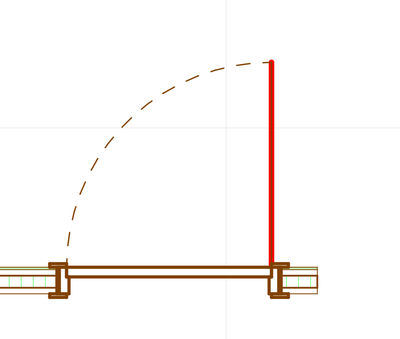
Unfortunately, in Model View Options, I can only change the settings for the curved line.
I assume that it's the matter of changing the script.
Thank you in advance for any help!
4 Replies 4
 Laszlo Nagy
Community Admin
Options
- Mark as New
- Bookmark
- Subscribe
- Mute
- Subscribe to RSS Feed
- Permalink
- Report Inappropriate Content
2025-10-30 12:31 AM
2025-10-30
12:31 AM
Are you familiar with GDL scripting? Modifying default Archicad Door/Window library parts requires at least an intermediate level of GDL skills, as they are very complex and contain many macros.
By the way, which Archicad version are you using and what is the name of the Door library part in question? These pieces of info may be relevant.
Loving Archicad since 1995 - Find Archicad Tips at x.com/laszlonagy
AMD Ryzen9 5900X CPU, 64 GB RAM 3600 MHz, Nvidia GTX 1060 6GB, 500 GB NVMe SSD
2x28" (2560x1440), Windows 10 PRO ENG, Ac20-Ac29
AMD Ryzen9 5900X CPU, 64 GB RAM 3600 MHz, Nvidia GTX 1060 6GB, 500 GB NVMe SSD
2x28" (2560x1440), Windows 10 PRO ENG, Ac20-Ac29
Magda-Karolina
Participant
Options
- Mark as New
- Bookmark
- Subscribe
- Mute
- Subscribe to RSS Feed
- Permalink
- Report Inappropriate Content
2025-10-30 09:28 AM - edited 2025-10-30 10:48 AM
2025-10-30
09:28 AM
Hi!
I'm currently using the Archicad 27 International version and the standard object - Window 27 & Door 27.
Laszlo Nagy
Community Admin
Options
- Mark as New
- Bookmark
- Subscribe
- Mute
- Subscribe to RSS Feed
- Permalink
- Report Inappropriate Content
2025-10-30 10:52 PM
2025-10-30
10:52 PM
How familiar are you with GDL scripting?
Loving Archicad since 1995 - Find Archicad Tips at x.com/laszlonagy
AMD Ryzen9 5900X CPU, 64 GB RAM 3600 MHz, Nvidia GTX 1060 6GB, 500 GB NVMe SSD
2x28" (2560x1440), Windows 10 PRO ENG, Ac20-Ac29
AMD Ryzen9 5900X CPU, 64 GB RAM 3600 MHz, Nvidia GTX 1060 6GB, 500 GB NVMe SSD
2x28" (2560x1440), Windows 10 PRO ENG, Ac20-Ac29

Davor P
Advocate
Options
- Mark as New
- Bookmark
- Subscribe
- Mute
- Subscribe to RSS Feed
- Permalink
- Report Inappropriate Content
2025-10-30 11:44 PM
2025-10-30
11:44 PM
Barking Dog BIM on youtube - Bruce Walker has done an extensive series on GDL doors.
www.vktrs.co

Didn't find the answer?
Check other topics in this Forum
Back to ForumRead the latest accepted solutions!
Accepted SolutionsStart a new conversation!

Suggested topics
- Building a timber frame from Python: 54 steps, 1,549 elements, and the API traps I hit in Archicad Python API
- GetElementsRelatedToZones batching provides no performance benefit — expected? in Archicad Python API
- OpenBrep: AI-Powered GDL Development from Your Terminal in GDL
- Help with creating a custom tree object. in GDL
