
Turn on suggestions
Auto-suggest helps you quickly narrow down your search results by suggesting possible matches as you type.
Showing results for
EN
Turn on suggestions
Auto-suggest helps you quickly narrow down your search results by suggesting possible matches as you type.
Showing results for
- English
- :
- Developer Hub
- :
- GDL
- :
- Re: Hide Reveal Settings
Options
- Subscribe to RSS Feed
- Mark Topic as New
- Mark Topic as Read
- Pin this post for me
- Bookmark
- Subscribe to Topic
- Mute
- Printer Friendly Page

Martin Walter
Enthusiast
Options
- Mark as New
- Bookmark
- Subscribe
- Mute
- Subscribe to RSS Feed
- Permalink
- Report Inappropriate Content
2021-12-07
05:39 PM
- last edited on
2023-05-31
10:18 AM
by
 Laszlo Simon
Hide Reveal Settings
2021-12-07
05:39 PM
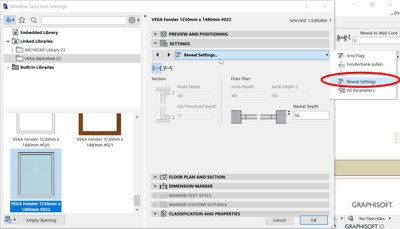
I'd like to hide the "Reveal Settings" tabpage, which is listed under "Settings"
I created a custom Window with my own tabpages, but the tabpage "Reveal Settings" automatically shows.
AC22-27, Windows 11, i7-1355U, 32GB RAM, 2TB SSD
Solved! Go to Solution.
1 Solution
Accepted Solutions

Yves
Expert
Options
- Mark as New
- Bookmark
- Subscribe
- Mute
- Subscribe to RSS Feed
- Permalink
- Report Inappropriate Content
2021-12-08 09:22 AM - edited 2021-12-08 09:25 AM
2021-12-08
09:22 AM
With ac_wido_hide_options (=3)
https://gdl.graphisoft.com/reference-guide/parameters-read-by-Archicad
Yves Houssier
Belgium
Archicad 19 -> 24
iMac - Mac Os 10,13
Belgium
Archicad 19 -> 24
iMac - Mac Os 10,13
5 Replies 5

Barry Kelly
Moderator
Options
- Mark as New
- Bookmark
- Subscribe
- Mute
- Subscribe to RSS Feed
- Permalink
- Report Inappropriate Content
2021-12-08 01:57 AM
2021-12-08
01:57 AM
I don't think you can.
Reveals are a part of every door and window.
Barry.
One of the forum moderators.
Versions 6.5 to 27
i7-10700 @ 2.9Ghz, 32GB ram, GeForce RTX 2060 (6GB), Windows 10
Lenovo Thinkpad - i7-1270P 2.20 GHz, 32GB RAM, Nvidia T550, Windows 11
Versions 6.5 to 27
i7-10700 @ 2.9Ghz, 32GB ram, GeForce RTX 2060 (6GB), Windows 10
Lenovo Thinkpad - i7-1270P 2.20 GHz, 32GB RAM, Nvidia T550, Windows 11
Yves
Expert
Options
- Mark as New
- Bookmark
- Subscribe
- Mute
- Subscribe to RSS Feed
- Permalink
- Report Inappropriate Content
2021-12-08 09:22 AM - edited 2021-12-08 09:25 AM
2021-12-08
09:22 AM
With ac_wido_hide_options (=3)
https://gdl.graphisoft.com/reference-guide/parameters-read-by-Archicad
Yves Houssier
Belgium
Archicad 19 -> 24
iMac - Mac Os 10,13
Belgium
Archicad 19 -> 24
iMac - Mac Os 10,13
Barry Kelly
Moderator
Options
- Mark as New
- Bookmark
- Subscribe
- Mute
- Subscribe to RSS Feed
- Permalink
- Report Inappropriate Content
2021-12-08 09:34 AM
2021-12-08
09:34 AM
Awsome, thanks @Yves .
I am still learning after all these years.
Pays to read those manuals from cover to cover. 😉
@Martin Walter , I''l leave it up to you to mark the post as solved if it does what you want.
Barry.
One of the forum moderators.
Versions 6.5 to 27
i7-10700 @ 2.9Ghz, 32GB ram, GeForce RTX 2060 (6GB), Windows 10
Lenovo Thinkpad - i7-1270P 2.20 GHz, 32GB RAM, Nvidia T550, Windows 11
Versions 6.5 to 27
i7-10700 @ 2.9Ghz, 32GB ram, GeForce RTX 2060 (6GB), Windows 10
Lenovo Thinkpad - i7-1270P 2.20 GHz, 32GB RAM, Nvidia T550, Windows 11
Yves
Expert
Options
- Mark as New
- Bookmark
- Subscribe
- Mute
- Subscribe to RSS Feed
- Permalink
- Report Inappropriate Content
2021-12-08 09:41 AM
2021-12-08
09:41 AM
No I use it for my window objects 😉
Yves Houssier
Belgium
Archicad 19 -> 24
iMac - Mac Os 10,13
Belgium
Archicad 19 -> 24
iMac - Mac Os 10,13
Martin Walter
Enthusiast
Options
- Mark as New
- Bookmark
- Subscribe
- Mute
- Subscribe to RSS Feed
- Permalink
- Report Inappropriate Content
2021-12-08 02:05 PM
2021-12-08
02:05 PM
Thank you so much!
AC22-27, Windows 11, i7-1355U, 32GB RAM, 2TB SSD

Didn't find the answer?
Check other topics in this Forum
Back to ForumRead the latest accepted solutions!
Accepted SolutionsStart a new conversation!

