
Turn on suggestions
Auto-suggest helps you quickly narrow down your search results by suggesting possible matches as you type.
Showing results for
EN
Turn on suggestions
Auto-suggest helps you quickly narrow down your search results by suggesting possible matches as you type.
Showing results for
- English
- :
- Forum
- :
- General discussions
- :
- Re: Turn off axes in 3D
Options
- Subscribe to RSS Feed
- Mark Topic as New
- Mark Topic as Read
- Pin this post for me
- Bookmark
- Subscribe to Topic
- Mute
- Printer Friendly Page

CIA20
Booster
Options
- Mark as New
- Bookmark
- Subscribe
- Mute
- Subscribe to RSS Feed
- Permalink
- Report Inappropriate Content
2023-10-20 10:21 AM
Turn off axes in 3D
2023-10-20
10:21 AM
Hi everyone,
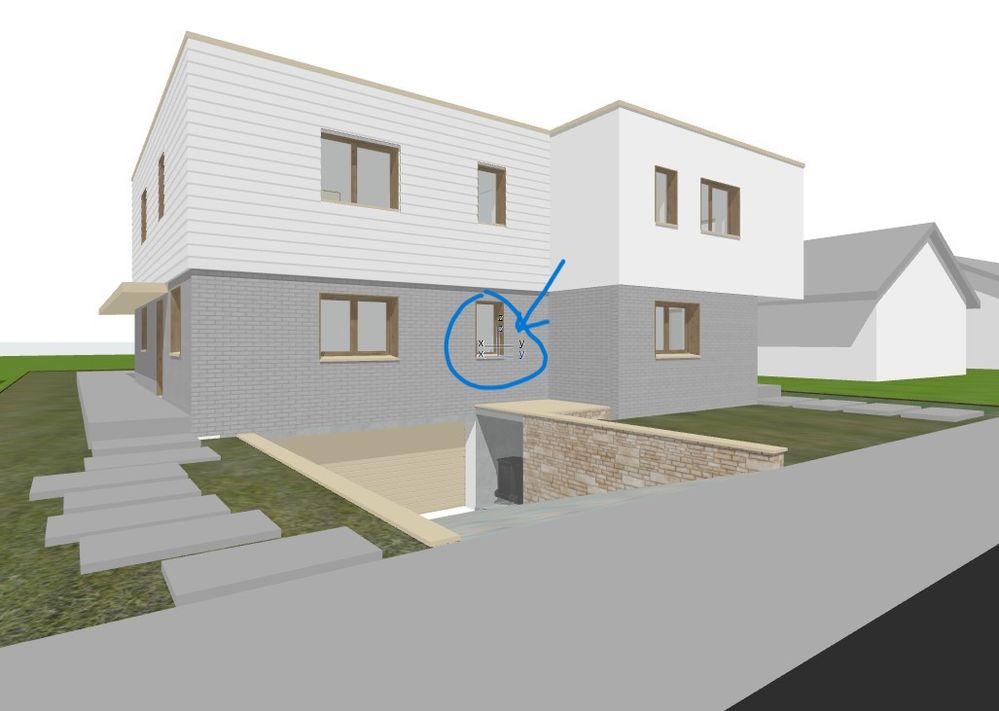
Can you help me to find the button that turns off the the x,y,z axes, please.
Thank you in advance !
C.I
CIArchitecte
Architecture et design
Architecture et design
4 Replies 4

Barry Kelly
Moderator
Options
- Mark as New
- Bookmark
- Subscribe
- Mute
- Subscribe to RSS Feed
- Permalink
- Report Inappropriate Content
2023-10-20 10:34 AM
2023-10-20
10:34 AM
You can turn of the user origin (blue one) by resetting it to the project origin.
But I don't know of a way to turn off the project origin.
It won't show up in any views that you save.
Barry.
One of the forum moderators.
Versions 6.5 to 27
i7-10700 @ 2.9Ghz, 32GB ram, GeForce RTX 2060 (6GB), Windows 10
Lenovo Thinkpad - i7-1270P 2.20 GHz, 32GB RAM, Nvidia T550, Windows 11
Versions 6.5 to 27
i7-10700 @ 2.9Ghz, 32GB ram, GeForce RTX 2060 (6GB), Windows 10
Lenovo Thinkpad - i7-1270P 2.20 GHz, 32GB RAM, Nvidia T550, Windows 11
CIA20
Booster
Options
- Mark as New
- Bookmark
- Subscribe
- Mute
- Subscribe to RSS Feed
- Permalink
- Report Inappropriate Content
2023-10-20 10:42 AM
2023-10-20
10:42 AM
Hello Barry,
Thank you for the suggestion.
I agree there is no possibility to turn it off, but how do I reset to the project origin then ?
Thank you
C.I
CIArchitecte
Architecture et design
Architecture et design
Barry Kelly
Moderator
Options
- Mark as New
- Bookmark
- Subscribe
- Mute
- Subscribe to RSS Feed
- Permalink
- Report Inappropriate Content
2023-10-20 10:55 AM
2023-10-20
10:55 AM
I always have my 'co-ordinate palette' turned on (Windows Menu > Palettes > Coordinates).

Barry.
One of the forum moderators.
Versions 6.5 to 27
i7-10700 @ 2.9Ghz, 32GB ram, GeForce RTX 2060 (6GB), Windows 10
Lenovo Thinkpad - i7-1270P 2.20 GHz, 32GB RAM, Nvidia T550, Windows 11
Versions 6.5 to 27
i7-10700 @ 2.9Ghz, 32GB ram, GeForce RTX 2060 (6GB), Windows 10
Lenovo Thinkpad - i7-1270P 2.20 GHz, 32GB RAM, Nvidia T550, Windows 11
CIA20
Booster
Options
- Mark as New
- Bookmark
- Subscribe
- Mute
- Subscribe to RSS Feed
- Permalink
- Report Inappropriate Content
2023-10-20 02:02 PM
2023-10-20
02:02 PM
Thank you for you quick reply,
It seems that I have 2 origins, one I can move anywhere on the screen as you suggest, but the other is fixed and I cannot move it.
That is bothering me because many times I just use the print screen (faster that publishing procedure) and the coordinates axes are there visible. And this doesn't happen in all the projects..
C.I
CIArchitecte
Architecture et design
Architecture et design

Still looking?

Suggested topics
- Teamwork: Complex Profiles can be edited even when reserved by another user. in Teamwork & BIMcloud
- Parking layouts and solar parks in a site polygon in Libraries & objects
- Roof custom layers in/out in Modeling
- Automatic mesh hatching on floorplan in Documentation
- Window reveal surfaces disappear in Host file after reindexing in Project data & BIM
