
Turn on suggestions
Auto-suggest helps you quickly narrow down your search results by suggesting possible matches as you type.
Showing results for
EN
Turn on suggestions
Auto-suggest helps you quickly narrow down your search results by suggesting possible matches as you type.
Showing results for
- English
- :
- Forum
- :
- Installation & update
- :
- Re: Quick TIme error
Options
- Subscribe to RSS Feed
- Mark Topic as New
- Mark Topic as Read
- Pin this post for me
- Bookmark
- Subscribe to Topic
- Mute
- Printer Friendly Page

Anonymous
Not applicable
Options
- Mark as New
- Bookmark
- Subscribe
- Mute
- Subscribe to RSS Feed
- Permalink
- Report Inappropriate Content
2009-10-06
05:34 AM
- last edited on
2024-04-26
10:26 AM
by
 Aruzhan Ilaikova
Quick TIme error
2009-10-06
05:34 AM
All,
After installation of Archicad 13 and then starting the program I am getting this (see attached)
Please help...
I did install the quicktime and new java applications from the CD, but I am out of luck on this one...
Thank you
DDJUSA
After installation of Archicad 13 and then starting the program I am getting this (see attached)
Please help...
I did install the quicktime and new java applications from the CD, but I am out of luck on this one...
Thank you
DDJUSA

11 Replies 11

Ingolf
Advocate
Options
- Mark as New
- Bookmark
- Subscribe
- Mute
- Subscribe to RSS Feed
- Permalink
- Report Inappropriate Content
2009-10-11 02:35 PM
2009-10-11
02:35 PM
Two steps to avoid this Problem:
1. Turn off your PC/Mac and start once more.
2. If this doesn't help, uninstall QuickTime and install it once more from the internet. http://www.apple.com/quicktime/download/
Good Luck
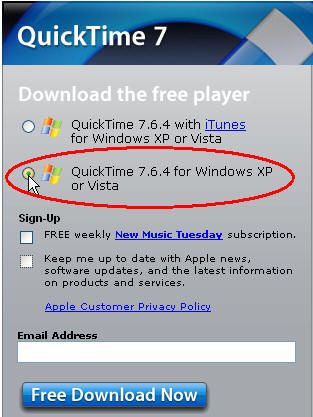
1. Turn off your PC/Mac and start once more.
2. If this doesn't help, uninstall QuickTime and install it once more from the internet. http://www.apple.com/quicktime/download/
Good Luck
Ingolf Sundfør, Bricklayer, Author of several Real Life Problem Solving Books for Archicaddicts in Norway.
PC/i7/W11/ArchiCAD 6.5-27
PC/i7/W11/ArchiCAD 6.5-27
Anonymous
Not applicable
Options
- Mark as New
- Bookmark
- Subscribe
- Mute
- Subscribe to RSS Feed
- Permalink
- Report Inappropriate Content
2009-10-14 01:20 AM
2009-10-14
01:20 AM
Ingolf,
I also have that issue and tried your suggestion, but that didn't work?
Any other suggestions?
I also have that issue and tried your suggestion, but that didn't work?
Any other suggestions?

 Greg Kmethy
Graphisoft Alumni
Options
- Mark as New
- Bookmark
- Subscribe
- Mute
- Subscribe to RSS Feed
- Permalink
- Report Inappropriate Content
2009-10-14 02:59 PM
2009-10-14
02:59 PM
Browse the install DVD and there is a folder on it called "SUPPORT" Try to run "GSQtComInstaller.exe" in it. Does that help?
Gergely Kmethy
VP, Customer Success, Graphisoft
VP, Customer Success, Graphisoft
Anonymous
Not applicable
Options
- Mark as New
- Bookmark
- Subscribe
- Mute
- Subscribe to RSS Feed
- Permalink
- Report Inappropriate Content
2009-10-16 03:02 AM
2009-10-16
03:02 AM
All,
I got an answer from Graphisoft about the error.
Step 1. GO TO C:PROGRAM FILES\COMMON FILES FOLDER
Step 2. Look for a folder name "Grpahisoft Shared"
Step 3. Delete this folder
Step 4. Browse the AC13 CD and go to the folder D:/SUPPORT and Install the file GSQtComInstaller.exe
Step 5. Restart Archicad.
It worked like a charm.
Thank you
DDJUSA
I got an answer from Graphisoft about the error.
Step 1. GO TO C:PROGRAM FILES\COMMON FILES FOLDER
Step 2. Look for a folder name "Grpahisoft Shared"
Step 3. Delete this folder
Step 4. Browse the AC13 CD and go to the folder D:/SUPPORT and Install the file GSQtComInstaller.exe
Step 5. Restart Archicad.
It worked like a charm.
Thank you
DDJUSA
Anonymous
Not applicable
Options
- Mark as New
- Bookmark
- Subscribe
- Mute
- Subscribe to RSS Feed
- Permalink
- Report Inappropriate Content
2009-10-18 12:46 AM
2009-10-18
12:46 AM
DDJUSA Wrote...
"I got an answer from Graphisoft about the error.
Step 1. GO TO C:PROGRAM FILES\COMMON FILES FOLDER
Step 2. Look for a folder name "Grpahisoft Shared"
Step 3. Delete this folder
Step 4. Browse the AC13 CD and go to the folder D:/SUPPORT and Install the file GSQtComInstaller.exe
Step 5. Restart Archicad.
It worked like a charm. "
This didn't work for me!?
"I got an answer from Graphisoft about the error.
Step 1. GO TO C:PROGRAM FILES\COMMON FILES FOLDER
Step 2. Look for a folder name "Grpahisoft Shared"
Step 3. Delete this folder
Step 4. Browse the AC13 CD and go to the folder D:/SUPPORT and Install the file GSQtComInstaller.exe
Step 5. Restart Archicad.
It worked like a charm. "
This didn't work for me!?
 Shaun C
Graphisoft
Options
- Mark as New
- Bookmark
- Subscribe
- Mute
- Subscribe to RSS Feed
- Permalink
- Report Inappropriate Content
2009-10-20 12:49 PM
2009-10-20
12:49 PM
If ArchiCAD still won't run after installing "GSQtComInstaller.exe", you should next run the vcredist installers in the "SUPPORT" folder ("vcredist_x86.exe", "vcredist_x64.exe").
Shaun Coomber
Technical Support Team
Graphisoft
Budapest, Hungary
archicadwiki - the ArchiCAD knowledge base
Technical Support Team
Graphisoft
Budapest, Hungary
archicadwiki - the ArchiCAD knowledge base
Anonymous
Not applicable
Options
- Mark as New
- Bookmark
- Subscribe
- Mute
- Subscribe to RSS Feed
- Permalink
- Report Inappropriate Content
2009-10-22 09:11 PM
2009-10-22
09:11 PM
this still didnt work?
Anonymous
Not applicable
Options
- Mark as New
- Bookmark
- Subscribe
- Mute
- Subscribe to RSS Feed
- Permalink
- Report Inappropriate Content
2009-10-24 01:15 AM
2009-10-24
01:15 AM
Shaun Coomber Wrote:
"If ArchiCAD still won't run after installing "GSQtComInstaller.exe", you should next run the vcredist installers in the "SUPPORT" folder ("vcredist_x86.exe", "vcredist_x64.exe")."
I tried this too, and it didnt work
"If ArchiCAD still won't run after installing "GSQtComInstaller.exe", you should next run the vcredist installers in the "SUPPORT" folder ("vcredist_x86.exe", "vcredist_x64.exe")."
I tried this too, and it didnt work
 compu
compu
Graphisoft Partner
Options
- Mark as New
- Bookmark
- Subscribe
- Mute
- Subscribe to RSS Feed
- Permalink
- Report Inappropriate Content
2009-10-26 05:24 PM
2009-10-26
05:24 PM
I had the same problem on AC13 installation.
Upgrading QuickTime to 7.6.4 and Graphisoft's answer (deleting "Graphisoft Shared" folder) solved the problem.
Regards.
Upgrading QuickTime to 7.6.4 and Graphisoft's answer (deleting "Graphisoft Shared" folder) solved the problem.
Regards.
archisem.com
Still looking?

Suggested topics
