
Turn on suggestions
Auto-suggest helps you quickly narrow down your search results by suggesting possible matches as you type.
Showing results for
EN
Turn on suggestions
Auto-suggest helps you quickly narrow down your search results by suggesting possible matches as you type.
Showing results for
- English
- :
- Forum
- :
- Installation & update
- :
- Re: Random directory switch, crash, no autosave, n...
Options
- Subscribe to RSS Feed
- Mark Topic as New
- Mark Topic as Read
- Pin this post for me
- Bookmark
- Subscribe to Topic
- Mute
- Printer Friendly Page

lasse
Booster
Options
- Mark as New
- Bookmark
- Subscribe
- Mute
- Subscribe to RSS Feed
- Permalink
- Report Inappropriate Content
2014-05-20 06:37 AM
Random directory switch, crash, no autosave, no cache
2014-05-20
06:37 AM
I have been working in a file that exists in a specific local job folder. It crashed when I tried to save and quit at the end of the day. Bug reporter fired up, but I chose not to report it. When I went to re-open it, thereby forcing the “orzel model file.pln.lck”file to re-open, it tragically wasn’t in the list.
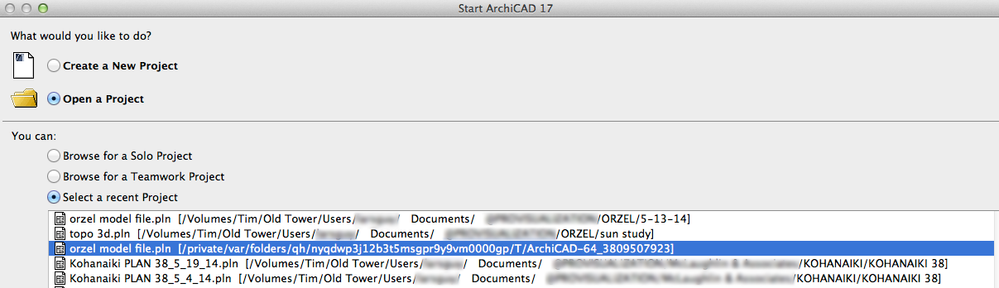
Looking in my file directory, it wasn’t there, neither was a “.pln.lck”. Yet, when starting Archicad fresh, it shows up in the “recent” files list view. This time it’s path is some random “/Private/var.... “ Path (see below, 3rd line item in blue):
The file on top in this list “was” the original file that I was working on, yet upon opening that file, it was in an earlier state/stage from this morning, not the file that I did all the work in during the course of the day. I don’t know how this switched?!?!?! I never closed it.
I am on a (new) MacPro/12 Core/32Gb RAM 512 GB SSD HD/3 TB USB external (where my files reside)/OS10.9.2
Is there anything I need to be aware of?
Respectfully,
Lars

(unnerved by updates since v.4.55)
Read-Only
Labels:
- Labels:
-
Performance
1 Reply 1
lasse
Booster
Options
- Mark as New
- Bookmark
- Subscribe
- Mute
- Subscribe to RSS Feed
- Permalink
- Report Inappropriate Content
2014-05-20 06:39 AM


Still looking?
Suggested topics
- Random directory switch, crash, no autosave, no cache in Installation & update
- Cleaning up cross section display of IFC imported objects in Collaboration with other software
- Silent installation woes in Installation & update
- Using Autosave Data in Project data & BIM
- AC9-INT R1V1 on MacOS X Panther with Greek in Installation & update
