
Turn on suggestions
Auto-suggest helps you quickly narrow down your search results by suggesting possible matches as you type.
Showing results for
EN
Turn on suggestions
Auto-suggest helps you quickly narrow down your search results by suggesting possible matches as you type.
Showing results for
- English
- :
- Forum
- :
- Installation & update
- :
- update macOS Sierra 12.4 archicad got crazy slow &...
Options
- Subscribe to RSS Feed
- Mark Topic as New
- Mark Topic as Read
- Pin this post for me
- Bookmark
- Subscribe to Topic
- Mute
- Printer Friendly Page

Anonymous
Not applicable
Options
- Mark as New
- Bookmark
- Subscribe
- Mute
- Subscribe to RSS Feed
- Permalink
- Report Inappropriate Content
2017-04-03 12:33 PM
update macOS Sierra 12.4 archicad got crazy slow & bugs
2017-04-03
12:33 PM
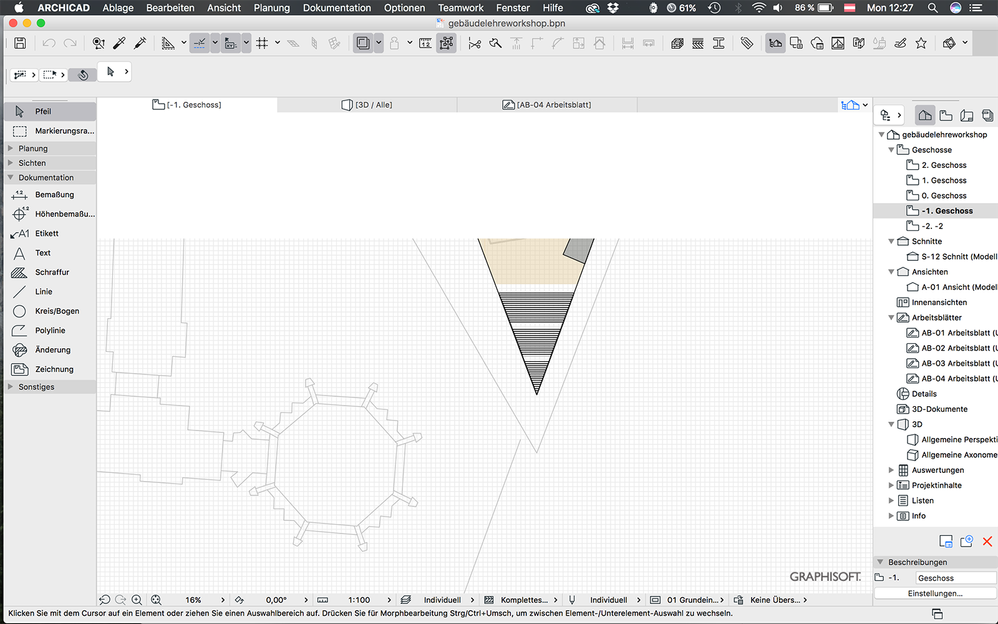
- When I wanna draw something 2D or 3D it works unbelievable slow, so can't do basically anything
- It crashes in every 5-10 mins
I hope an update will be there soon otherwise unfortunately i won't be working with archicad anymore.
Read-Only
Labels:
- Labels:
-
Performance
7 Replies 7

Richard Morrison
Expert
Options
- Mark as New
- Bookmark
- Subscribe
- Mute
- Subscribe to RSS Feed
- Permalink
- Report Inappropriate Content
2017-04-03 04:27 PM
2017-04-03
04:27 PM
Have you updated to the latest ArchiCAD hotfix? (Update 5025)
Richard
--------------------------
Richard Morrison, Architect-Interior Designer
AC26 (since AC6.0), Win10
--------------------------
Richard Morrison, Architect-Interior Designer
AC26 (since AC6.0), Win10
Anonymous
Not applicable
Options
- Mark as New
- Bookmark
- Subscribe
- Mute
- Subscribe to RSS Feed
- Permalink
- Report Inappropriate Content
2017-04-03 04:48 PM
2017-04-03
04:48 PM
yes I did, I really hope someone could solve this problem.

Karl Ottenstein
Moderator Emeritus
Options
- Mark as New
- Bookmark
- Subscribe
- Mute
- Subscribe to RSS Feed
- Permalink
- Report Inappropriate Content
2017-04-03 05:47 PM
2017-04-03
05:47 PM
Which version of ARCHICAD? 20?
Have you contacted tech support for Austria?
http://www.graphisoft.at/support/
Have you contacted tech support for Austria?
http://www.graphisoft.at/support/
Vote for Wish: Copy/Paste in 3D
AC 29 USA and earlier • hardware key • macOS Tahoe 26.7 MacBook Pro M2 Max 12CPU/30GPU cores, 32GB
AC 29 USA and earlier • hardware key • macOS Tahoe 26.7 MacBook Pro M2 Max 12CPU/30GPU cores, 32GB
Anonymous
Not applicable
Options
- Mark as New
- Bookmark
- Subscribe
- Mute
- Subscribe to RSS Feed
- Permalink
- Report Inappropriate Content
2017-04-03 06:33 PM
2017-04-03
06:33 PM
of course Archicad 20, no I haven't, it has nothing to do with Austrian or International community I suppose. I just wanna know whats happening.

Eduardo Rolon
Moderator
Options
- Mark as New
- Bookmark
- Subscribe
- Mute
- Subscribe to RSS Feed
- Permalink
- Report Inappropriate Content
2017-04-03 07:43 PM
2017-04-03
07:43 PM
It is not obvious which version you are running, that is why everybody adds t to their signature.
Anyway I am using 10.12.4 without any slowdowns so we might need more info.
Is it when you turn Trace Ref" on?
Anyway I am using 10.12.4 without any slowdowns so we might need more info.
Is it when you turn Trace Ref" on?
Eduardo Rolón AIA NCARB
AC29 US/INT -> AC08
AC29 US/INT -> AC08
Mac Studio M4 Max 64GB ram, OS X 10.XX latest
Karl Ottenstein
Moderator Emeritus
Options
- Mark as New
- Bookmark
- Subscribe
- Mute
- Subscribe to RSS Feed
- Permalink
- Report Inappropriate Content
2017-04-04 12:09 AM
2017-04-04
12:09 AM
barisaron wrote:Why would it be obvious that you are using 20? You never said.
of course Archicad 20, no I haven't, it has nothing to do with Austrian or International community I suppose. I just wanna know whats happening.
This is not technical support. Technical support is through the Graphisoft support group for your country - which is Austria - and so if you want to sort this out, that is who you should contact.
Vote for Wish: Copy/Paste in 3D
AC 29 USA and earlier • hardware key • macOS Tahoe 26.7 MacBook Pro M2 Max 12CPU/30GPU cores, 32GB
AC 29 USA and earlier • hardware key • macOS Tahoe 26.7 MacBook Pro M2 Max 12CPU/30GPU cores, 32GB
Karl Ottenstein
Moderator Emeritus
Options
- Mark as New
- Bookmark
- Subscribe
- Mute
- Subscribe to RSS Feed
- Permalink
- Report Inappropriate Content
2017-04-04 12:35 AM
2017-04-04
12:35 AM
This support article on 10.12.4 crashing and display issues may help:
http://helpcenter.graphisoft.com/technotes/operating-systems/mac-os-x-10-12-sierra/crash-freeze-disp...
Vote for Wish: Copy/Paste in 3D
AC 29 USA and earlier • hardware key • macOS Tahoe 26.7 MacBook Pro M2 Max 12CPU/30GPU cores, 32GB
AC 29 USA and earlier • hardware key • macOS Tahoe 26.7 MacBook Pro M2 Max 12CPU/30GPU cores, 32GB
Still looking?

Suggested topics
- Archicad 30 Light mode: where did the contrast go? in General discussions
- Welcome to our AI Solutions forum | Guidelines for participating in AI solutions
- Linking and Managing Office Custom Libraries in Libraries & objects
- Starting new projects and looking for history of elements like a bathroom fixtures or any models in Project data & BIM
- Ci Tools Roof Covering in Modeling
