
Turn on suggestions
Auto-suggest helps you quickly narrow down your search results by suggesting possible matches as you type.
Showing results for
EN
Turn on suggestions
Auto-suggest helps you quickly narrow down your search results by suggesting possible matches as you type.
Showing results for
- English
- :
- Forum
- :
- Libraries & objects
- :
- Re: Custom cabinet door not appearing in list
Options
- Subscribe to RSS Feed
- Mark Topic as New
- Mark Topic as Read
- Pin this post for me
- Bookmark
- Subscribe to Topic
- Mute
- Printer Friendly Page

HelenEc
Participant
Options
- Mark as New
- Bookmark
- Subscribe
- Mute
- Subscribe to RSS Feed
- Permalink
- Report Inappropriate Content
2023-03-09
04:43 PM
- last edited on
2025-01-31
12:47 PM
by
 Molinda Prey
Custom cabinet door not appearing in list
2023-03-09
04:43 PM
Hello!
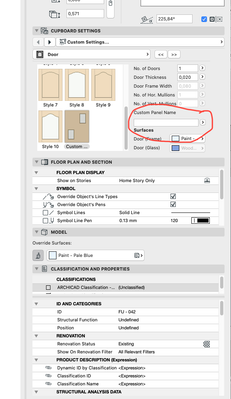
I would greatly appreciate any tips you might have regarding a custom cabinet door I have created that does not appear in the list you get in the cabinet object's settings. The custom cabinet door is in the embedded library. I've attached a couple of screenshots. I'm working with Archicad 25. Thank you!


Labels:
- Labels:
-
Library Part Maker
6 Replies 6

Lee Hankins
Virtuoso
Options
- Mark as New
- Bookmark
- Subscribe
- Mute
- Subscribe to RSS Feed
- Permalink
- Report Inappropriate Content
2023-03-09 09:04 PM - edited 2023-03-09 09:05 PM
2023-03-09
09:04 PM
Have you clicked the little black arrow next to the empty box beneath ‘Custom Panel’ on the right hand side of your palette? That should let you select the custom panel you wish to use from your embedded library.
Lee Hankins
ArchiCAD 4.5 - Archicad 29
macOS Tahoe (26.0)
ArchiCAD 4.5 - Archicad 29
macOS Tahoe (26.0)
HelenEc
Participant
Options
- Mark as New
- Bookmark
- Subscribe
- Mute
- Subscribe to RSS Feed
- Permalink
- Report Inappropriate Content
2023-03-10 11:47 AM
2023-03-10
11:47 AM
Thank you for your reply! Unfortunately nothing appears when I click on the little arrow. I ended up deleting some large items from the embedded library and it now works! Go figure!

BrunoH
Expert
Options
- Mark as New
- Bookmark
- Subscribe
- Mute
- Subscribe to RSS Feed
- Permalink
- Report Inappropriate Content
2023-03-13 04:07 PM
2023-03-13
04:07 PM
Did you save your objet as a "Cabinet door" type object, if not it will not appear in the list.
ArchiCad 3.43 to 28
MacOS Monterey
MacOS Monterey

Lingwisyer
Guru
Options
- Mark as New
- Bookmark
- Subscribe
- Mute
- Subscribe to RSS Feed
- Permalink
- Report Inappropriate Content
2023-03-14 02:32 AM
2023-03-14
02:32 AM
That would suggest an guID conflict. Open the object and try clearing the coll_guid parameter. It has been known to cause issues with door panels.
| AC22-29 AUS 3200 | Help Those Help You - Add a Signature |
| Self-taught, bend it till it breaks | Creating a Thread |
| Win11 | i9 10850K | 64GB | RX6600 | Win11 | 7800X3D | 32GB | RTX5070TI |
HelenEc
Participant
Options
- Mark as New
- Bookmark
- Subscribe
- Mute
- Subscribe to RSS Feed
- Permalink
- Report Inappropriate Content
2023-03-27 10:53 AM
2023-03-27
10:53 AM
Thank you for your reply! I had saved it as a "Cabinet door" type... I ended up deleting a lot of things from the embedded library and it helped, the custom cabinet appeared!
HelenEc
Participant
Options
- Mark as New
- Bookmark
- Subscribe
- Mute
- Subscribe to RSS Feed
- Permalink
- Report Inappropriate Content
2023-03-27 10:54 AM
2023-03-27
10:54 AM
Thank you so much for your reply! I will try it!!

Didn't find the answer?
Check other topics in this Forum
Back to ForumRead the latest accepted solutions!
Accepted SolutionsStart a new conversation!

Suggested topics
