
Turn on suggestions
Auto-suggest helps you quickly narrow down your search results by suggesting possible matches as you type.
Showing results for
EN
Turn on suggestions
Auto-suggest helps you quickly narrow down your search results by suggesting possible matches as you type.
Showing results for
- English
- :
- Forum
- :
- Libraries & objects
- :
- Re: Door Selection Settings - Door Leaf
Options
- Subscribe to RSS Feed
- Mark Topic as New
- Mark Topic as Read
- Pin this post for me
- Bookmark
- Subscribe to Topic
- Mute
- Printer Friendly Page

Anonymous
Not applicable
Options
- Mark as New
- Bookmark
- Subscribe
- Mute
- Subscribe to RSS Feed
- Permalink
- Report Inappropriate Content
2016-11-16
01:14 AM
- last edited on
2023-05-26
11:13 AM
by
 Rubia Torres
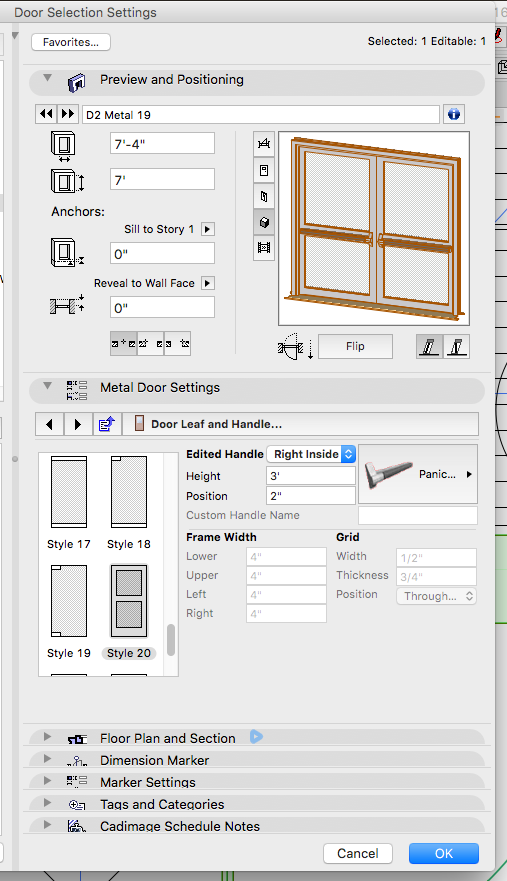
Door Selection Settings - Door Leaf
2016-11-16
01:14 AM
Thanks in advance!
1 Reply 1

Erwin Edel
Rockstar
Options
- Mark as New
- Bookmark
- Subscribe
- Mute
- Subscribe to RSS Feed
- Permalink
- Report Inappropriate Content
2016-11-16 10:27 AM
2016-11-16
10:27 AM
Those parameters are greyed out, because they are not used in that particular door leaf.
Your best bet is to create a custom door panel, drafting it with (for example) slabs in the floor plan and saving it as a door panel object.
Or, if you are familiar with basic coding or GDL, you can look up the referred doorpanel script in the library, copy that in to a new object, make the changes needed to suit your needs and save that object as a door panel.
Your best bet is to create a custom door panel, drafting it with (for example) slabs in the floor plan and saving it as a door panel object.
Or, if you are familiar with basic coding or GDL, you can look up the referred doorpanel script in the library, copy that in to a new object, make the changes needed to suit your needs and save that object as a door panel.
Erwin Edel, Project Lead, Leloup Architecten
www.leloup.nl
ArchiCAD 9-29NED FULL
Windows 11 Pro for Workstations
Adobe Design Premium CS5
www.leloup.nl
ArchiCAD 9-29NED FULL
Windows 11 Pro for Workstations
Adobe Design Premium CS5
Didn't find the answer?
Check other topics in this Forum
Back to ForumRead the latest accepted solutions!
Accepted SolutionsStart a new conversation!

