
Turn on suggestions
Auto-suggest helps you quickly narrow down your search results by suggesting possible matches as you type.
Showing results for
EN
Turn on suggestions
Auto-suggest helps you quickly narrow down your search results by suggesting possible matches as you type.
Showing results for
- English
- :
- Forum
- :
- Libraries & objects
- :
- Re: Hole in custom objects
Options
- Subscribe to RSS Feed
- Mark Topic as New
- Mark Topic as Read
- Pin this post for me
- Bookmark
- Subscribe to Topic
- Mute
- Printer Friendly Page

mante
Participant
Options
- Mark as New
- Bookmark
- Subscribe
- Mute
- Subscribe to RSS Feed
- Permalink
- Report Inappropriate Content
2023-11-29 12:29 PM
Hole in custom objects
2023-11-29
12:29 PM
I downloaded custom steel profiles, and imported them to the library, but i need to make holes in the objects, the default hole tool does not work on it.
I did not download the profiles inside archichad, it was from bimcomponments.
4 Replies 4

Ricardo Lopez
Advisor
Options
- Mark as New
- Bookmark
- Subscribe
- Mute
- Subscribe to RSS Feed
- Permalink
- Report Inappropriate Content
2023-11-29 03:46 PM
2023-11-29
03:46 PM
Hi @mante
Check if you can use the Morph tool to model the hole and Connect> Solid elements operations to substract from the objects.
The hole morph could then be placed into a hidden layer to do the trick.
Regards. -
😊
Ricardo López, M. Arch.
BIM Consultant | Project Solutions and Services | Panama
AC17-29 SPA+INT | Windows 11 | MSI CreatorPro M16 HX C14VJG, 64GB, Nvidia Quadro RTX 2000 Ada Generation
BIM Consultant | Project Solutions and Services | Panama
AC17-29 SPA+INT | Windows 11 | MSI CreatorPro M16 HX C14VJG, 64GB, Nvidia Quadro RTX 2000 Ada Generation

SenecaDesignLLC
Ace
Options
- Mark as New
- Bookmark
- Subscribe
- Mute
- Subscribe to RSS Feed
- Permalink
- Report Inappropriate Content
2023-11-29 04:14 PM
2023-11-29
04:14 PM
SEO would be the easiest, but you can also add some gdl code to the object and have the cuts as part of the object.
Ricardo Lopez
Advisor
Options
- Mark as New
- Bookmark
- Subscribe
- Mute
- Subscribe to RSS Feed
- Permalink
- Report Inappropriate Content
2023-11-29 06:05 PM
2023-11-29
06:05 PM
@SenecaDesignLLC , that could be great if you own the object, it is editable and you know how to program in GDL. 😉
That would be the best case scenario.
Ricardo López, M. Arch.
BIM Consultant | Project Solutions and Services | Panama
AC17-29 SPA+INT | Windows 11 | MSI CreatorPro M16 HX C14VJG, 64GB, Nvidia Quadro RTX 2000 Ada Generation
BIM Consultant | Project Solutions and Services | Panama
AC17-29 SPA+INT | Windows 11 | MSI CreatorPro M16 HX C14VJG, 64GB, Nvidia Quadro RTX 2000 Ada Generation

Barry Kelly
Moderator
Options
- Mark as New
- Bookmark
- Subscribe
- Mute
- Subscribe to RSS Feed
- Permalink
- Report Inappropriate Content
2023-11-30 02:14 AM
2023-11-30
02:14 AM
When you say you "downloaded custom steel profiles", you mean objects?
You can create your own profiles as in 'complex profiles' for use with beams.
Beams have an option in the pet palette to add holes.
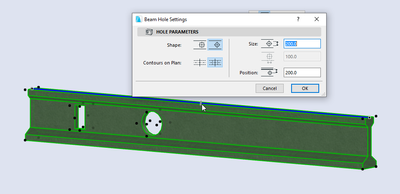
Is that what you are trying to do?
Barry.
One of the forum moderators.
Versions 6.5 to 27
i7-10700 @ 2.9Ghz, 32GB ram, GeForce RTX 2060 (6GB), Windows 10
Lenovo Thinkpad - i7-1270P 2.20 GHz, 32GB RAM, Nvidia T550, Windows 11
Versions 6.5 to 27
i7-10700 @ 2.9Ghz, 32GB ram, GeForce RTX 2060 (6GB), Windows 10
Lenovo Thinkpad - i7-1270P 2.20 GHz, 32GB RAM, Nvidia T550, Windows 11

Didn't find the answer?
Check other topics in this Forum
Back to ForumRead the latest accepted solutions!
Accepted SolutionsStart a new conversation!

Suggested topics
- Climate and sunpath objects for analysis presentation in Libraries & objects
- Linking and Managing Office Custom Libraries in Libraries & objects
- Can't create custom opening (grayed out) in Modeling
- Custom objects become invalid when downgraded from AC29 to 27 in Libraries & objects
- gdl custom object snaps back to older version upon opening the file in Libraries & objects
