
Turn on suggestions
Auto-suggest helps you quickly narrow down your search results by suggesting possible matches as you type.
Showing results for
EN
Turn on suggestions
Auto-suggest helps you quickly narrow down your search results by suggesting possible matches as you type.
Showing results for
- English
- :
- Forum
- :
- Libraries & objects
- :
- Re: How to create 3d line between windows?
Options
- Subscribe to RSS Feed
- Mark Topic as New
- Mark Topic as Read
- Pin this post for me
- Bookmark
- Subscribe to Topic
- Mute
- Printer Friendly Page

riyadist
Booster
Options
- Mark as New
- Bookmark
- Subscribe
- Mute
- Subscribe to RSS Feed
- Permalink
- Report Inappropriate Content
2021-11-26
10:38 AM
- last edited on
2023-05-24
12:44 PM
by
 Rubia Torres
How to create 3d line between windows?
2021-11-26
10:38 AM
Hi,
I try to add chamfer between these local windows but they look like one unit. I export these windows 3d rendering programs. Do you know how can I adjust geometry of these windows? Is there a way to chamfer frame edges?
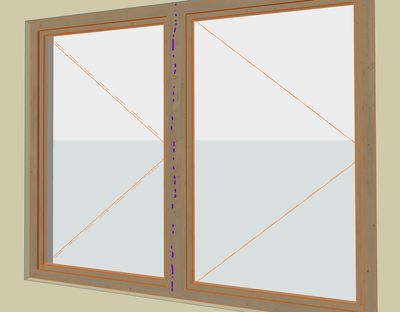
4 Replies 4

Miha Nahtigal
Expert
Options
- Mark as New
- Bookmark
- Subscribe
- Mute
- Subscribe to RSS Feed
- Permalink
- Report Inappropriate Content
2021-11-26 02:10 PM
riyadist
Booster
Options
- Mark as New
- Bookmark
- Subscribe
- Mute
- Subscribe to RSS Feed
- Permalink
- Report Inappropriate Content
2021-11-26 02:39 PM
2021-11-26
02:39 PM
Thanks for reply but this is just a sample in the picture. I have more complex windows so that's why I can not use these double windows in the library.

Lukas Zeleny
Enthusiast
Options
- Mark as New
- Bookmark
- Subscribe
- Mute
- Subscribe to RSS Feed
- Permalink
- Report Inappropriate Content
2021-11-26 07:13 PM
2021-11-26
07:13 PM
Have you considered creating your own windows with details that you need? There is nice tool for that: https://graphisoft.com/downloads/addons/lpm/int
Or, when it is on few windows and it is only for visualisations, use solid element operations to create chamfers.
BIM Manager at SIEBERT+TALAŠ
www.sieberttalas.com
www.sieberttalas.com

Barry Kelly
Moderator
Options
- Mark as New
- Bookmark
- Subscribe
- Mute
- Subscribe to RSS Feed
- Permalink
- Report Inappropriate Content
2021-11-29 02:54 AM
2021-11-29
02:54 AM
Duplicate your surface material.
Give the second surface material a slightly different name.
Then apply one material to one window and the second material to the adjacent window.
They will look the same in 3D (because they are) but will not blend as technically they are different materials.
Barry.
One of the forum moderators.
Versions 6.5 to 27
i7-10700 @ 2.9Ghz, 32GB ram, GeForce RTX 2060 (6GB), Windows 10
Lenovo Thinkpad - i7-1270P 2.20 GHz, 32GB RAM, Nvidia T550, Windows 11
Versions 6.5 to 27
i7-10700 @ 2.9Ghz, 32GB ram, GeForce RTX 2060 (6GB), Windows 10
Lenovo Thinkpad - i7-1270P 2.20 GHz, 32GB RAM, Nvidia T550, Windows 11

Didn't find the answer?
Check other topics in this Forum
Back to ForumRead the latest accepted solutions!
Accepted SolutionsStart a new conversation!

Suggested topics
- Curved wall bug...any way to fix? in Modeling
- MEP AC29 Incorrect behavior of the Z mark in the tracking display when editing the Z mark of a pipe in Modeling
- Roof custom layers in/out in Modeling
- BIMcloud Basic 2026.1 – Activate button does not open Graphisoft ID activation in Teamwork & BIMcloud
- Wall surface offset in Modeling
