
Turn on suggestions
Auto-suggest helps you quickly narrow down your search results by suggesting possible matches as you type.
Showing results for
EN
Turn on suggestions
Auto-suggest helps you quickly narrow down your search results by suggesting possible matches as you type.
Showing results for
- English
- :
- Forum
- :
- Libraries & objects
- :
- Hundreds of unwanted Surfaces reappearing in Surfa...
Options
- Subscribe to RSS Feed
- Mark Topic as New
- Mark Topic as Read
- Pin this post for me
- Bookmark
- Subscribe to Topic
- Mute
- Printer Friendly Page

waydowntown
Contributor
Options
- Mark as New
- Bookmark
- Subscribe
- Mute
- Subscribe to RSS Feed
- Permalink
- Report Inappropriate Content
2023-10-13 04:44 PM - edited 2023-10-13 05:33 PM
Hundreds of unwanted Surfaces reappearing in Surface Palette
2023-10-13
04:44 PM
Hi everyone
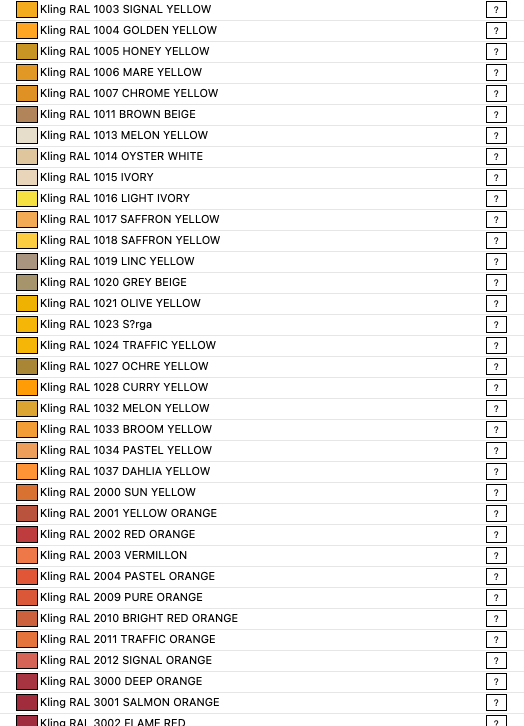
Shortly after starting any project with our standard office template, a couple hundred new surfaces always appear in the Surfaces palette. If we delete them using the attribute manager, it's just a matter of (short) time before they reappear in the palette. Now I'm pretty sure these are embedded in a library object (or family of objects) located within our own office library (let me know if you think I'm wrong on that). Is there any way of pinpointing which objects in our library are linked with these surfaces so that we can remove them?
Incidentally the surfaces are all named Kling RAL. Does anyone know where this might originate from?
Mac M1 Ultra OS 12.3
Since AC 4.55
Since AC 4.55
Labels:
22 Replies 22

ksjhawk
Enthusiast
Options
- Mark as New
- Bookmark
- Subscribe
- Mute
- Subscribe to RSS Feed
- Permalink
- Report Inappropriate Content
2025-10-24 02:28 PM
2025-10-24
02:28 PM
Thanks. I did fins a Shoegnome video below speaking to Copy/Pasting into a file, even a hotspot copied from one file to another, can bring in a host of unwanted stuff from the original file. Thanks for the reply.
MacBook Pro Apple M4 Max 128GB ram
OS X 15.7.2
AC29 - AC6.5
OS X 15.7.2
AC29 - AC6.5

dsfahsdfhn
Booster
Options
- Mark as New
- Bookmark
- Subscribe
- Mute
- Subscribe to RSS Feed
- Permalink
- Report Inappropriate Content
2026-01-16 12:48 AM
2026-01-16
12:48 AM
Yep. I'm sure that works for you. How do we make that work for us (non-programmers) and how come Graphisoft won't fix it? I have an access denied issue to that other post someone linked to above that apaprently Graphisoft have responded to...
This problem still needlessly infects my files to this day, as when the *owner of the company* refuses to not copy/paste between files, we're screwed.

Ernest Atanasiu
Advisor
Options
- Mark as New
- Bookmark
- Subscribe
- Mute
- Subscribe to RSS Feed
- Permalink
- Report Inappropriate Content
2026-01-16 11:04 AM

- « Previous
- Next »
- « Previous
- Next »
Didn't find the answer?
Check other topics in this Forum
Back to ForumRead the latest accepted solutions!
Accepted SolutionsStart a new conversation!

