
Turn on suggestions
Auto-suggest helps you quickly narrow down your search results by suggesting possible matches as you type.
Showing results for
EN
Turn on suggestions
Auto-suggest helps you quickly narrow down your search results by suggesting possible matches as you type.
Showing results for
- English
- :
- Forum
- :
- Libraries & objects
- :
- Re: Objects (chairs) show up in 2D without any det...
Options
- Subscribe to RSS Feed
- Mark Topic as New
- Mark Topic as Read
- Pin this post for me
- Bookmark
- Subscribe to Topic
- Mute
- Printer Friendly Page

Anonymous
Not applicable
Options
- Mark as New
- Bookmark
- Subscribe
- Mute
- Subscribe to RSS Feed
- Permalink
- Report Inappropriate Content
2009-10-09 03:28 PM
Objects (chairs) show up in 2D without any detail
2009-10-09
03:28 PM
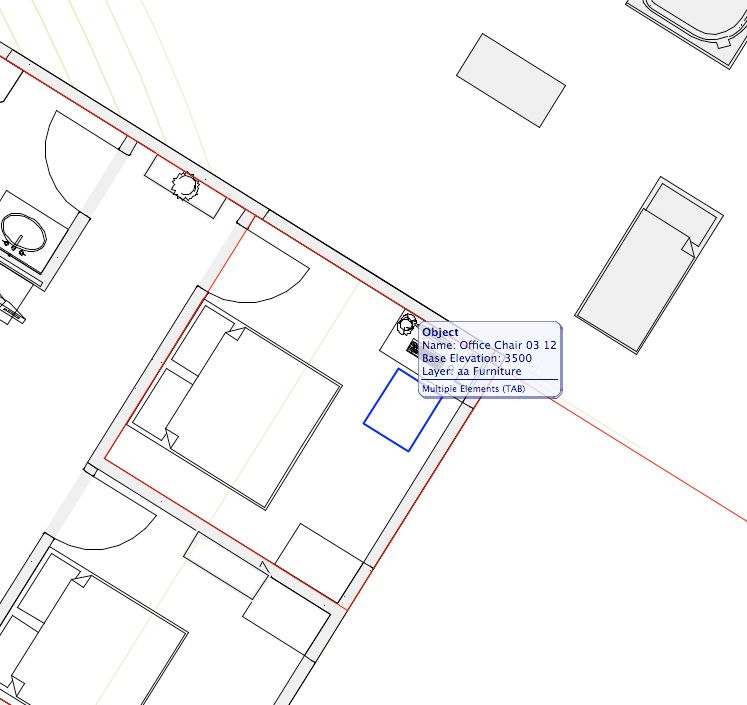
I don't know if I'm posting in the right spot but here goes.
Objects that I place (chairs) seem to show up as blocks in 2D without any detail (e.g backrest).
I have tried changing line-types and moving computers (ones with other libraries) but no luck.
Any ideas?
Gordy
3 Replies 3
Anonymous
Not applicable
Options
- Mark as New
- Bookmark
- Subscribe
- Mute
- Subscribe to RSS Feed
- Permalink
- Report Inappropriate Content
2009-10-09 04:17 PM
2009-10-09
04:17 PM
It's possibel that Your plan scale is: 1:200
You may have to change it: 1:100
Usually the appearance (2D, 3D) of the objcets are scale sensitive.
Cheers,
You may have to change it: 1:100
Usually the appearance (2D, 3D) of the objcets are scale sensitive.
Cheers,

David Maudlin
Rockstar
Options
- Mark as New
- Bookmark
- Subscribe
- Mute
- Subscribe to RSS Feed
- Permalink
- Report Inappropriate Content
2009-10-10 08:25 PM
2009-10-10
08:25 PM
Gordy:
In the US Library, the 2D Script for this object (Office Chair 03 12) does not have any code for the simple symbol you are showing in your screen shot. So I will ask the obvious: your screen shot shows multiple elements (the object tag is stacked), so is it possible that there is some other element covering the chair?
You should add a Signature to your Profile (click the Profile button near the top of this page) with your ArchiCAD version and operating system (see mine for an example) for more accurate help in this forum.
HTH
David
In the US Library, the 2D Script for this object (Office Chair 03 12) does not have any code for the simple symbol you are showing in your screen shot. So I will ask the obvious: your screen shot shows multiple elements (the object tag is stacked), so is it possible that there is some other element covering the chair?
You should add a Signature to your Profile (click the Profile button near the top of this page) with your ArchiCAD version and operating system (see mine for an example) for more accurate help in this forum.
HTH
David
David Maudlin / Architect
www.davidmaudlin.com
Digital Architecture
AC29 USA Perpetual • Mac mini M4 Pro OSX15 | 64 gb ram • MacBook Pro M3 Pro OSX14 | 36 gb ram
www.davidmaudlin.com
Digital Architecture
AC29 USA Perpetual • Mac mini M4 Pro OSX15 | 64 gb ram • MacBook Pro M3 Pro OSX14 | 36 gb ram

andrewzarb
Booster
Options
- Mark as New
- Bookmark
- Subscribe
- Mute
- Subscribe to RSS Feed
- Permalink
- Report Inappropriate Content
2009-10-10 10:55 PM
2009-10-10
10:55 PM
Go to your object tool settings then to parameters and then to "2D representation" and then to "2D Detail Level" you can change it manually to your required settings from automatic.
Didn't find the answer?
Check other topics in this Forum
Back to ForumRead the latest accepted solutions!
Accepted SolutionsStart a new conversation!

Suggested topics
- Parking layouts and solar parks in a site polygon in Libraries & objects
- Two free GDL objects: parking layouts and solar parks in a site polygon in Libraries & objects
- Number of Section Elevation and Detail Markers (Total Number of Viewpoints) in Documentation
- Fill Pattern Object in Modeling
- Detail marker as plan in Documentation
