
Turn on suggestions
Auto-suggest helps you quickly narrow down your search results by suggesting possible matches as you type.
Showing results for
EN
Turn on suggestions
Auto-suggest helps you quickly narrow down your search results by suggesting possible matches as you type.
Showing results for
- English
- :
- Forum
- :
- Libraries & objects
- :
- Re: Rotating hotspot with unwanted normal hotspot
Options
- Subscribe to RSS Feed
- Mark Topic as New
- Mark Topic as Read
- Pin this post for me
- Bookmark
- Subscribe to Topic
- Mute
- Printer Friendly Page

JGoode
Expert
Options
- Mark as New
- Bookmark
- Subscribe
- Mute
- Subscribe to RSS Feed
- Permalink
- Report Inappropriate Content
2019-04-25 05:00 PM
Rotating hotspot with unwanted normal hotspot
2019-04-25
05:00 PM
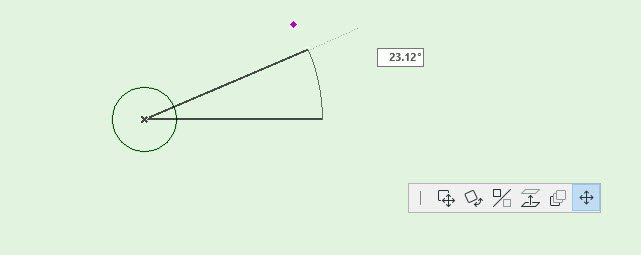
I have a 2D hotspot that I am using to rotate my object however there is a black base hotspot that stays in place when the rotating hotspot is moved. Is there any way to remove this? I've looked at the gdl ref guide and changed the flags but it doesn't seem to work. Here it is:
 	! Center
 	! --------------------------------------------------------------------------------
 	hotspot2 0, 0, hsID, ang, 6     : hsID = hsID + 1
 	! --------------------------------------------------------------------------------
 	! Base
 	! --------------------------------------------------------------------------------
 	hotspot2 1.1, 0, hsID, ang, 4     : hsID = hsID + 1
 	! --------------------------------------------------------------------------------
 	! Moving
 	! --------------------------------------------------------------------------------
 	hotspot2 1.1 * COS(ang), 1.1 * SIN(ang), hsID, ang, 5    : hsID = hsID + 1
Thanks!
ArchiCAD 27
Windows 10
Windows 10
Solved! Go to Solution.
1 Solution
Accepted Solutions

Lingwisyer
Guru
Options
- Mark as New
- Bookmark
- Subscribe
- Mute
- Subscribe to RSS Feed
- Permalink
- Report Inappropriate Content
2019-04-26 03:32 AM
2019-04-26
03:32 AM
Adding the attribute 128 to your base hotspot does not work?
Ling.
hotspot2 1.1, 0, hsID, ang, 4 + 128 : hsID = hsID + 1
Ling.
| AC22-29 AUS 3200 | Help Those Help You - Add a Signature |
| Self-taught, bend it till it breaks | Creating a Thread |
| Win11 | i9 10850K | 64GB | RX6600 | Win11 | 7800X3D | 32GB | RTX5070TI |
Solution
4 Replies 4
Lingwisyer
Guru
Options
- Mark as New
- Bookmark
- Subscribe
- Mute
- Subscribe to RSS Feed
- Permalink
- Report Inappropriate Content
2019-04-26 03:32 AM
2019-04-26
03:32 AM
Adding the attribute 128 to your base hotspot does not work?
Ling.
hotspot2 1.1, 0, hsID, ang, 4 + 128 : hsID = hsID + 1
Ling.
| AC22-29 AUS 3200 | Help Those Help You - Add a Signature |
| Self-taught, bend it till it breaks | Creating a Thread |
| Win11 | i9 10850K | 64GB | RX6600 | Win11 | 7800X3D | 32GB | RTX5070TI |
Solution
JGoode
Expert
Options
- Mark as New
- Bookmark
- Subscribe
- Mute
- Subscribe to RSS Feed
- Permalink
- Report Inappropriate Content
2019-04-26 10:50 AM
2019-04-26
10:50 AM
No, the black hotspot remained in place.
ArchiCAD 27
Windows 10
Windows 10

Barry Kelly
Moderator
Options
- Mark as New
- Bookmark
- Subscribe
- Mute
- Subscribe to RSS Feed
- Permalink
- Report Inappropriate Content
2019-04-29 03:41 AM
2019-04-29
03:41 AM
JGoode wrote:It works fine for me just as Ling has shown.
No, the black hotspot remained in place.
Barry.
One of the forum moderators.
Versions 6.5 to 27
i7-10700 @ 2.9Ghz, 32GB ram, GeForce RTX 2060 (6GB), Windows 10
Lenovo Thinkpad - i7-1270P 2.20 GHz, 32GB RAM, Nvidia T550, Windows 11
Versions 6.5 to 27
i7-10700 @ 2.9Ghz, 32GB ram, GeForce RTX 2060 (6GB), Windows 10
Lenovo Thinkpad - i7-1270P 2.20 GHz, 32GB RAM, Nvidia T550, Windows 11
JGoode
Expert
Options
- Mark as New
- Bookmark
- Subscribe
- Mute
- Subscribe to RSS Feed
- Permalink
- Report Inappropriate Content
2019-04-29 12:47 PM
2019-04-29
12:47 PM
ah I found my error, turned out I had more than 1 hotspot and one of which didn't have the +128! all sorted now.
Thank you.
Thank you.
ArchiCAD 27
Windows 10
Windows 10

Didn't find the answer?
Check other topics in this Forum
Back to ForumRead the latest accepted solutions!
Accepted SolutionsStart a new conversation!

Suggested topics
