
Turn on suggestions
Auto-suggest helps you quickly narrow down your search results by suggesting possible matches as you type.
Showing results for
EN
Turn on suggestions
Auto-suggest helps you quickly narrow down your search results by suggesting possible matches as you type.
Showing results for
- English
- :
- Forum
- :
- Libraries & objects
- :
- Re: UI radiobutton edit
Options
- Subscribe to RSS Feed
- Mark Topic as New
- Mark Topic as Read
- Pin this post for me
- Bookmark
- Subscribe to Topic
- Mute
- Printer Friendly Page

Anonymous
Not applicable
Options
- Mark as New
- Bookmark
- Subscribe
- Mute
- Subscribe to RSS Feed
- Permalink
- Report Inappropriate Content
2016-04-22 09:53 AM
UI radiobutton edit
2016-04-22
09:53 AM
how I can edit in UI radiobutton, I want create choice with radiobutton, for exemple:
UI_RADIOBUTTON "exemple", 0, `Cyrcle`, 250, 20, 170, 20
UI_RADIOBUTTON "exemple", 1, `Cube`, 250, 40, 170, 20
UI_RADIOBUTTON "exemple", 2, `Pyramid`, 250, 60, 170, 20
UI Radiobutton work only 0 and 1, how I can add 3. atribut?
Or exist any similar way?
Please help me
7 Replies 7

Barry Kelly
Moderator
Options
- Mark as New
- Bookmark
- Subscribe
- Mute
- Subscribe to RSS Feed
- Permalink
- Report Inappropriate Content
2016-04-22 10:20 AM
2016-04-22
10:20 AM
The radio button is only an on/off switch (i.e. 0 or 1)
If you want a choice of multiple values then you will need to use the UI_INFIELD.
UI_INFIELD "name", x, y, width, height
Where "name" is the parameter that contains the VALUE list of your shapes.
Barry.
If you want a choice of multiple values then you will need to use the UI_INFIELD.
UI_INFIELD "name", x, y, width, height
Where "name" is the parameter that contains the VALUE list of your shapes.
Barry.
One of the forum moderators.
Versions 6.5 to 27
i7-10700 @ 2.9Ghz, 32GB ram, GeForce RTX 2060 (6GB), Windows 10
Lenovo Thinkpad - i7-1270P 2.20 GHz, 32GB RAM, Nvidia T550, Windows 11
Versions 6.5 to 27
i7-10700 @ 2.9Ghz, 32GB ram, GeForce RTX 2060 (6GB), Windows 10
Lenovo Thinkpad - i7-1270P 2.20 GHz, 32GB RAM, Nvidia T550, Windows 11
Anonymous
Not applicable
Options
- Mark as New
- Bookmark
- Subscribe
- Mute
- Subscribe to RSS Feed
- Permalink
- Report Inappropriate Content
2016-04-22 11:46 AM
2016-04-22
11:46 AM
But with infield I must use checkbox (In parameters Boolein. constant)
And if i want choice only one values, I must uncheck all other boxes.
Because I want use something like that.
Or what do you think with INFIELD?
Can you looked that on this my example?
And if i want choice only one values, I must uncheck all other boxes.
Because I want use something like that.
Or what do you think with INFIELD?
Can you looked that on this my example?
"Barry Kelly" wrote:
The radio button is only an on/off switch (i.e. 0 or 1)
If you want a choice of multiple values then you will need to use the UI_INFIELD.
UI_INFIELD "name", x, y, width, height
Where "name" is the parameter that contains the VALUE list of your shapes.
Barry.
Barry Kelly
Moderator
Options
- Mark as New
- Bookmark
- Subscribe
- Mute
- Subscribe to RSS Feed
- Permalink
- Report Inappropriate Content
2016-04-23 05:54 AM
2016-04-23
05:54 AM
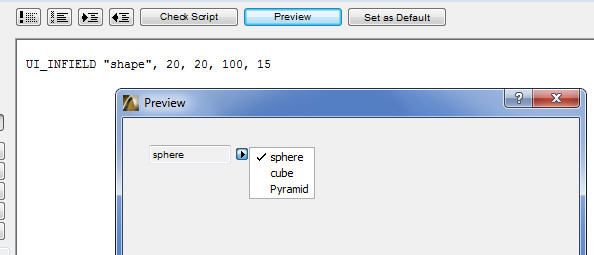
If you want a choice of say "sphere", "cube" or "Pyramid" then create a text parameter fore "shape"
Then in the parameter list create a VALUE list ...
VALUES "shape" "sphere", "cube", "Pyramid"
Then I interface script ...
UI_INFIELD "shape", 20, 20, 100, 15
This way you can only ever have one shape chosen.
Otherwise if you are trying to use a radio button or check box you will need to add a routine that says if "sphere" is on then turn all the others off rather than turning them all off manually.
Barry.
Then in the parameter list create a VALUE list ...
VALUES "shape" "sphere", "cube", "Pyramid"
Then I interface script ...
UI_INFIELD "shape", 20, 20, 100, 15
This way you can only ever have one shape chosen.
Otherwise if you are trying to use a radio button or check box you will need to add a routine that says if "sphere" is on then turn all the others off rather than turning them all off manually.
Barry.
One of the forum moderators.
Versions 6.5 to 27
i7-10700 @ 2.9Ghz, 32GB ram, GeForce RTX 2060 (6GB), Windows 10
Lenovo Thinkpad - i7-1270P 2.20 GHz, 32GB RAM, Nvidia T550, Windows 11
Versions 6.5 to 27
i7-10700 @ 2.9Ghz, 32GB ram, GeForce RTX 2060 (6GB), Windows 10
Lenovo Thinkpad - i7-1270P 2.20 GHz, 32GB RAM, Nvidia T550, Windows 11

Erich
Booster
Options
- Mark as New
- Bookmark
- Subscribe
- Mute
- Subscribe to RSS Feed
- Permalink
- Report Inappropriate Content
2016-04-24 02:32 AM
2016-04-24
02:32 AM
You can also do a grouping of bolean parameters with individual Infield and Outfield callouts - something like this (The uiX, uiY, uiLablelX1...etc. are just positioning variables):
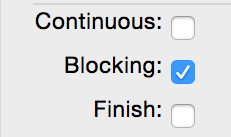
	UI_OUTFIELD 'Continuous:',         uiX,  uiY, uiLabelX1, uiLabelY3, 1 : uiX = uiX + uiLabelX1 + uiGapX
	UI_INFIELD{3}  "bcont",            uiX,  uiY, uiButton1, uiLabelY3    : uiX = uiXs : uiY = uiY + uiLabelY3 + uiGapY

	UI_OUTFIELD 'Blocking:',           uiX,  uiY, uiLabelX1, uiLabelY3, 1 : uiX = uiX + uiLabelX1 + uiGapX
	UI_INFIELD{3}  "bblock",           uiX,  uiY, uiButton1, uiLabelY3    : uiX = uiXs : uiY = uiY + uiLabelY3 + uiGapY

	UI_OUTFIELD 'Finish:',             uiX,  uiY, uiLabelX1, uiLabelY3, 1 : uiX = uiX + uiLabelX1 + uiGapX
	UI_INFIELD{3}  "bfinish",          uiX,  uiY, uiButton1, uiLabelY3    : uiX = uiXs
Then in the master script you will want to add something like this:!! =========================================================== !! Radio Button Parameters !! =========================================================== bSetParams = 0 IF GLOB_MODPAR_NAME = "bcont" THEN bcont = 1 bblock = 0 bfinish = 0 bSetParams = 1 ENDIF IF GLOB_MODPAR_NAME = "bblock" THEN bcont = 0 bblock = 1 bfinish = 0 bSetParams = 1 ENDIF IF GLOB_MODPAR_NAME = "bfinish" THEN bcont = 0 bblock = 0 bfinish = 1 bSetParams = 1 ENDIF IF bSetParams THEN PARAMETERS bcont = bcont, bblock = bblock, bfinish = bfinish ENDIFTo contol your variables so that only one parameter can be selected at any time. This essentially creates a three way radio button that will look something like what you see in the attached image.
Erich
AC 19 6006 & AC 20
Mac OS 10.11.5
15" Retina MacBook Pro 2.6
27" iMac Retina 5K
AC 19 6006 & AC 20
Mac OS 10.11.5
15" Retina MacBook Pro 2.6
27" iMac Retina 5K
Anonymous
Not applicable
Options
- Mark as New
- Bookmark
- Subscribe
- Mute
- Subscribe to RSS Feed
- Permalink
- Report Inappropriate Content
2016-04-25 07:57 PM
2016-04-25
07:57 PM
Hello,
Radio buttons should work as nGhost suggested. Maybe
adding a value script does the trick?
Radio buttons should work as nGhost suggested. Maybe
adding a value script does the trick?
!--value script
values "radiobutton" 0,1,2,3

!--UI-script
UI_RADIOBUTTON "radiobutton", 0, "Zero", 10, 140, 200, 20
UI_RADIOBUTTON "radiobutton", 1, "One", 10, 160, 200, 20
UI_RADIOBUTTON "radiobutton", 2, "Two", 10, 180, 200, 20
UI_RADIOBUTTON "radiobutton", 3, "Three", 10, 200, 200, 20

Anonymous
Not applicable
Options
- Mark as New
- Bookmark
- Subscribe
- Mute
- Subscribe to RSS Feed
- Permalink
- Report Inappropriate Content
2016-04-25 09:56 PM
Anonymous
Not applicable
Options
- Mark as New
- Bookmark
- Subscribe
- Mute
- Subscribe to RSS Feed
- Permalink
- Report Inappropriate Content
2016-04-26 08:33 PM
2016-04-26
08:33 PM
Thank you so much Juha Vesen.
This is it !!
This is it !!
Didn't find the answer?
Check other topics in this Forum
Back to ForumRead the latest accepted solutions!
Accepted SolutionsStart a new conversation!
Suggested topics
- Detailing | Better methods of 2d drafting, creation of Blocks , Detail Elements , 2d Objects in Documentation
- "pyramid" type stair in Modeling
- How to edit the opening lines for BAse Cabinet Block in Modeling
- End caps for lines and polylines in Documentation
- Text/Autotext Label -Can not edit Text Content from the tool's settings dialogue in Documentation
