
Turn on suggestions
Auto-suggest helps you quickly narrow down your search results by suggesting possible matches as you type.
Showing results for
EN
Turn on suggestions
Auto-suggest helps you quickly narrow down your search results by suggesting possible matches as you type.
Showing results for
Options
- Subscribe to RSS Feed
- Mark Topic as New
- Mark Topic as Read
- Pin this post for me
- Bookmark
- Subscribe to Topic
- Mute
- Printer Friendly Page

Sheena Marie Tamidle
Contributor
Options
- Mark as New
- Bookmark
- Subscribe
- Mute
- Subscribe to RSS Feed
- Permalink
- Report Inappropriate Content
2022-10-25
08:37 AM
- last edited on
2023-05-09
02:01 PM
by
 Rubia Torres
Archicad 26: Graphic Override Problem
2022-10-25
08:37 AM
I created a graphic override for Quality Assurance which rules that any element with "Undefined" Structural Function will be painted in orange and the rest will be transparent . But whenever I go to 3d, everything is transparent even if there one element with undefined structural function. Please see pictures attached.
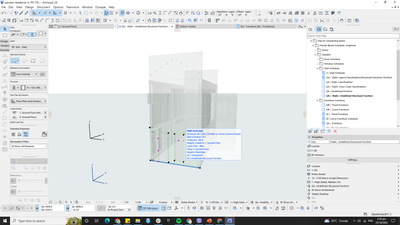
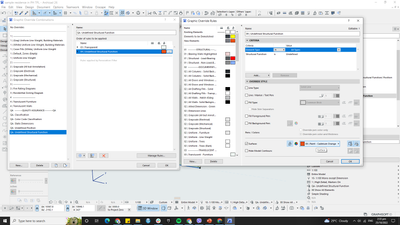
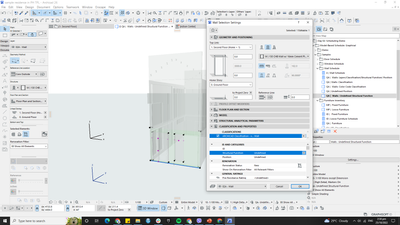
Please Help! Is this a bug? 'Cuz this has been the graphic override I used for QA since Archicad 25 and I don't know why it is no longer working in Archicad 26.
Solved! Go to Solution.
1 Solution
Accepted Solutions

hevi
Ace
Options
- Mark as New
- Bookmark
- Subscribe
- Mute
- Subscribe to RSS Feed
- Permalink
- Report Inappropriate Content
2022-10-25 08:41 AM - edited 2022-10-25 08:43 AM
2022-10-25
08:41 AM
The rule list is executed from the bottom - switch position on the two rules.
5 Replies 5
hevi
Ace
Options
- Mark as New
- Bookmark
- Subscribe
- Mute
- Subscribe to RSS Feed
- Permalink
- Report Inappropriate Content
2022-10-25 08:41 AM - edited 2022-10-25 08:43 AM
2022-10-25
08:41 AM
The rule list is executed from the bottom - switch position on the two rules.
Sheena Marie Tamidle
Contributor
Options
- Mark as New
- Bookmark
- Subscribe
- Mute
- Subscribe to RSS Feed
- Permalink
- Report Inappropriate Content
2022-10-25 08:58 AM
2022-10-25
08:58 AM
I see it worked now. Thank you so much😀

DGSketcher
Legend
Options
- Mark as New
- Bookmark
- Subscribe
- Mute
- Subscribe to RSS Feed
- Permalink
- Report Inappropriate Content
2022-10-25 04:49 PM
2022-10-25
04:49 PM
Another piece of GS logic at its best. 🙄
Apple iMac Intel i9 / macOS Sonoma / AC27UKI (most recent builds.. if they work)

Karl Ottenstein
Moderator Emeritus
Options
- Mark as New
- Bookmark
- Subscribe
- Mute
- Subscribe to RSS Feed
- Permalink
- Report Inappropriate Content
2022-10-25 05:29 PM - edited 2022-10-25 05:30 PM
2022-10-25
05:29 PM
@DGSketcher wrote:
Another piece of GS logic at its best. 🙄
Incredible, isn't it? I'd never noticed this before but it makes zero sense to me. The Help File says this:
Order of rules
Rules in a Graphic Override Combination are applied in the order that they are listed.
If two rules both apply, but can’t be applied simultaneously, then the rule that is higher up applies.
•For example: all plaster walls are blue, and all elements with a Fire Rating of 30 min are red. A wall that fits both of these rules will get the override from the rule that is higher up in the list.
To change the order, drag a rule up and down using the arrows the left edge of its row in the list.
Which states that rules are applied in the order listed (top-down)... BUT as soon as one rule matches, no subsequent rules will be applied to the same element. So, basically, as @hevi said, the rules are really applied bottom up - in the opposite order from which they are listed. Insanity.
Vote for Wish: Copy/Paste in 3D
AC 29 USA and earlier • hardware key • macOS Tahoe 26.7 MacBook Pro M2 Max 12CPU/30GPU cores, 32GB
AC 29 USA and earlier • hardware key • macOS Tahoe 26.7 MacBook Pro M2 Max 12CPU/30GPU cores, 32GB
 Laszlo Nagy
Community Admin
Options
- Mark as New
- Bookmark
- Subscribe
- Mute
- Subscribe to RSS Feed
- Permalink
- Report Inappropriate Content
2022-10-26 04:13 PM - edited 2022-10-31 12:05 AM
2022-10-26
04:13 PM
This must be a cultural thing - for me, the way the rules are applied and the explanation both make perfect sense.
Archicad goes from top to bottom in the list of Rules. If an element satisfies a Rule's Criteria, then the Rule's Override is applied to it. Then no other Rule in the list is even evaluated for it, since it already has an Override applied to it.
If you think about it, why would you evaluate a Rule's Criteria for an element any more if the element is already Overridden? It is just a waste of time.
Loving Archicad since 1995 - Find Archicad Tips at x.com/laszlonagy
AMD Ryzen9 5900X CPU, 64 GB RAM 3600 MHz, Nvidia GTX 1060 6GB, 500 GB NVMe SSD
2x28" (2560x1440), Windows 10 PRO ENG, Ac20-Ac29
AMD Ryzen9 5900X CPU, 64 GB RAM 3600 MHz, Nvidia GTX 1060 6GB, 500 GB NVMe SSD
2x28" (2560x1440), Windows 10 PRO ENG, Ac20-Ac29

Still looking?

Suggested topics
- Selecting text to edit in Documentation
- Window frame representation (AC 29 - new libpack) in Libraries & objects
- From one hand-drawn sketch to an Archicad construction model, rebar model and 61 structural drawings in AI solutions
- Archicad 30: what the official MCP and Tapir 1.7.1 can each do (side-by-side table) in AI solutions
- Editing zones within schedules in Project data & BIM
