
Turn on suggestions
Auto-suggest helps you quickly narrow down your search results by suggesting possible matches as you type.
Showing results for
EN
Turn on suggestions
Auto-suggest helps you quickly narrow down your search results by suggesting possible matches as you type.
Showing results for
Options
- Subscribe to RSS Feed
- Mark Topic as New
- Mark Topic as Read
- Pin this post for me
- Bookmark
- Subscribe to Topic
- Mute
- Printer Friendly Page

LeeJaeYoung
Virtuoso
Options
- Mark as New
- Bookmark
- Subscribe
- Mute
- Subscribe to RSS Feed
- Permalink
- Report Inappropriate Content
2023-03-31 02:02 PM
Connection between beams with different widths
2023-03-31
02:02 PM
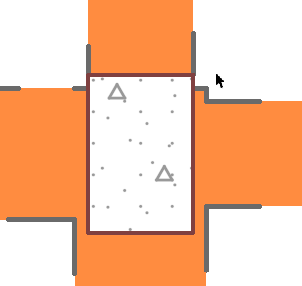
I want to make sure there are no overhangs where the arrows are, but I think this is the best solution.
How are you doing?
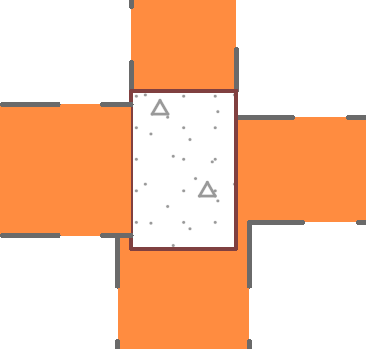
in REVIT
If you do not combine with a disallow join in the revit and place it in the desired location, it is automatically combined.

AC27 on window 11
Solved! Go to Solution.
1 Solution
Accepted Solutions

 Laszlo Nagy
Community Admin
Options
- Mark as New
- Bookmark
- Subscribe
- Mute
- Subscribe to RSS Feed
- Permalink
- Report Inappropriate Content
2023-04-04 01:58 PM
2023-04-04
01:58 PM
Here is how you can achieve it:
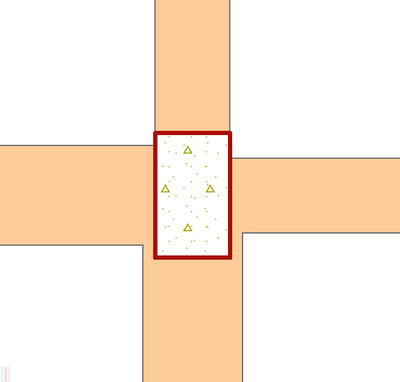
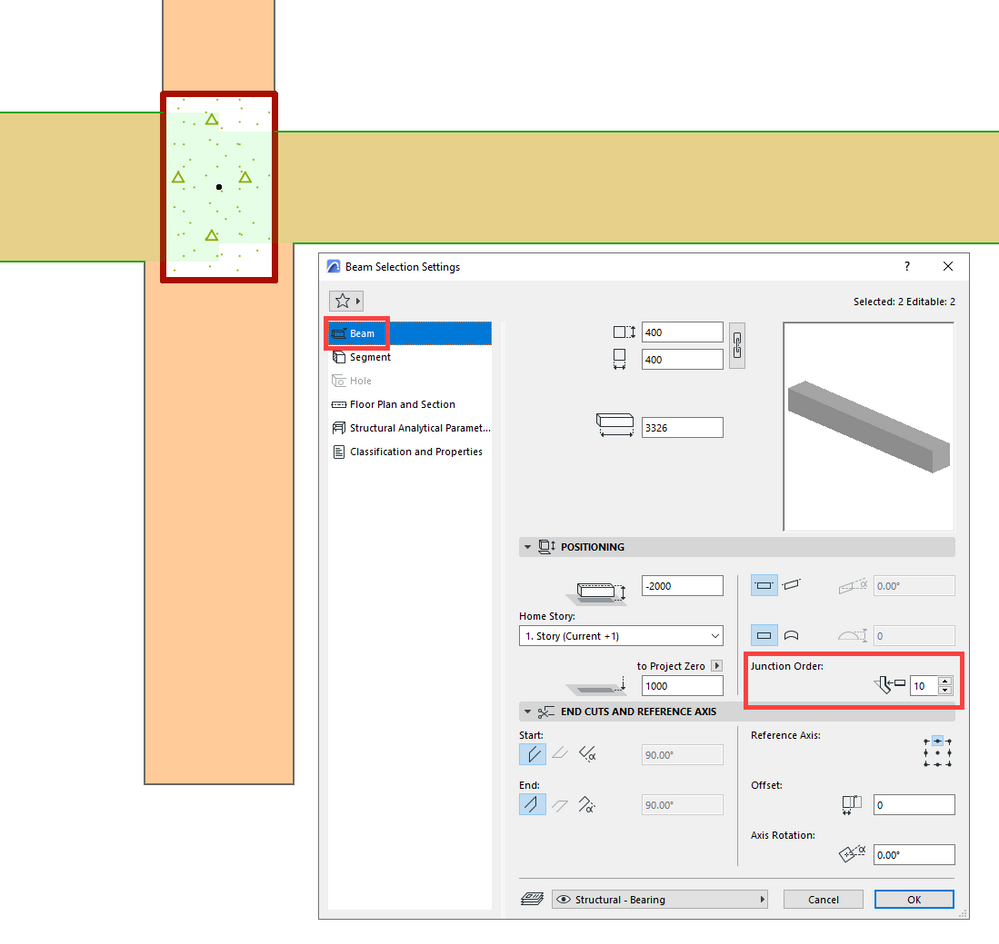
Make sure that the Junction Order value for the two horizontal Beams is set to a higher number than for the two vertical Beams. That way, Archicad will first connect the two Horizontal Beams, then it will join the two vertical Beams after, resulting in the desired junction geometry.
Loving Archicad since 1995 - Find Archicad Tips at x.com/laszlonagy
AMD Ryzen9 5900X CPU, 64 GB RAM 3600 MHz, Nvidia GTX 1060 6GB, 500 GB NVMe SSD
2x28" (2560x1440), Windows 10 PRO ENG, Ac20-Ac29
AMD Ryzen9 5900X CPU, 64 GB RAM 3600 MHz, Nvidia GTX 1060 6GB, 500 GB NVMe SSD
2x28" (2560x1440), Windows 10 PRO ENG, Ac20-Ac29
2 Replies 2
Laszlo Nagy
Community Admin
Options
- Mark as New
- Bookmark
- Subscribe
- Mute
- Subscribe to RSS Feed
- Permalink
- Report Inappropriate Content
2023-04-04 01:58 PM
2023-04-04
01:58 PM
Here is how you can achieve it:
Make sure that the Junction Order value for the two horizontal Beams is set to a higher number than for the two vertical Beams. That way, Archicad will first connect the two Horizontal Beams, then it will join the two vertical Beams after, resulting in the desired junction geometry.
Loving Archicad since 1995 - Find Archicad Tips at x.com/laszlonagy
AMD Ryzen9 5900X CPU, 64 GB RAM 3600 MHz, Nvidia GTX 1060 6GB, 500 GB NVMe SSD
2x28" (2560x1440), Windows 10 PRO ENG, Ac20-Ac29
AMD Ryzen9 5900X CPU, 64 GB RAM 3600 MHz, Nvidia GTX 1060 6GB, 500 GB NVMe SSD
2x28" (2560x1440), Windows 10 PRO ENG, Ac20-Ac29
LeeJaeYoung
Virtuoso
Options
- Mark as New
- Bookmark
- Subscribe
- Mute
- Subscribe to RSS Feed
- Permalink
- Report Inappropriate Content
2023-04-04 02:49 PM
2023-04-04
02:49 PM
Thank you for your kind explanation.
AC27 on window 11

Still looking?
Suggested topics
- Can not connect to BIMCloud in Teamwork & BIMcloud
- BIMx sign-in fails on iPadOS 16 due to untrusted Graphisoft certificate in BIMx
- Archicad 29 crashes when updating drawings linked to another Teamwork project in Teamwork & BIMcloud
- The learning platform does NOT load content in General discussions
- 3D Connection Spacemouse Mac — only moves in one axis at a time in 3D in Modeling
