
Turn on suggestions
Auto-suggest helps you quickly narrow down your search results by suggesting possible matches as you type.
Showing results for
EN
Turn on suggestions
Auto-suggest helps you quickly narrow down your search results by suggesting possible matches as you type.
Showing results for
Options
- Subscribe to RSS Feed
- Mark Topic as New
- Mark Topic as Read
- Pin this post for me
- Bookmark
- Subscribe to Topic
- Mute
- Printer Friendly Page

David Bearss
Booster
Options
- Mark as New
- Bookmark
- Subscribe
- Mute
- Subscribe to RSS Feed
- Permalink
- Report Inappropriate Content
2007-08-15 11:00 PM
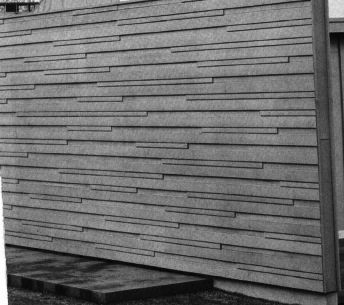
Create siding material
2007-08-15
11:00 PM
David Bearss
Archicad 28/Windows 11
Alienware 17 R5
i7 2.4 GHz / 16 GB ram
Archicad 28/Windows 11
Alienware 17 R5
i7 2.4 GHz / 16 GB ram
2 Replies 2

Anonymous
Not applicable
Options
- Mark as New
- Bookmark
- Subscribe
- Mute
- Subscribe to RSS Feed
- Permalink
- Report Inappropriate Content
2007-08-16 11:57 AM
2007-08-16
11:57 AM
Hi,
firstly have you got a photo of this that is more square on? because if you have it is fairly simple to make the material.
Also, do you have photoshop?
Craig
firstly have you got a photo of this that is more square on? because if you have it is fairly simple to make the material.
Also, do you have photoshop?
Craig
Anonymous
Not applicable
Options
- Mark as New
- Bookmark
- Subscribe
- Mute
- Subscribe to RSS Feed
- Permalink
- Report Inappropriate Content
2007-08-16 12:07 PM
2007-08-16
12:07 PM
The fill you can draw with lines on the floor plan, copy the lines, go to: Options - Element Attributes - Fill Types and select New. highlight symbol fill, name it, hit OK and hit the paste button above the window.
Still looking?

Suggested topics
- Changing wall preview type in favorite window library in Libraries & objects
- Archicad 29 regression - Complex Profile fill orientation bug has returned in Modeling
- Using Project Info as an editable lookup table — a practical example in Project data & BIM
- Is It Possible to Create a One-Way Vision Material in Archicad? in Modeling
- Building materials, priorities and linework. in Modeling
