
Turn on suggestions
Auto-suggest helps you quickly narrow down your search results by suggesting possible matches as you type.
Showing results for
EN
Turn on suggestions
Auto-suggest helps you quickly narrow down your search results by suggesting possible matches as you type.
Showing results for
Options
- Subscribe to RSS Feed
- Mark Topic as New
- Mark Topic as Read
- Pin this post for me
- Bookmark
- Subscribe to Topic
- Mute
- Printer Friendly Page

Kamelite
Expert
Options
- Mark as New
- Bookmark
- Subscribe
- Mute
- Subscribe to RSS Feed
- Permalink
- Report Inappropriate Content
2023-03-18
11:16 AM
- last edited on
2023-05-09
03:04 PM
by
 Rubia Torres
Differense in behaviour of roof
2023-03-18
11:16 AM
When I create a flat roof, and alter the angle in 3D, the change is reflected in the Roof Height and Pitch window.
But when I alter the gableheight of a gabled roof, using elevate ridges, it doesn't reflect the changes.
Bug or intended?
.Kamelite
Windows 10, Archicad 27,28 and 29
2 Replies 2

Barry Kelly
Moderator
Options
- Mark as New
- Bookmark
- Subscribe
- Mute
- Subscribe to RSS Feed
- Permalink
- Report Inappropriate Content
2023-03-19 08:52 AM - edited 2023-03-19 08:53 AM
2023-03-19
08:52 AM
By 'flat' roof I assume you mean a single plane roof.
They only have one surface and therefore only one pitch.
Multi-plane roofs can have any number of surfaces and only show the original pitch as it was created.
In the settings (not info box) you will a warning to say there are multiple pitches.
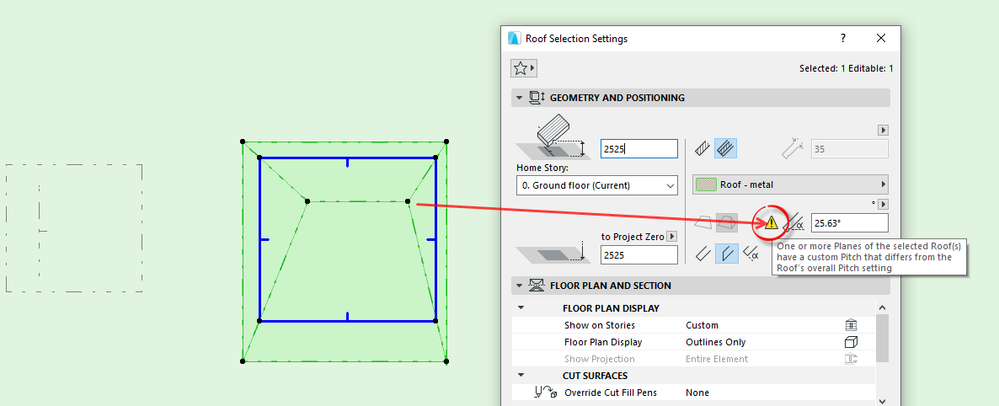
If you click on a pivot line of a multi=plane roof and go to the 'Custom planes' option in the pet palette, you will see the custom pitch.
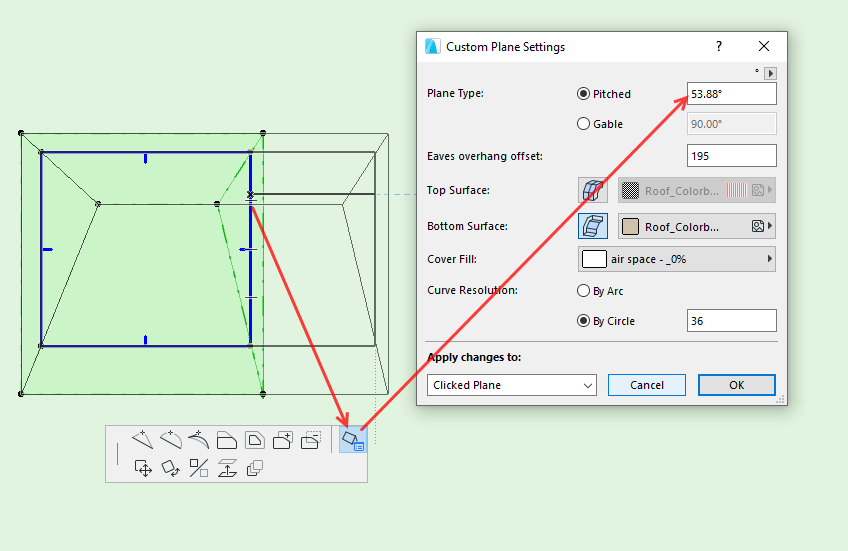
Barry.
One of the forum moderators.
Versions 6.5 to 27
i7-10700 @ 2.9Ghz, 32GB ram, GeForce RTX 2060 (6GB), Windows 10
Lenovo Thinkpad - i7-1270P 2.20 GHz, 32GB RAM, Nvidia T550, Windows 11
Versions 6.5 to 27
i7-10700 @ 2.9Ghz, 32GB ram, GeForce RTX 2060 (6GB), Windows 10
Lenovo Thinkpad - i7-1270P 2.20 GHz, 32GB RAM, Nvidia T550, Windows 11
Kamelite
Expert
Options
- Mark as New
- Bookmark
- Subscribe
- Mute
- Subscribe to RSS Feed
- Permalink
- Report Inappropriate Content
2023-03-22 08:15 AM
2023-03-22
08:15 AM
That makes sence. It never crossed my mind that I could do other things whith the gable than just elevate it!
.Kamelite
Windows 10, Archicad 27,28 and 29

Still looking?

Suggested topics
- Updating existing Roof Components instead of creating new ones on update in Grasshopper in Parametric design
- Display Order ...disorder in Documentation
- Differense in behaviour of roof in Modeling
- Roof shown as overhead with outline selected in Modeling
- Zone - Crop to roof and CW Strange behaviour in Sustainable design
