
Turn on suggestions
Auto-suggest helps you quickly narrow down your search results by suggesting possible matches as you type.
Showing results for
EN
Turn on suggestions
Auto-suggest helps you quickly narrow down your search results by suggesting possible matches as you type.
Showing results for
Options
- Subscribe to RSS Feed
- Mark Topic as New
- Mark Topic as Read
- Pin this post for me
- Bookmark
- Subscribe to Topic
- Mute
- Printer Friendly Page

jvogt
Participant
Options
- Mark as New
- Bookmark
- Subscribe
- Mute
- Subscribe to RSS Feed
- Permalink
- Report Inappropriate Content
2022-05-24 10:17 PM
Editable Grid
2022-05-24
10:17 PM
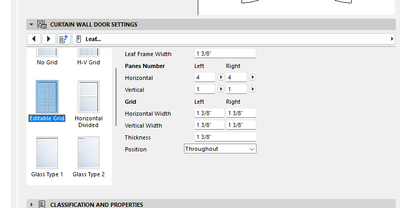
Does anyone know how to actually edit the grid with this option? There is nothing in the help, and there doesn't seem to be anyway to actually edit the grid.
Thanks,
J
Solved! Go to Solution.
Solved
Read-Only
1 Solution
Accepted Solutions

hevi
Ace
Options
- Mark as New
- Bookmark
- Subscribe
- Mute
- Subscribe to RSS Feed
- Permalink
- Report Inappropriate Content
2022-05-24 10:24 PM - edited 2022-05-24 10:25 PM
2022-05-24
10:24 PM
7 Replies 7
hevi
Ace
Options
- Mark as New
- Bookmark
- Subscribe
- Mute
- Subscribe to RSS Feed
- Permalink
- Report Inappropriate Content
2022-05-24 10:24 PM - edited 2022-05-24 10:25 PM
2022-05-24
10:24 PM
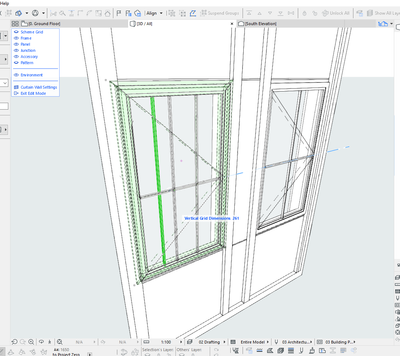
It is edited graphically by moving hotspots (pinkish nodes) in 3d view:
jvogt
Participant
Options
- Mark as New
- Bookmark
- Subscribe
- Mute
- Subscribe to RSS Feed
- Permalink
- Report Inappropriate Content
2022-05-24 10:25 PM
2022-05-24
10:25 PM
Got it - hot spots are only in 3d view.
jvogt
Participant
Options
- Mark as New
- Bookmark
- Subscribe
- Mute
- Subscribe to RSS Feed
- Permalink
- Report Inappropriate Content
2022-05-25 05:37 PM
2022-05-25
05:37 PM
Thanks for the reply. Is there any reason it's limited to 3D, and can't be manipulated in elevation?

 Laszlo Nagy
Community Admin
Options
- Mark as New
- Bookmark
- Subscribe
- Mute
- Subscribe to RSS Feed
- Permalink
- Report Inappropriate Content
2022-05-25 08:51 PM
2022-05-25
08:51 PM
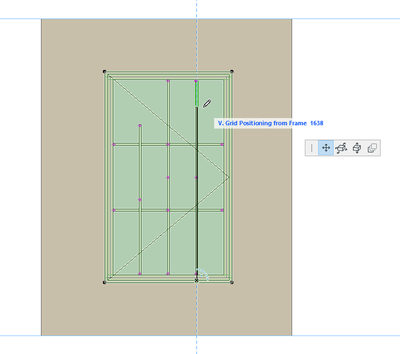
You can edit the individual Grid elements of a Window in Sections/Elevations too, using the diamond-shaped handles.
Loving Archicad since 1995 - Find Archicad Tips at x.com/laszlonagy
AMD Ryzen9 5900X CPU, 64 GB RAM 3600 MHz, Nvidia GTX 1060 6GB, 500 GB NVMe SSD
2x28" (2560x1440), Windows 10 PRO ENG, Ac20-Ac29
AMD Ryzen9 5900X CPU, 64 GB RAM 3600 MHz, Nvidia GTX 1060 6GB, 500 GB NVMe SSD
2x28" (2560x1440), Windows 10 PRO ENG, Ac20-Ac29
hevi
Ace
Options
- Mark as New
- Bookmark
- Subscribe
- Mute
- Subscribe to RSS Feed
- Permalink
- Report Inappropriate Content
2022-05-25 10:16 PM
2022-05-25
10:16 PM
Yes, when used in an ordinary window/door object - not when used for CW panels.
Laszlo Nagy
Community Admin
Options
- Mark as New
- Bookmark
- Subscribe
- Mute
- Subscribe to RSS Feed
- Permalink
- Report Inappropriate Content
2022-05-26 12:07 AM
2022-05-26
12:07 AM
You are right, it is not available in a Section/Elevation Viewpoint when the Window is placed into a Curtain Wall. At this point I can not decide whether this is a limitation or a bug as it works totally fine if the Curtain Wall is edited in 3D, but does not work when it is edited in a Section/Elevation Viewpoint. I will report this to Graphisoft.
Loving Archicad since 1995 - Find Archicad Tips at x.com/laszlonagy
AMD Ryzen9 5900X CPU, 64 GB RAM 3600 MHz, Nvidia GTX 1060 6GB, 500 GB NVMe SSD
2x28" (2560x1440), Windows 10 PRO ENG, Ac20-Ac29
AMD Ryzen9 5900X CPU, 64 GB RAM 3600 MHz, Nvidia GTX 1060 6GB, 500 GB NVMe SSD
2x28" (2560x1440), Windows 10 PRO ENG, Ac20-Ac29

 Minh Nguyen
Graphisoft Alumni
Options
- Mark as New
- Bookmark
- Subscribe
- Mute
- Subscribe to RSS Feed
- Permalink
- Report Inappropriate Content
2022-06-22 01:46 PM
2022-06-22
01:46 PM
Dear All,
Thank you very much for sharing the problem!
After consulting with the developers, we believe that this is intentional and also a limitation as well. This does not limit to the Editable grid but also any other hotspot on the CW panels. The Edit mode won't allow editing hotspot in section/elevation, thus the spots are disabled there to avoid confusion.
I hope this answers the question. Thank you very much for your understanding, and feel free to ask if you have any further problems!
Best regards,
Minh
Minh Nguyen
Technical Support Engineer
GRAPHISOFT

Still looking?

Suggested topics
- MEP AC29 Incorrect behavior of the Z mark in the tracking display when editing the Z mark of a pipe in Modeling
- Some free useful objects: Road signs, parametric pathway, roof crickets, crowds in Libraries & objects
- The snap to construction grid doesn't work if I change the plan orientation angle in General discussions
- Creating elements on a rotate grid in 3d in Modeling
- Railing break mark in Modeling
