
Turn on suggestions
Auto-suggest helps you quickly narrow down your search results by suggesting possible matches as you type.
Showing results for
EN
Turn on suggestions
Auto-suggest helps you quickly narrow down your search results by suggesting possible matches as you type.
Showing results for
Options
- Subscribe to RSS Feed
- Mark Topic as New
- Mark Topic as Read
- Pin this post for me
- Bookmark
- Subscribe to Topic
- Mute
- Printer Friendly Page

Vojtech Slavik
Expert
Options
- Mark as New
- Bookmark
- Subscribe
- Mute
- Subscribe to RSS Feed
- Permalink
- Report Inappropriate Content
2022-04-19 10:41 AM
Facades Walls with panels / profiles
2022-04-19
10:41 AM
Hi, I'm trying to figured out how to make properly profiles for facades walls - which they have a gabs or some 3D textures
- Profile manager it's seem that can do profile only : TopSurface and after this profile I can use it for FrontSurface - Not like SideSurface
- Also tried to do this troughs NISH window object - It's do very well but it not easy to change "parametrically" ( Also it's too many windows in the wall after )

- I tested also Texture and it do very well just it's so flat and any change is not exactly and reUplouding Libraries is little pain 😕
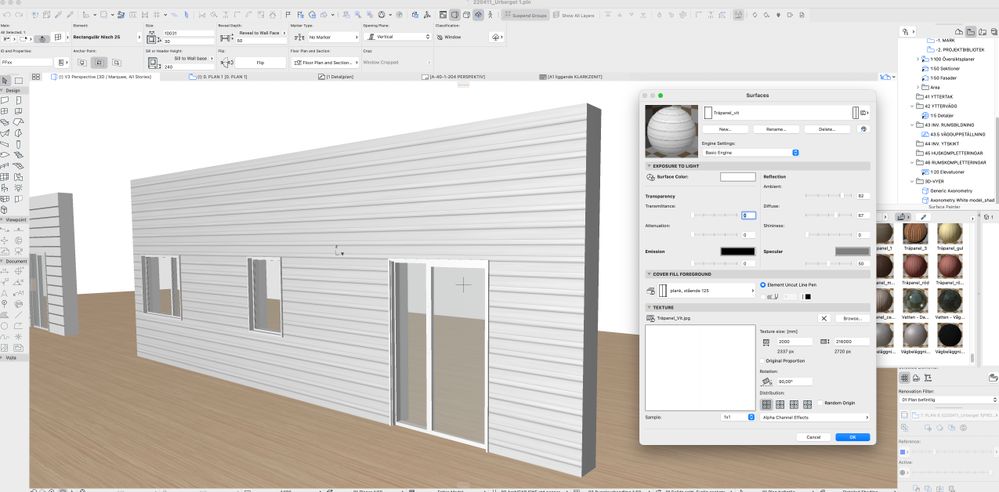
- Solid operations tools is also working but it's annoying work with it ( hiding layers ...)
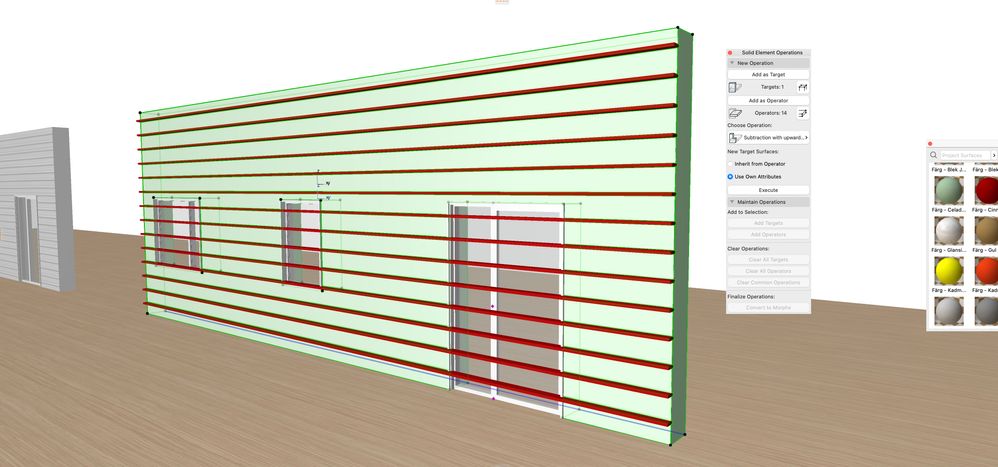
- Last what I know is using CurtainWalls but they are so heavy for projects and I want to combine with windows and doors from the wall. this tool is not my favorit too
• Is there something how to do it more simple or easier ?
• I'm looking for something solid operation tool but what it give me FrontSurface to profile my Walls
• Can I use it PARAOM for this ?
I hope you understand what I want is quite hard to explain 😇 I wanna do just Wall but with 3D texture and right now I will be very happy if I can do just some Lines / gabs in the walls but be able to applicate for whole house with possibilities to change dimension/positions of gabs
AC 7 - 27 SWE
MacBook Pro, M4 Pro
MacBook Pro, M4 Pro
Read-Only
11 Replies 11

ryejuan
Advisor
Options
- Mark as New
- Bookmark
- Subscribe
- Mute
- Subscribe to RSS Feed
- Permalink
- Report Inappropriate Content
2022-04-19 11:22 AM
2022-04-19
11:22 AM
Hi, you can refer to this topic it might help you. 😎
https://community.Graphisoft.com/t5/What-s-new/split-face-on-exterior/m-p/326310/highlight/true#M918
In the end what is your Objective? ArchiCAD 9 onwards
CPU: i9-14900K @ 3.2Ghz; GPU: GeForce RTX 5080 super (16GB); SSD: XPG GAMMIX S70 1TB; RAM: 64GB @ 4200MT/s.
WINDOWS 11 PRO
CPU: i9-14900K @ 3.2Ghz; GPU: GeForce RTX 5080 super (16GB); SSD: XPG GAMMIX S70 1TB; RAM: 64GB @ 4200MT/s.
WINDOWS 11 PRO

mija
Enthusiast
Options
- Mark as New
- Bookmark
- Subscribe
- Mute
- Subscribe to RSS Feed
- Permalink
- Report Inappropriate Content
2022-04-19 12:08 PM
2022-04-19
12:08 PM
Hi,
i hope this helps, it is really easy to use.

Archicad 26, build 3001
Montenegro
Vojtech Slavik
Expert
Options
- Mark as New
- Bookmark
- Subscribe
- Mute
- Subscribe to RSS Feed
- Permalink
- Report Inappropriate Content
2022-04-19 12:51 PM
2022-04-19
12:51 PM
Wau this is quite interesting solution thanks
AC 7 - 27 SWE
MacBook Pro, M4 Pro
MacBook Pro, M4 Pro

SenecaDesignLLC
Ace
Options
- Mark as New
- Bookmark
- Subscribe
- Mute
- Subscribe to RSS Feed
- Permalink
- Report Inappropriate Content
2022-04-19 04:04 PM
2022-04-19
04:04 PM
My free wall coverings do this.
Vojtech Slavik
Expert
Options
- Mark as New
- Bookmark
- Subscribe
- Mute
- Subscribe to RSS Feed
- Permalink
- Report Inappropriate Content
2022-04-19 04:20 PM - edited 2022-04-19 04:28 PM
2022-04-19
04:20 PM
Thank's. i
I'm not gonna lie it's little bit hard to navigate in your tools 😇
Unfortnately I have no Idea how it working 😕
AC 7 - 27 SWE
MacBook Pro, M4 Pro
MacBook Pro, M4 Pro
SenecaDesignLLC
Ace
Options
- Mark as New
- Bookmark
- Subscribe
- Mute
- Subscribe to RSS Feed
- Permalink
- Report Inappropriate Content
2022-04-19 05:25 PM
2022-04-19
05:25 PM
Lol I am aware, they are still being developed.
I will make a video soon.
ryejuan
Advisor
Options
- Mark as New
- Bookmark
- Subscribe
- Mute
- Subscribe to RSS Feed
- Permalink
- Report Inappropriate Content
2022-04-20 03:52 AM
2022-04-20
03:52 AM
can you rotate the orientation with this? or just purely horizontal? 🤔
In the end what is your Objective? ArchiCAD 9 onwards
CPU: i9-14900K @ 3.2Ghz; GPU: GeForce RTX 5080 super (16GB); SSD: XPG GAMMIX S70 1TB; RAM: 64GB @ 4200MT/s.
WINDOWS 11 PRO
CPU: i9-14900K @ 3.2Ghz; GPU: GeForce RTX 5080 super (16GB); SSD: XPG GAMMIX S70 1TB; RAM: 64GB @ 4200MT/s.
WINDOWS 11 PRO

Barry Kelly
Moderator
Options
- Mark as New
- Bookmark
- Subscribe
- Mute
- Subscribe to RSS Feed
- Permalink
- Report Inappropriate Content
2022-04-20 03:57 AM
2022-04-20
03:57 AM
It is purely horizontal.
It is just turning the wall into horizontal logs.
Barry.
One of the forum moderators.
Versions 6.5 to 27
i7-10700 @ 2.9Ghz, 32GB ram, GeForce RTX 2060 (6GB), Windows 10
Lenovo Thinkpad - i7-1270P 2.20 GHz, 32GB RAM, Nvidia T550, Windows 11
Versions 6.5 to 27
i7-10700 @ 2.9Ghz, 32GB ram, GeForce RTX 2060 (6GB), Windows 10
Lenovo Thinkpad - i7-1270P 2.20 GHz, 32GB RAM, Nvidia T550, Windows 11
ryejuan
Advisor
Options
- Mark as New
- Bookmark
- Subscribe
- Mute
- Subscribe to RSS Feed
- Permalink
- Report Inappropriate Content
2022-04-20 04:04 AM
2022-04-20
04:04 AM
I see, interesting feature but not much control for the sizing of grooves, if you really intend to use it for groove lines. I think for me I will still prefer using complex profiles, but good to know. 😊
In the end what is your Objective? ArchiCAD 9 onwards
CPU: i9-14900K @ 3.2Ghz; GPU: GeForce RTX 5080 super (16GB); SSD: XPG GAMMIX S70 1TB; RAM: 64GB @ 4200MT/s.
WINDOWS 11 PRO
CPU: i9-14900K @ 3.2Ghz; GPU: GeForce RTX 5080 super (16GB); SSD: XPG GAMMIX S70 1TB; RAM: 64GB @ 4200MT/s.
WINDOWS 11 PRO

Still looking?

Suggested topics
- Railing and Curtain Wall in Modeling
- Curtain Wall - custom edge profile creates gap in adjacent panel in Modeling
- How to model curved vertical wood slat wall paneling + fluted glass wall. Efficient workflow? in Modeling
- How to model aluminum facade panels with different angles and dimensions around windows? in Modeling
- Saving a custom profile metal fence profile as a railing panel in Modeling
