
Turn on suggestions
Auto-suggest helps you quickly narrow down your search results by suggesting possible matches as you type.
Showing results for
EN
Turn on suggestions
Auto-suggest helps you quickly narrow down your search results by suggesting possible matches as you type.
Showing results for
Options
- Subscribe to RSS Feed
- Mark Topic as New
- Mark Topic as Read
- Pin this post for me
- Bookmark
- Subscribe to Topic
- Mute
- Printer Friendly Page

William Yan
Expert
Options
- Mark as New
- Bookmark
- Subscribe
- Mute
- Subscribe to RSS Feed
- Permalink
- Report Inappropriate Content
2022-08-08 12:31 PM
How to set different wall closure thickness?
2022-08-08
12:31 PM
Hi guys, I met a problem. I can't set different thickness of the wall closure. As shown in pic below, How can I set thickness of "b" not equal to "a"? Thank you !
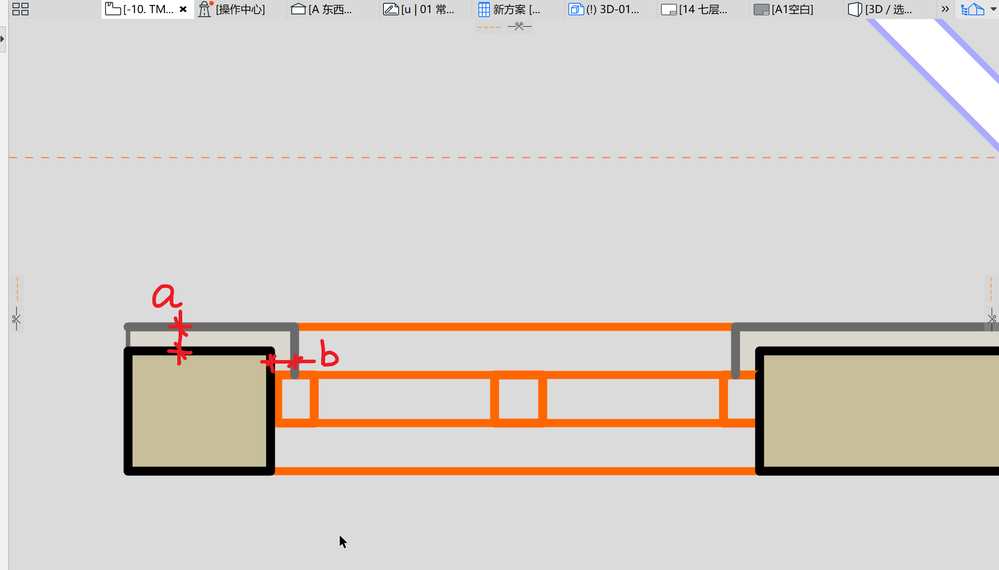
AC 26 5002 CHI, Windows 10
Solved! Go to Solution.
Solved
Read-Only
11 Replies 11

Andrii Levko
Expert
Options
- Mark as New
- Bookmark
- Subscribe
- Mute
- Subscribe to RSS Feed
- Permalink
- Report Inappropriate Content
2022-08-09 11:22 AM - edited 2022-08-09 12:15 PM
2022-08-09
11:22 AM
Hi William,
This is really a problem because even in the Archicad Channel video (as you showed above) there are lines of varying thickness as you may have noticed.
I have some workaround for myself, but I don't know if it will suit you because it's a bit complicated.
But looks like the picture below.
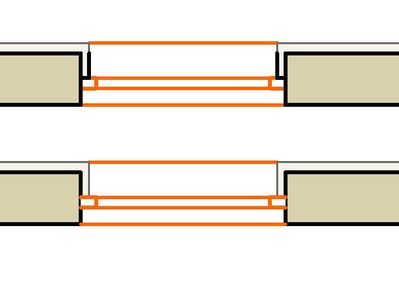
Workaround is based on the following:
I turn off Skin End Line only for core wall material.
Then I add 0.1mm thick air space on the inside of the composite wall and wrap it to the outer edge of the window in Window Settings Dialog>>Wall Closure>>Inside Face, creating a Skin End Line where I need it.
I don't know if such a workaround will be useful for you, but sometimes it helps me for some cases.
Andrii
AC 8.1 - 28 INT/POL 3001
Win11
AC 8.1 - 28 INT/POL 3001
Win11
William Yan
Expert
Options
- Mark as New
- Bookmark
- Subscribe
- Mute
- Subscribe to RSS Feed
- Permalink
- Report Inappropriate Content
2022-08-09 12:06 PM
2022-08-09
12:06 PM
Thank you Andrii! 🤝
AC 26 5002 CHI, Windows 10

- « Previous
-
- 1
- 2
- Next »
- « Previous
-
- 1
- 2
- Next »
Still looking?
Suggested topics
- Replace door thickness on just the door schedule with Expression Editor in Project data & BIM
- Autocad drawing into Archicad in Modeling
- End caps for lines and polylines in Documentation
- How to 'return' the plasterboard on the edges of empty opening in Modeling
- Window with adjustable frame extensions (jamb) and automatic insulation return – AC29 / GDL in Modeling
