
Turn on suggestions
Auto-suggest helps you quickly narrow down your search results by suggesting possible matches as you type.
Showing results for
EN
Turn on suggestions
Auto-suggest helps you quickly narrow down your search results by suggesting possible matches as you type.
Showing results for
Options
- Subscribe to RSS Feed
- Mark Topic as New
- Mark Topic as Read
- Pin this post for me
- Bookmark
- Subscribe to Topic
- Mute
- Printer Friendly Page

Anonymous
Not applicable
Options
- Mark as New
- Bookmark
- Subscribe
- Mute
- Subscribe to RSS Feed
- Permalink
- Report Inappropriate Content
2014-05-12
06:58 PM
- last edited on
2023-05-24
09:00 AM
by
 Rubia Torres
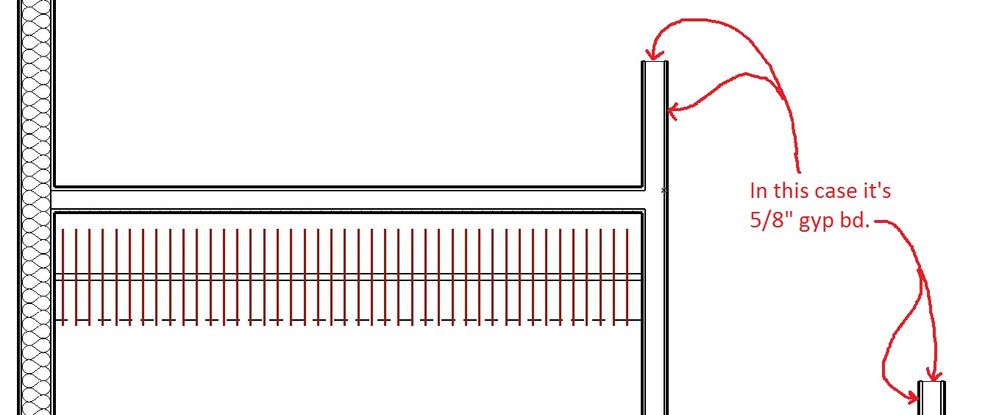
How to show finish mat. at wall ends?
2014-05-12
06:58 PM
around the end of the wall?
19 Replies 19

Karl Ottenstein
Moderator Emeritus
Options
- Mark as New
- Bookmark
- Subscribe
- Mute
- Subscribe to RSS Feed
- Permalink
- Report Inappropriate Content
2014-05-13 03:06 AM
2014-05-13
03:06 AM
Jonathan wrote:You can think of a MOD file as saving clipboard elements to an external file. So, where you might copy and paste within your own file, you can save-as-MOD and send that to a friend, and they can Merge that... and it is as if they pasted your selection into their project.
So, you can make a mod file of any part of a project that is selected and send to whomever for whatever. Is it too complex to explain the basic difference between hotlinked and not hotlinked?
A Hotlink can be an MOD, part of a PLN, and more. It is a reference to an external file... sort of like an XREF for AutoCAD if you ever used that, other than it refers to Building Model elements.
Easy save-as-mod and hotlink example: suppose you want the same furniture arrangment of desk, chair, waste basket in every office. You could select those 3 elements, save them as a MOD but allow a hotlink to be made. (Allowing the hotlink means that the 3 elements are DELETED from the active project... and replaced with this link to the external MOD file.) The desk, chair and trash can will now appear as a group with square group nodes in your project. You can copy this group into all of the other offices. They all refer to that single MOD file. If you now decide you want a different model desk or chair, you edit just that MOD file... and the new desk/chair combo appears in all rooms.
A since-the-beginning wish for Hotlinks is that we could edit them in-place (the way AutoCAD users can edit Blocks). But we can't. You have to open a separate instance of ArchiCAD to do that (or close and re-open your project.
Things can get very elaborate, too. Don't want to blow you away, but just to give a hint of where this can go... a PLN can hotlink part of itself back into itself... to make high-rise towers, duplicate and mirror identical hotel rooms, etc. Or, you can create a Publisher set that publishes bits of the building as MOD files... or even publishes 2D details as MOD files for an office detail library.
Used to tell people that everything I know could fit in a thimble and felt good about bragging like that because I was pretty sure it wasn't an exaggeration. Guess I need to rethink this whole idea.
Vote for Wish: Copy/Paste in 3D
AC 29 USA and earlier • hardware key • macOS Tahoe 26.7 MacBook Pro M2 Max 12CPU/30GPU cores, 32GB
AC 29 USA and earlier • hardware key • macOS Tahoe 26.7 MacBook Pro M2 Max 12CPU/30GPU cores, 32GB
Anonymous
Not applicable
Options
- Mark as New
- Bookmark
- Subscribe
- Mute
- Subscribe to RSS Feed
- Permalink
- Report Inappropriate Content
2014-05-13 04:23 AM
2014-05-13
04:23 AM
Thanks Karl!
It's better, but Still can't get the end face of studs line to match the walls
pen weight?
Frustrating at times to get things just right.... Jon
It's better, but Still can't get the end face of studs line to match the walls
pen weight?
Frustrating at times to get things just right.... Jon
Karl wrote:
Easy solution. You selected the 'Cased End' wall end object. Simply switching to the 'Wrapped End' cleaned things up.

Anonymous
Not applicable
Options
- Mark as New
- Bookmark
- Subscribe
- Mute
- Subscribe to RSS Feed
- Permalink
- Report Inappropriate Content
2014-05-13 04:56 AM
2014-05-13
04:56 AM
Karl,
Thank you for the explanation. Very much appriciated!
There is a new jpg. below w/ some more questions if and when you can spare the time.
Thanks again....Jonathan
Thank you for the explanation. Very much appriciated!
There is a new jpg. below w/ some more questions if and when you can spare the time.
Thanks again....Jonathan
Karl wrote:Jonathan wrote:You can think of a MOD file as saving clipboard elements to an external file. So, where you might copy and paste within your own file, you can save-as-MOD and send that to a friend, and they can Merge that... and it is as if they pasted your selection into their project.
So, you can make a mod file of any part of a project that is selected and send to whomever for whatever. Is it too complex to explain the basic difference between hotlinked and not hotlinked?
A Hotlink can be an MOD, part of a PLN, and more. It is a reference to an external file... sort of like an XREF for AutoCAD if you ever used that, other than it refers to Building Model elements.
Easy save-as-mod and hotlink example: suppose you want the same furniture arrangment of desk, chair, waste basket in every office. You could select those 3 elements, save them as a MOD but allow a hotlink to be made. (Allowing the hotlink means that the 3 elements are DELETED from the active project... and replaced with this link to the external MOD file.) The desk, chair and trash can will now appear as a group with square group nodes in your project. You can copy this group into all of the other offices. They all refer to that single MOD file. If you now decide you want a different model desk or chair, you edit just that MOD file... and the new desk/chair combo appears in all rooms.
A since-the-beginning wish for Hotlinks is that we could edit them in-place (the way AutoCAD users can edit Blocks). But we can't. You have to open a separate instance of ArchiCAD to do that (or close and re-open your project.
Things can get very elaborate, too. Don't want to blow you away, but just to give a hint of where this can go... a PLN can hotlink part of itself back into itself... to make high-rise towers, duplicate and mirror identical hotel rooms, etc. Or, you can create a Publisher set that publishes bits of the building as MOD files... or even publishes 2D details as MOD files for an office detail library.
Used to tell people that everything I know could fit in a thimble and felt good about bragging like that because I was pretty sure it wasn't an exaggeration. Guess I need to rethink this whole idea.🙂 The nice thing about fitting knowledge in a thimble is that knowledge is infinitely compressible. So, you can actually fit quite a bit.🙂

Anonymous
Not applicable
Options
- Mark as New
- Bookmark
- Subscribe
- Mute
- Subscribe to RSS Feed
- Permalink
- Report Inappropriate Content
2014-05-13 05:41 AM

Anonymous
Not applicable
Options
- Mark as New
- Bookmark
- Subscribe
- Mute
- Subscribe to RSS Feed
- Permalink
- Report Inappropriate Content
2014-05-13 05:53 AM

Karl Ottenstein
Moderator Emeritus
Options
- Mark as New
- Bookmark
- Subscribe
- Mute
- Subscribe to RSS Feed
- Permalink
- Report Inappropriate Content
2014-05-13 06:08 AM
2014-05-13
06:08 AM
Jonathan wrote:Bug in my opinion. A shame to have this behavior in 17... the library part has been out for many years.
Thanks Karl!
It's better, but Still can't get the end face of studs line to match the walls
pen weight?
Frustrating at times to get things just right.... Jon
Karl wrote:
Easy solution. You selected the 'Cased End' wall end object. Simply switching to the 'Wrapped End' cleaned things up.
See attached screenshot... Weird workaround, but seems to pick up the correct pen. Switch to the Returned End wall end part... and change the number of skins to turn to just 1.

Vote for Wish: Copy/Paste in 3D
AC 29 USA and earlier • hardware key • macOS Tahoe 26.7 MacBook Pro M2 Max 12CPU/30GPU cores, 32GB
AC 29 USA and earlier • hardware key • macOS Tahoe 26.7 MacBook Pro M2 Max 12CPU/30GPU cores, 32GB
Anonymous
Not applicable
Options
- Mark as New
- Bookmark
- Subscribe
- Mute
- Subscribe to RSS Feed
- Permalink
- Report Inappropriate Content
2014-05-13 07:28 AM
2014-05-13
07:28 AM
This is the best solution yet, but as you can see on the jpg below that it still is not matching the line all the way, one side or the other has a small
section of outside finish line (the heavier of the two) that is not correct.
Did you see my other posts above? Several questions in there if you have the time.
Thanks again! Jon
section of outside finish line (the heavier of the two) that is not correct.
Did you see my other posts above? Several questions in there if you have the time.
Thanks again! Jon
Karl wrote:Jonathan wrote:Bug in my opinion. A shame to have this behavior in 17... the library part has been out for many years.
Thanks Karl!
It's better, but Still can't get the end face of studs line to match the walls
pen weight?
Frustrating at times to get things just right.... Jon
Karl wrote:
Easy solution. You selected the 'Cased End' wall end object. Simply switching to the 'Wrapped End' cleaned things up.
See attached screenshot... Weird workaround, but seems to pick up the correct pen. Switch to the Returned End wall end part... and change the number of skins to turn to just 1.


David Maudlin
Rockstar
Options
- Mark as New
- Bookmark
- Subscribe
- Mute
- Subscribe to RSS Feed
- Permalink
- Report Inappropriate Content
2014-05-13 02:30 PM
2014-05-13
02:30 PM
Jonathan:
For the Wall intersection, extend the reference line of the vertical exterior wall and the interior wall to meet. You may also need to edit the Building Materials' Intersection Priority to get the correct result, but you will need to do this for other intersections anyway.
David
For the Wall intersection, extend the reference line of the vertical exterior wall and the interior wall to meet. You may also need to edit the Building Materials' Intersection Priority to get the correct result, but you will need to do this for other intersections anyway.
David
David Maudlin / Architect
www.davidmaudlin.com
Digital Architecture
AC29 USA Perpetual • Mac mini M4 Pro OSX15 | 64 gb ram • MacBook Pro M3 Pro OSX14 | 36 gb ram
www.davidmaudlin.com
Digital Architecture
AC29 USA Perpetual • Mac mini M4 Pro OSX15 | 64 gb ram • MacBook Pro M3 Pro OSX14 | 36 gb ram

Anonymous
Not applicable
Options
- Mark as New
- Bookmark
- Subscribe
- Mute
- Subscribe to RSS Feed
- Permalink
- Report Inappropriate Content
2014-05-13 06:37 PM
2014-05-13
06:37 PM
Thanks David,
I guess the correct order would be to do the intersection priority first and then
clean up the skins in the building material, priority (weak / strong) settings?
It's a bit of a challenge, but the results are amazing and well worth the effort. I may even decide that it's not necessary to show each top plate, sill plate, block, beam, and continuous member etc., in section anymore. Thirty-seven years of that is enough, maybe?
I guess the correct order would be to do the intersection priority first and then
clean up the skins in the building material, priority (weak / strong) settings?
It's a bit of a challenge, but the results are amazing and well worth the effort. I may even decide that it's not necessary to show each top plate, sill plate, block, beam, and continuous member etc., in section anymore. Thirty-seven years of that is enough, maybe?
David wrote:
Jonathan:
For the Wall intersection, extend the reference line of the vertical exterior wall and the interior wall to meet. You may also need to edit the Building Materials' Intersection Priority to get the correct result, but you will need to do this for other intersections anyway.
David
David Maudlin
Rockstar
Options
- Mark as New
- Bookmark
- Subscribe
- Mute
- Subscribe to RSS Feed
- Permalink
- Report Inappropriate Content
2014-05-14 01:52 PM
2014-05-14
01:52 PM
Jonathan wrote:I would get a few typical intersections (or collisions) set up in plan and section, and then start editing the Building Materials' Intersection Priority to get the desired result, so you have feedback on the consequences of each edit. Then remember to incorporate the changes into your template file.
I guess the correct order would be to do the intersection priority first and then clean up the skins in the building material, priority (weak / strong) settings
Jonathan wrote:I've changed my graphic standards from time to time as the software has changed, to better take advantage of the improvements. When I look at an old set of hand drawings, I miss some of the look & feel, but not the work.
It's a bit of a challenge, but the results are amazing and well worth the effort. I may even decide that it's not necessary to show each top plate, sill plate, block, beam, and continuous member etc., in section anymore. Thirty-seven years of that is enough, maybe?
David
David Maudlin / Architect
www.davidmaudlin.com
Digital Architecture
AC29 USA Perpetual • Mac mini M4 Pro OSX15 | 64 gb ram • MacBook Pro M3 Pro OSX14 | 36 gb ram
www.davidmaudlin.com
Digital Architecture
AC29 USA Perpetual • Mac mini M4 Pro OSX15 | 64 gb ram • MacBook Pro M3 Pro OSX14 | 36 gb ram
- « Previous
-
- 1
- 2
- Next »
- « Previous
-
- 1
- 2
- Next »
Still looking?

Suggested topics
- Surface / Component Schedule Bug: Automatic Column Wrapping Ignores Folded Geometry and Returns Flat in Project data & BIM
- Need help modelling a Wall Reveal in Modeling
- Profile wall issue in Modeling
- Railing ends disappear when perpendicular to elevation in Modeling
- Brick Soldiers Arched Entry in Modeling
