
Turn on suggestions
Auto-suggest helps you quickly narrow down your search results by suggesting possible matches as you type.
Showing results for
EN
Turn on suggestions
Auto-suggest helps you quickly narrow down your search results by suggesting possible matches as you type.
Showing results for
Options
- Subscribe to RSS Feed
- Mark Topic as New
- Mark Topic as Read
- Pin this post for me
- Bookmark
- Subscribe to Topic
- Mute
- Printer Friendly Page

Anonymous
Not applicable
Options
- Mark as New
- Bookmark
- Subscribe
- Mute
- Subscribe to RSS Feed
- Permalink
- Report Inappropriate Content
2013-11-05
06:28 AM
- last edited on
2023-05-26
02:22 PM
by
 Rubia Torres
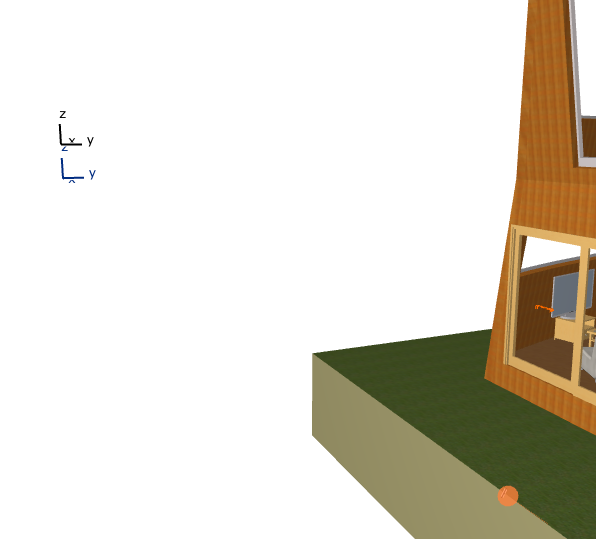
How to turn off xyz thing in 3d view
2013-11-05
06:28 AM
Im trying to take pictures in 3d view, so these can be annoying (attached image)
Can anyone tell me how to turn this off?
Thank you.
4 Replies 4
vistasp
Mentor
Options
- Mark as New
- Bookmark
- Subscribe
- Mute
- Subscribe to RSS Feed
- Permalink
- Report Inappropriate Content
2013-11-05 11:57 AM
2013-11-05
11:57 AM
Explore! 
= v i s t a s p =
bT Square Peg
https://archicadstuff.blogspot.com
https://www.btsquarepeg.com
| AC INT | Win11 | Ryzen 5700 | 64 GB | RTX 3050 |
bT Square Peg
https://archicadstuff.blogspot.com
https://www.btsquarepeg.com
| AC INT | Win11 | Ryzen 5700 | 64 GB | RTX 3050 |

Anonymous
Not applicable
Options
- Mark as New
- Bookmark
- Subscribe
- Mute
- Subscribe to RSS Feed
- Permalink
- Report Inappropriate Content
2013-11-07 01:08 AM
2013-11-07
01:08 AM
A 'better' way to save a one-off image of the 3d window is by going File>Save As (from the 3d window!), then selecting an image type as the format (.png .jpg etc).
This retains the anti-aliasing (smoothing of lines) and shadows AND hides the origin symbol (XYZ). Pressing the Explore button and taking a screenshot causes those features to turn off resulting in a poorer quality image.
This retains the anti-aliasing (smoothing of lines) and shadows AND hides the origin symbol (XYZ). Pressing the Explore button and taking a screenshot causes those features to turn off resulting in a poorer quality image.
vistasp
Mentor
Options
- Mark as New
- Bookmark
- Subscribe
- Mute
- Subscribe to RSS Feed
- Permalink
- Report Inappropriate Content
2013-11-07 06:05 AM
2013-11-07
06:05 AM
Didn't know that! Thanks Peter.
= v i s t a s p =
bT Square Peg
https://archicadstuff.blogspot.com
https://www.btsquarepeg.com
| AC INT | Win11 | Ryzen 5700 | 64 GB | RTX 3050 |
bT Square Peg
https://archicadstuff.blogspot.com
https://www.btsquarepeg.com
| AC INT | Win11 | Ryzen 5700 | 64 GB | RTX 3050 |
Anonymous
Not applicable
Options
- Mark as New
- Bookmark
- Subscribe
- Mute
- Subscribe to RSS Feed
- Permalink
- Report Inappropriate Content
2015-05-17 05:45 AM
2015-05-17
05:45 AM
Go to View-3D navigation extras- Look to
Still looking?

Suggested topics
- Roof custom layers in/out in Modeling
- Automatic mesh hatching on floorplan in Documentation
- Archicad to Revit for MEP: the workaround Graphisoft's own method couldn't give me in Collaboration with other software
- Viewport with open Tab turning items red in Documentation
- Zones for Massing Model and for Space Planning in Documentation
