
Turn on suggestions
Auto-suggest helps you quickly narrow down your search results by suggesting possible matches as you type.
Showing results for
EN
Turn on suggestions
Auto-suggest helps you quickly narrow down your search results by suggesting possible matches as you type.
Showing results for
Options
- Subscribe to RSS Feed
- Mark Topic as New
- Mark Topic as Read
- Pin this post for me
- Bookmark
- Subscribe to Topic
- Mute
- Printer Friendly Page

Geof Gainer
Enthusiast
Options
- Mark as New
- Bookmark
- Subscribe
- Mute
- Subscribe to RSS Feed
- Permalink
- Report Inappropriate Content
2009-05-13 11:58 PM
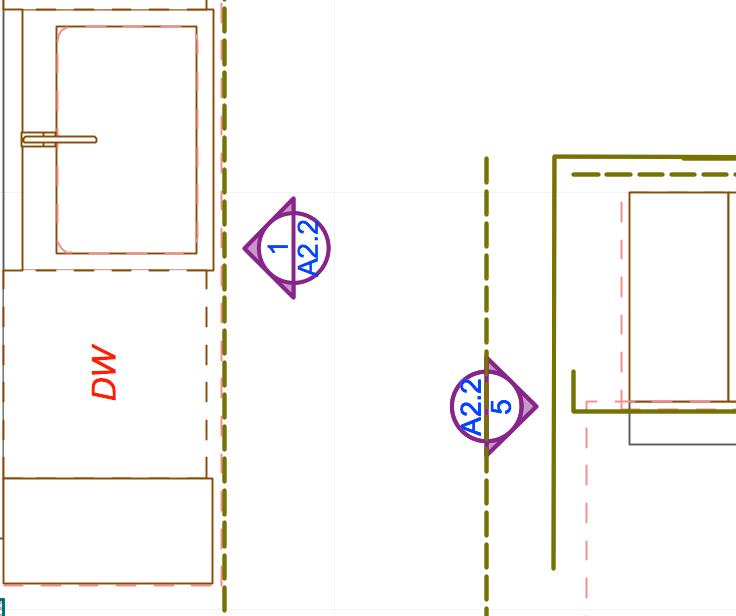
Interior Elevation Marker Head -- rotate?
2009-05-13
11:58 PM
AC fan since v 7. Currently on AC 28.1.1 (4100) USA FULL, Apple Silicon,. 2022 Mac Studio, 32G ram. MacOS Sequoia 15.5
4 Replies 4

Erika Epstein
Enthusiast
Options
- Mark as New
- Bookmark
- Subscribe
- Mute
- Subscribe to RSS Feed
- Permalink
- Report Inappropriate Content
2009-05-14 07:32 PM
2009-05-14
07:32 PM
On the marker tab there is a setting Marker Text Rotation where you have 3 options. Will this do what you want?
Erika
Architect, Consultant
MacBook Pro Retina, 15-inch Yosemite 2.8 GHz Intel Core i7 16 GB 1600 MHz DDR3
Mac OSX 10.11.1
AC5-18
Onuma System
"Implementing Successful Building Information Modeling"
Architect, Consultant
MacBook Pro Retina, 15-inch Yosemite 2.8 GHz Intel Core i7 16 GB 1600 MHz DDR3
Mac OSX 10.11.1
AC5-18
Onuma System
"Implementing Successful Building Information Modeling"
Geof Gainer
Enthusiast
Options
- Mark as New
- Bookmark
- Subscribe
- Mute
- Subscribe to RSS Feed
- Permalink
- Report Inappropriate Content
2009-05-14 07:54 PM
2009-05-14
07:54 PM
Oop! -- I must have looked right at that thing. Thanks.
Any way to hide or change the line type?
Any way to hide or change the line type?
AC fan since v 7. Currently on AC 28.1.1 (4100) USA FULL, Apple Silicon,. 2022 Mac Studio, 32G ram. MacOS Sequoia 15.5

David Maudlin
Rockstar
Options
- Mark as New
- Bookmark
- Subscribe
- Mute
- Subscribe to RSS Feed
- Permalink
- Report Inappropriate Content
2009-05-15 01:36 PM
2009-05-15
01:36 PM
Geof wrote:Geof:
Any way to hide or change the line type?
These lines are an On-Screen Display Option, so they won't print, and can be turned off by disabling Marker Range. Their line type and pen are set under Project Preferences > Miscellaneous: Line Type and Pen of Markers Elements' on-screen-only parts.
David
David Maudlin / Architect
www.davidmaudlin.com
Digital Architecture
AC29 USA Perpetual • Mac mini M4 Pro OSX15 | 64 gb ram • MacBook Pro M3 Pro OSX14 | 36 gb ram
www.davidmaudlin.com
Digital Architecture
AC29 USA Perpetual • Mac mini M4 Pro OSX15 | 64 gb ram • MacBook Pro M3 Pro OSX14 | 36 gb ram
Geof Gainer
Enthusiast
Options
- Mark as New
- Bookmark
- Subscribe
- Mute
- Subscribe to RSS Feed
- Permalink
- Report Inappropriate Content
2009-05-15 05:39 PM
2009-05-15
05:39 PM
Fantastic -- would have taken me a while to find that one.
AC fan since v 7. Currently on AC 28.1.1 (4100) USA FULL, Apple Silicon,. 2022 Mac Studio, 32G ram. MacOS Sequoia 15.5

Still looking?

Suggested topics
