
Turn on suggestions
Auto-suggest helps you quickly narrow down your search results by suggesting possible matches as you type.
Showing results for
EN
Turn on suggestions
Auto-suggest helps you quickly narrow down your search results by suggesting possible matches as you type.
Showing results for
Options
- Subscribe to RSS Feed
- Mark Topic as New
- Mark Topic as Read
- Pin this post for me
- Bookmark
- Subscribe to Topic
- Mute
- Printer Friendly Page

Tom Krowka
Enthusiast
Options
- Mark as New
- Bookmark
- Subscribe
- Mute
- Subscribe to RSS Feed
- Permalink
- Report Inappropriate Content
2023-03-31 06:21 PM
Mesh with holes-area
2023-03-31
06:21 PM
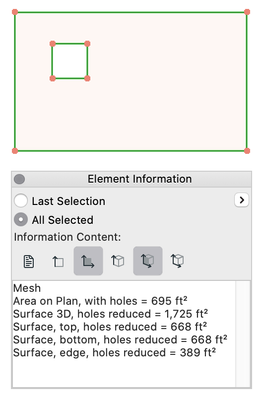
How might I find the surface area of a mesh without the area of the several holes cut into it. Element information appears to only give me the surface area of the mesh including the holes. Thanks Tom
Solved! Go to Solution.
1 Solution
Accepted Solutions

David Maudlin
Rockstar
Options
- Mark as New
- Bookmark
- Subscribe
- Mute
- Subscribe to RSS Feed
- Permalink
- Report Inappropriate Content
2023-04-01 03:30 PM
2023-04-01
03:30 PM
Tom:
Select the Element's Surface option in the Element Information palette.
David
David Maudlin / Architect
www.davidmaudlin.com
Digital Architecture
AC29 USA Perpetual • Mac mini M4 Pro OSX15 | 64 gb ram • MacBook Pro M3 Pro OSX14 | 36 gb ram
www.davidmaudlin.com
Digital Architecture
AC29 USA Perpetual • Mac mini M4 Pro OSX15 | 64 gb ram • MacBook Pro M3 Pro OSX14 | 36 gb ram
Solution
2 Replies 2
David Maudlin
Rockstar
Options
- Mark as New
- Bookmark
- Subscribe
- Mute
- Subscribe to RSS Feed
- Permalink
- Report Inappropriate Content
2023-04-01 03:30 PM
2023-04-01
03:30 PM
Tom:
Select the Element's Surface option in the Element Information palette.
David
David Maudlin / Architect
www.davidmaudlin.com
Digital Architecture
AC29 USA Perpetual • Mac mini M4 Pro OSX15 | 64 gb ram • MacBook Pro M3 Pro OSX14 | 36 gb ram
www.davidmaudlin.com
Digital Architecture
AC29 USA Perpetual • Mac mini M4 Pro OSX15 | 64 gb ram • MacBook Pro M3 Pro OSX14 | 36 gb ram
Solution
Tom Krowka
Enthusiast
Options
- Mark as New
- Bookmark
- Subscribe
- Mute
- Subscribe to RSS Feed
- Permalink
- Report Inappropriate Content
2023-04-03 12:14 AM
2023-04-03
12:14 AM
Yes....thanks. I was only using area....not surface area. Thanks TK.

Still looking?
Suggested topics
- Moving multiple Mesh Points at once in Modeling
- Mesh Consolidation in Modeling
- 3D dimensioning and parallel lines in Documentation
- CiTools Boundary - horizontal lines showing in 3D and driveway obscured by mesh in 2D in Modeling
- Archicad AI Pilot— MEPbridge ACAIstr | Version v0.1.5 Release, Read/Write & Automation Validation in General discussions
