
Turn on suggestions
Auto-suggest helps you quickly narrow down your search results by suggesting possible matches as you type.
Showing results for
EN
Turn on suggestions
Auto-suggest helps you quickly narrow down your search results by suggesting possible matches as you type.
Showing results for
Options
- Subscribe to RSS Feed
- Mark Topic as New
- Mark Topic as Read
- Pin this post for me
- Bookmark
- Subscribe to Topic
- Mute
- Printer Friendly Page

Anonymous
Not applicable
Options
- Mark as New
- Bookmark
- Subscribe
- Mute
- Subscribe to RSS Feed
- Permalink
- Report Inappropriate Content
2015-03-28
07:34 AM
- last edited on
2023-05-23
02:27 PM
by
 Rubia Torres
Plan view complex profile beam
2015-03-28
07:34 AM
I've modelled a Klip Lok roof profile using complex profiles and the beam tool. It turns out really well in section and 3D, but in plan view the contour lines don't show up, only the outline of the whole beam. Anyway to remedy this? Or should I be using another method to achieve this? Please see attached images.
Thanks
7 Replies 7

Dontknow
Enthusiast
Options
- Mark as New
- Bookmark
- Subscribe
- Mute
- Subscribe to RSS Feed
- Permalink
- Report Inappropriate Content
2015-03-28 07:57 AM
2015-03-28
07:57 AM
With 'complex profiles' you mean you made a profile with the profile manager as a beam?
Architectural construction designer, draftsman, modeller
ArchiCAD 25.
ArchiCAD 25.
Anonymous
Not applicable
Options
- Mark as New
- Bookmark
- Subscribe
- Mute
- Subscribe to RSS Feed
- Permalink
- Report Inappropriate Content
2015-03-28 08:06 AM
2015-03-28
08:06 AM
Yes, that's right
Dontknow
Enthusiast
Options
- Mark as New
- Bookmark
- Subscribe
- Mute
- Subscribe to RSS Feed
- Permalink
- Report Inappropriate Content
2015-03-28 09:18 AM
2015-03-28
09:18 AM
Did some experimenting myself.
When you make a roof profile with the profile manager the profile doesn't show up on the plan view. Strangely enough.
But when you make the profile as a morph it does!
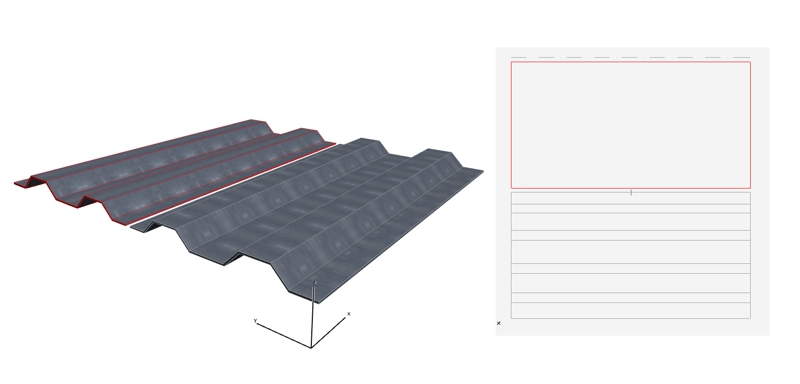
When you make a roof profile with the profile manager the profile doesn't show up on the plan view. Strangely enough.
But when you make the profile as a morph it does!
Architectural construction designer, draftsman, modeller
ArchiCAD 25.
ArchiCAD 25.
Anonymous
Not applicable
Options
- Mark as New
- Bookmark
- Subscribe
- Mute
- Subscribe to RSS Feed
- Permalink
- Report Inappropriate Content
2015-03-28 01:29 PM
2015-03-28
01:29 PM
Thanks for the work around Dontknow
Anonymous
Not applicable
Options
- Mark as New
- Bookmark
- Subscribe
- Mute
- Subscribe to RSS Feed
- Permalink
- Report Inappropriate Content
2015-03-29 11:36 AM
2015-03-29
11:36 AM
Dontknow wrote:It can also show all edges in plan view if you use the wall tool.
When you make a roof profile with the profile manager the profile doesn't show up on the plan view. Strangely enough.
But when you make the profile as a morph it does!
Adrian Tudoreanu
Dontknow
Enthusiast
Options
- Mark as New
- Bookmark
- Subscribe
- Mute
- Subscribe to RSS Feed
- Permalink
- Report Inappropriate Content
2015-03-29 02:01 PM
2015-03-29
02:01 PM
adytc wrote:It does indeed! Thnx for your info!
It can also show all edges in plan view if you use the wall tool.
Architectural construction designer, draftsman, modeller
ArchiCAD 25.
ArchiCAD 25.

TJ Admin
Booster
Options
- Mark as New
- Bookmark
- Subscribe
- Mute
- Subscribe to RSS Feed
- Permalink
- Report Inappropriate Content
2022-09-15 11:37 AM
2022-09-15
11:37 AM
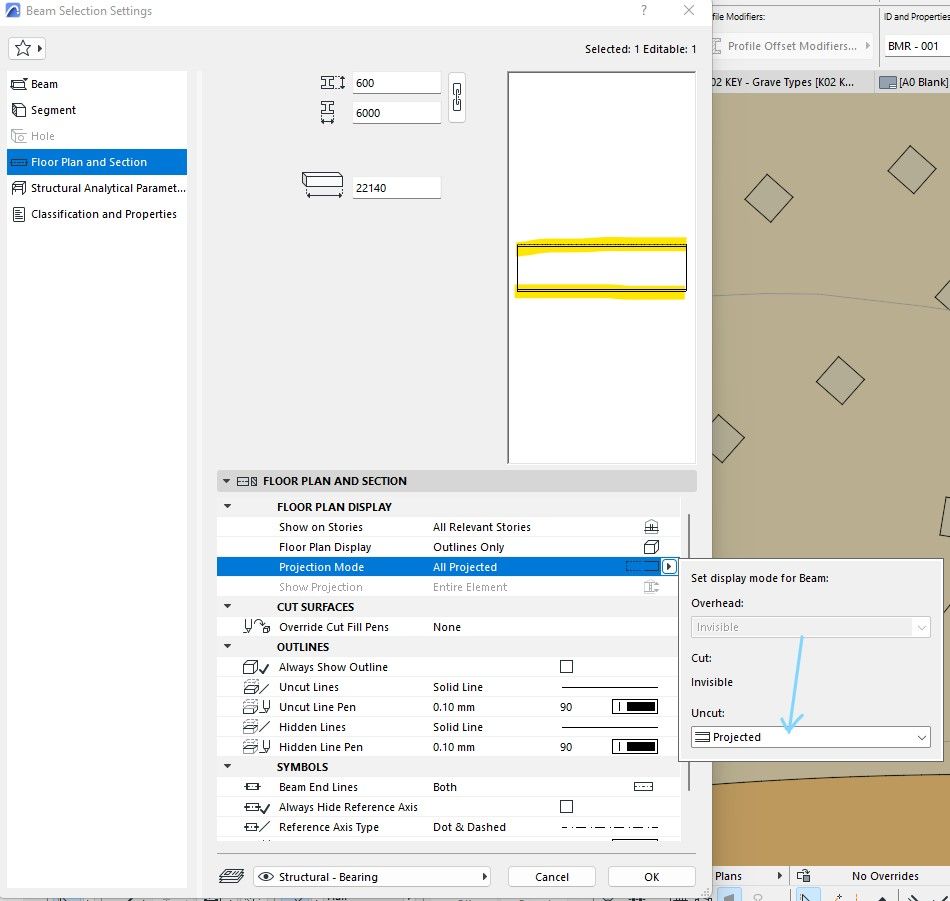
With Archicad 26, I found the setting to switch those lines on now! Because you can't tilt a wall, but a beam you can... 🙂
Still looking?

Suggested topics
- Door getting offset from complex wall on 3D preview in Modeling
- Detailing | Better methods of 2d drafting, creation of Blocks , Detail Elements , 2d Objects in Documentation
- W Lesene 27, complex profile wall fill direction problem in Modeling
- solid element operatin failing in Modeling
- Schedule values rounding on beams and columns in Modeling
