
Turn on suggestions
Auto-suggest helps you quickly narrow down your search results by suggesting possible matches as you type.
Showing results for
EN
Turn on suggestions
Auto-suggest helps you quickly narrow down your search results by suggesting possible matches as you type.
Showing results for
Options
- Subscribe to RSS Feed
- Mark Topic as New
- Mark Topic as Read
- Pin this post for me
- Bookmark
- Subscribe to Topic
- Mute
- Printer Friendly Page

Stelio
Contributor
Options
- Mark as New
- Bookmark
- Subscribe
- Mute
- Subscribe to RSS Feed
- Permalink
- Report Inappropriate Content
2022-07-23
07:56 PM
- last edited on
2022-09-20
01:59 PM
by
 Oleksandra Vakariuk
Problem with Complex profile wall with 3d projection, core material texture appearing
2022-07-23
07:56 PM
How to solve this issue in the intersection between two complex wall, the texture of the core material is appearing on the 3d projection overlapping the desires texture on the finish wall.
How i can solve this problem?
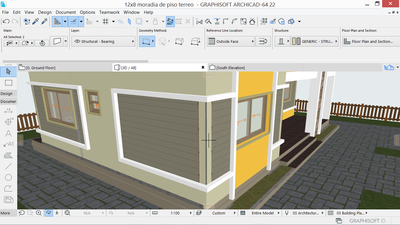
https://drive.google.com/folderview?id=1_EO16NGHOT1cbtzn6-WOQLiKmCrtadDF (please watch short videos e images for further understanding)
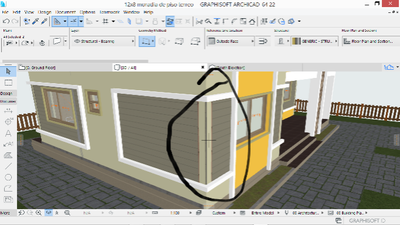
Read-Only
Labels:
- Labels:
-
Complex Profiles
6 Replies 6

Andrii Levko
Expert
Options
- Mark as New
- Bookmark
- Subscribe
- Mute
- Subscribe to RSS Feed
- Permalink
- Report Inappropriate Content
2022-07-23 11:29 PM - edited 2022-07-23 11:40 PM
2022-07-23
11:29 PM
You can just offset the reference line for your profile wall (for example 1 cm) , then the profile wall will not be intersected by the wall core and most importantly the profile wall will not change location.
Andrii
AC 8.1 - 28 INT/POL 3001
Win11
AC 8.1 - 28 INT/POL 3001
Win11
Andrii Levko
Expert
Options
- Mark as New
- Bookmark
- Subscribe
- Mute
- Subscribe to RSS Feed
- Permalink
- Report Inappropriate Content
2022-07-24 12:04 AM - edited 2022-07-24 12:22 AM
2022-07-24
12:04 AM
If you need to reference a facade wall, you can assign a stronger priority to the building material of the profiled wall or create a so-called Layer Intersection Group in the Layer Settings and set number 2 to your layer that the profiled wall is on. Then the priority of this layer will be stronger, the profiled wall will also not intersect with the facade wall, but in my opinion the first option is easier.
Andrii
AC 8.1 - 28 INT/POL 3001
Win11
AC 8.1 - 28 INT/POL 3001
Win11

Mahmoud Qenawi
Ace
Options
- Mark as New
- Bookmark
- Subscribe
- Mute
- Subscribe to RSS Feed
- Permalink
- Report Inappropriate Content
2022-07-24 12:12 AM
2022-07-24
12:12 AM
Is it ok in floor plan? If the intersection in floor plan is as 3D that means material priority, check if the core material priority is higher than the finish one.
AC 29 INT 4006/WIN 11
AMD Ryzen 7 5800H with Radeon Graphics 3.20 GHz 16.0 GB
AMD Ryzen 7 5800H with Radeon Graphics 3.20 GHz 16.0 GB
Stelio
Contributor
Options
- Mark as New
- Bookmark
- Subscribe
- Mute
- Subscribe to RSS Feed
- Permalink
- Report Inappropriate Content
2022-07-25 09:17 PM
2022-07-25
09:17 PM
Thanks for the suggestion @Andrii Levko but I was able to solve the problem by changing the building material on the fill selection setting, I changed to "Air Space" and maintaining the override surfaces previously selected.
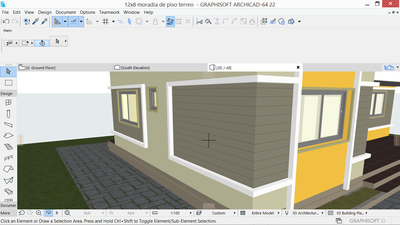
Stelio
Contributor
Options
- Mark as New
- Bookmark
- Subscribe
- Mute
- Subscribe to RSS Feed
- Permalink
- Report Inappropriate Content
2022-07-25 09:19 PM
2022-07-25
09:19 PM
I believe this information can be useful in the future when I face the same problem
Sorry for my late response
Stelio
Contributor
Options
- Mark as New
- Bookmark
- Subscribe
- Mute
- Subscribe to RSS Feed
- Permalink
- Report Inappropriate Content
2022-07-25 09:22 PM - edited 2022-07-25 09:26 PM
2022-07-25
09:22 PM
Fortunately was everything okay in Floor plan.
Knowing this was helpful solving the problem.

Still looking?

Suggested topics
- Surface / Component Schedule Bug: Automatic Column Wrapping Ignores Folded Geometry and Returns Flat in Project data & BIM
- Texture mapping incorrectly in Visualization
- How to calculate material-specific volumes in my project in Project data & BIM
- MEP Elements 2d in Modeling
- How to make Param-o Blocks appear in the materials list in Parametric design
