
Turn on suggestions
Auto-suggest helps you quickly narrow down your search results by suggesting possible matches as you type.
Showing results for
EN
Turn on suggestions
Auto-suggest helps you quickly narrow down your search results by suggesting possible matches as you type.
Showing results for
Options
- Subscribe to RSS Feed
- Mark Topic as New
- Mark Topic as Read
- Pin this post for me
- Bookmark
- Subscribe to Topic
- Mute
- Printer Friendly Page

Anonymous
Not applicable
Options
- Mark as New
- Bookmark
- Subscribe
- Mute
- Subscribe to RSS Feed
- Permalink
- Report Inappropriate Content
2020-05-25
03:49 PM
- last edited on
2023-05-23
05:59 PM
by
 Rubia Torres

4 Replies 4

David Maudlin
Rockstar
Options
- Mark as New
- Bookmark
- Subscribe
- Mute
- Subscribe to RSS Feed
- Permalink
- Report Inappropriate Content
2020-05-25 04:18 PM
2020-05-25
04:18 PM
rasnoland:
Look at Model View Options (MVO) > Railing Options > Railing 3D and Section/Elevation: if it is set to Simplified or Schematic, the Surface is controlled by the Attributes... setting.
You should add a Signature to your Profile (click the Profile button near the top of this page) with your ArchiCAD version and operating system (see mine for an example) for more accurate help in this forum.
David
Look at Model View Options (MVO) > Railing Options > Railing 3D and Section/Elevation: if it is set to Simplified or Schematic, the Surface is controlled by the Attributes... setting.
You should add a Signature to your Profile (click the Profile button near the top of this page) with your ArchiCAD version and operating system (see mine for an example) for more accurate help in this forum.
David
David Maudlin / Architect
www.davidmaudlin.com
Digital Architecture
AC29 USA Perpetual • Mac mini M4 Pro OSX15 | 64 gb ram • MacBook Pro M3 Pro OSX14 | 36 gb ram
www.davidmaudlin.com
Digital Architecture
AC29 USA Perpetual • Mac mini M4 Pro OSX15 | 64 gb ram • MacBook Pro M3 Pro OSX14 | 36 gb ram
Anonymous
Not applicable
Options
- Mark as New
- Bookmark
- Subscribe
- Mute
- Subscribe to RSS Feed
- Permalink
- Report Inappropriate Content
2020-05-28 11:10 PM
2020-05-28
11:10 PM
Thanks David.
I have been working with Archicad for a few days only, and it still feels a bit daunting.
I have added system info to my profile
Cheers.
I have been working with Archicad for a few days only, and it still feels a bit daunting.
I have added system info to my profile
Cheers.
David Maudlin
Rockstar
Options
- Mark as New
- Bookmark
- Subscribe
- Mute
- Subscribe to RSS Feed
- Permalink
- Report Inappropriate Content
2020-05-29 03:09 PM
2020-05-29
03:09 PM
rasnoland:
Yes, ArchiCAD is a large and complex application. Settings for some features can be hard to find. It should get easier as you establish your own working methods.
Thanks for adding your signature.
David
Yes, ArchiCAD is a large and complex application. Settings for some features can be hard to find. It should get easier as you establish your own working methods.
Thanks for adding your signature.
David
David Maudlin / Architect
www.davidmaudlin.com
Digital Architecture
AC29 USA Perpetual • Mac mini M4 Pro OSX15 | 64 gb ram • MacBook Pro M3 Pro OSX14 | 36 gb ram
www.davidmaudlin.com
Digital Architecture
AC29 USA Perpetual • Mac mini M4 Pro OSX15 | 64 gb ram • MacBook Pro M3 Pro OSX14 | 36 gb ram

ananas
Expert
Options
- Mark as New
- Bookmark
- Subscribe
- Mute
- Subscribe to RSS Feed
- Permalink
- Report Inappropriate Content
2022-11-11 02:02 PM
2022-11-11
02:02 PM
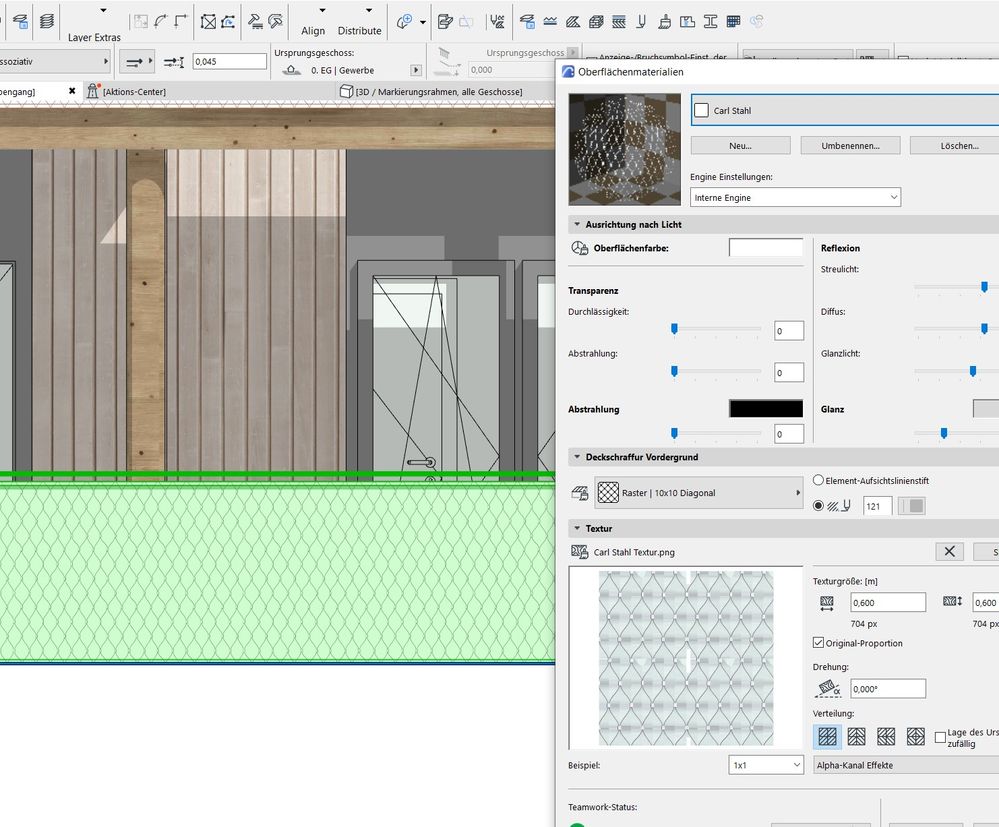
Hi! I will join to the existing topic.
I am wondering if it´s possible to set a railing transparent in the elevations?
The material is transparent, but not visible as such.
Still looking?

Suggested topics
- Detailing | Better methods of 2d drafting, creation of Blocks , Detail Elements , 2d Objects in Documentation
- Incomplete 2D Representation and Incorrect Placement of Handrail Fixings at Nodes in Documentation
- Archicad 29 interior elevation tool will not display glass as transparent when projected in Documentation
- Railing ends display in plan in Documentation
- Fence in front view in Modeling
