
Turn on suggestions
Auto-suggest helps you quickly narrow down your search results by suggesting possible matches as you type.
Showing results for
EN
Turn on suggestions
Auto-suggest helps you quickly narrow down your search results by suggesting possible matches as you type.
Showing results for
Options
- Subscribe to RSS Feed
- Mark Topic as New
- Mark Topic as Read
- Pin this post for me
- Bookmark
- Subscribe to Topic
- Mute
- Printer Friendly Page

Anonymous
Not applicable
Options
- Mark as New
- Bookmark
- Subscribe
- Mute
- Subscribe to RSS Feed
- Permalink
- Report Inappropriate Content
2021-02-08
04:56 PM
- last edited on
2023-05-23
02:05 PM
by
 Rubia Torres
Roof Pet Palette editing commands not comming up
2021-02-08
04:56 PM
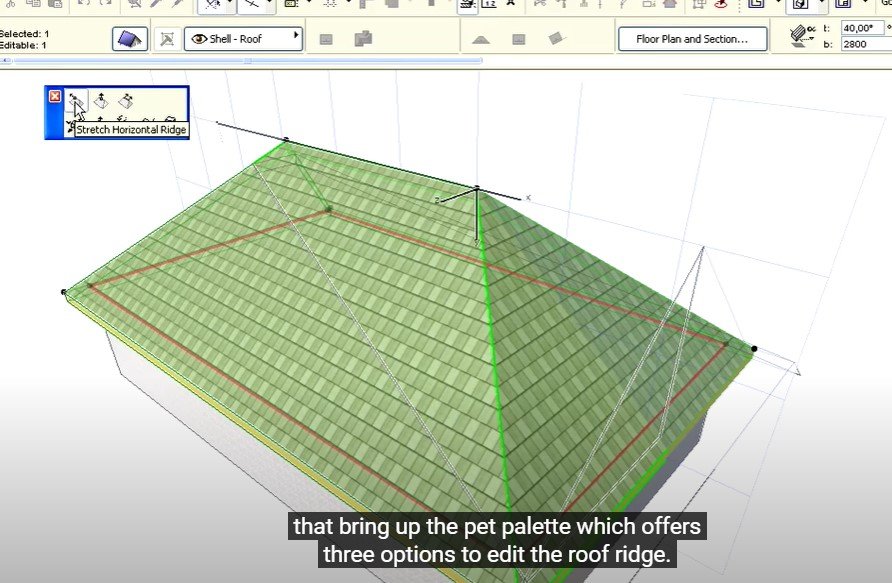
I need to customize a roof, but It wont let me edit it with any of the options that normally come up in the pet palette are not available.
you can see in my pictures whichones I mean, the firts option: "stretch horizontal ridge", "Drag horizontal ridge" and so on... I only get the normal drag, rotate, mirror, multiply commands. .. I tried redrawing the roofs again but this doesnt change..
Is there some other way of getting these commands? or how can I fix this 😕

5 Replies 5

Lingwisyer
Guru
Options
- Mark as New
- Bookmark
- Subscribe
- Mute
- Subscribe to RSS Feed
- Permalink
- Report Inappropriate Content
2021-02-09 02:38 AM
2021-02-09
02:38 AM
That roof is not grouped with anything is it? If so toggle grouping.
Also, the options will only appear on node selection, when there is a tick next to the cursor.
Ling.
Also, the options will only appear on node selection, when there is a tick next to the cursor.
Ling.
| AC22-29 AUS 3200 | Help Those Help You - Add a Signature |
| Self-taught, bend it till it breaks | Creating a Thread |
| Win11 | i9 10850K | 64GB | RX6600 | Win11 | 7800X3D | 32GB | RTX5070TI |

Cohenm
Participant
Options
- Mark as New
- Bookmark
- Subscribe
- Mute
- Subscribe to RSS Feed
- Permalink
- Report Inappropriate Content
2022-01-19 03:37 AM
2022-01-19
03:37 AM
I am having the same problem with AC 25. On some roof nodes the stretch/drag horizontal ridge commands appear, and on some they do not. Has anyone found a solution?
 Gordana Radonic
Community Manager
Options
- Mark as New
- Bookmark
- Subscribe
- Mute
- Subscribe to RSS Feed
- Permalink
- Report Inappropriate Content
2022-01-19 04:52 AM
2022-01-19
04:52 AM
Hi @Cohenm,
That sounds rather like an irregular behaviour. Did you report it to your support team? They can try replicating and detect whether it's a bug.
Gordana Radonić
Community Manager
Cohenm
Participant
Options
- Mark as New
- Bookmark
- Subscribe
- Mute
- Subscribe to RSS Feed
- Permalink
- Report Inappropriate Content
2022-01-19 05:18 AM
2022-01-19
05:18 AM
Hi @Gordana Radonic,
Do you mean emailing [email protected]?
Gordana Radonic
Community Manager
Options
- Mark as New
- Bookmark
- Subscribe
- Mute
- Subscribe to RSS Feed
- Permalink
- Report Inappropriate Content
2022-01-24 11:54 AM
2022-01-24
11:54 AM
Hi @Cohenm, is your local Graphisoft support our North American team?
https://graphisoft.com/us/contact-us/local-contacts
If so, I believe the email is [email protected].
Let me know if you need other information!
Gordana
Gordana Radonić
Community Manager
Still looking?

Suggested topics
