
Turn on suggestions
Auto-suggest helps you quickly narrow down your search results by suggesting possible matches as you type.
Showing results for
EN
Turn on suggestions
Auto-suggest helps you quickly narrow down your search results by suggesting possible matches as you type.
Showing results for
Options
- Subscribe to RSS Feed
- Mark Topic as New
- Mark Topic as Read
- Pin this post for me
- Bookmark
- Subscribe to Topic
- Mute
- Printer Friendly Page

Daniel_He
Booster
Options
- Mark as New
- Bookmark
- Subscribe
- Mute
- Subscribe to RSS Feed
- Permalink
- Report Inappropriate Content
2022-12-15
04:25 AM
- last edited on
2023-05-09
03:09 PM
by
 Rubia Torres
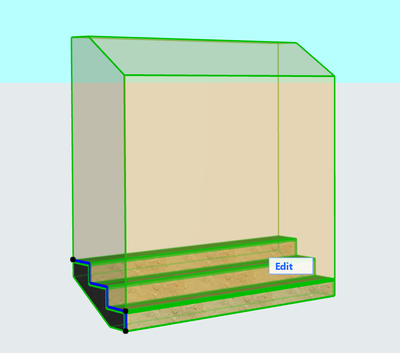
Stair shown in 3D with frame
2022-12-15
04:25 AM
Hi, I'm not sure what setting I did, the stair shown in 3D has frame as picture, what shall I do to cancel it, thanks
Daniel.He
ArchiCAD 25 3011 USA - Windows 11 Home 64x
DESKTOP 12600KF 64G RAM 3070 GPU
ArchiCAD 25 3011 USA - Windows 11 Home 64x
DESKTOP 12600KF 64G RAM 3070 GPU
Solved! Go to Solution.
1 Solution
Accepted Solutions

Barry Kelly
Moderator
Options
- Mark as New
- Bookmark
- Subscribe
- Mute
- Subscribe to RSS Feed
- Permalink
- Report Inappropriate Content
2022-12-15 04:35 AM - edited 2022-12-15 04:36 AM
2022-12-15
04:35 AM
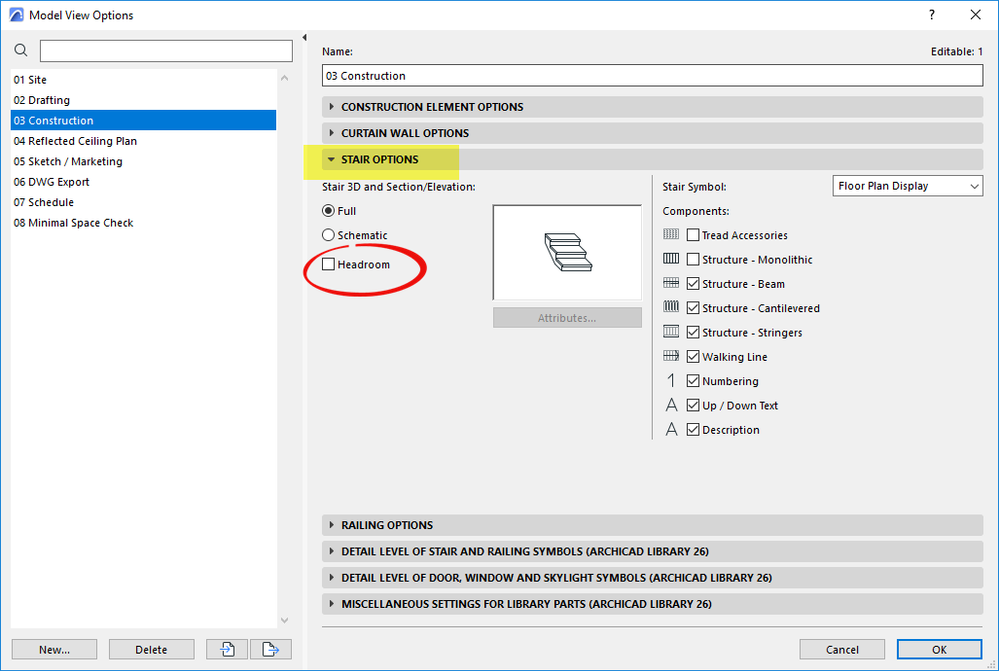
In your Model View Options you have the headroom option turned on.
Barry.
One of the forum moderators.
Versions 6.5 to 27
i7-10700 @ 2.9Ghz, 32GB ram, GeForce RTX 2060 (6GB), Windows 10
Lenovo Thinkpad - i7-1270P 2.20 GHz, 32GB RAM, Nvidia T550, Windows 11
Versions 6.5 to 27
i7-10700 @ 2.9Ghz, 32GB ram, GeForce RTX 2060 (6GB), Windows 10
Lenovo Thinkpad - i7-1270P 2.20 GHz, 32GB RAM, Nvidia T550, Windows 11
2 Replies 2
Barry Kelly
Moderator
Options
- Mark as New
- Bookmark
- Subscribe
- Mute
- Subscribe to RSS Feed
- Permalink
- Report Inappropriate Content
2022-12-15 04:35 AM - edited 2022-12-15 04:36 AM
2022-12-15
04:35 AM
In your Model View Options you have the headroom option turned on.
Barry.
One of the forum moderators.
Versions 6.5 to 27
i7-10700 @ 2.9Ghz, 32GB ram, GeForce RTX 2060 (6GB), Windows 10
Lenovo Thinkpad - i7-1270P 2.20 GHz, 32GB RAM, Nvidia T550, Windows 11
Versions 6.5 to 27
i7-10700 @ 2.9Ghz, 32GB ram, GeForce RTX 2060 (6GB), Windows 10
Lenovo Thinkpad - i7-1270P 2.20 GHz, 32GB RAM, Nvidia T550, Windows 11
Daniel_He
Booster
Options
- Mark as New
- Bookmark
- Subscribe
- Mute
- Subscribe to RSS Feed
- Permalink
- Report Inappropriate Content
2022-12-15 10:01 AM
2022-12-15
10:01 AM
Solved, thanks
Daniel.He
ArchiCAD 25 3011 USA - Windows 11 Home 64x
DESKTOP 12600KF 64G RAM 3070 GPU
ArchiCAD 25 3011 USA - Windows 11 Home 64x
DESKTOP 12600KF 64G RAM 3070 GPU

Still looking?

Suggested topics
- How can I show hidden stair treads as dashed lines in a section? in Modeling
- Railing and Curtain Wall in Modeling
- Up/Down Text in the Stair tool in Modeling
- Skin List Label - Showing Material Thickness in Libraries & objects
- Curtain wall frame option for mullion/dividing frame not showing in Libraries & objects
