
Turn on suggestions
Auto-suggest helps you quickly narrow down your search results by suggesting possible matches as you type.
Showing results for
EN
Turn on suggestions
Auto-suggest helps you quickly narrow down your search results by suggesting possible matches as you type.
Showing results for
Options
- Subscribe to RSS Feed
- Mark Topic as New
- Mark Topic as Read
- Pin this post for me
- Bookmark
- Subscribe to Topic
- Mute
- Printer Friendly Page

Anonymous
Not applicable
Options
- Mark as New
- Bookmark
- Subscribe
- Mute
- Subscribe to RSS Feed
- Permalink
- Report Inappropriate Content
2015-11-05
10:29 PM
- last edited on
2023-05-24
08:46 AM
by
 Rubia Torres
Wall closure disappear when setting floor plan to projected
2015-11-05
10:29 PM
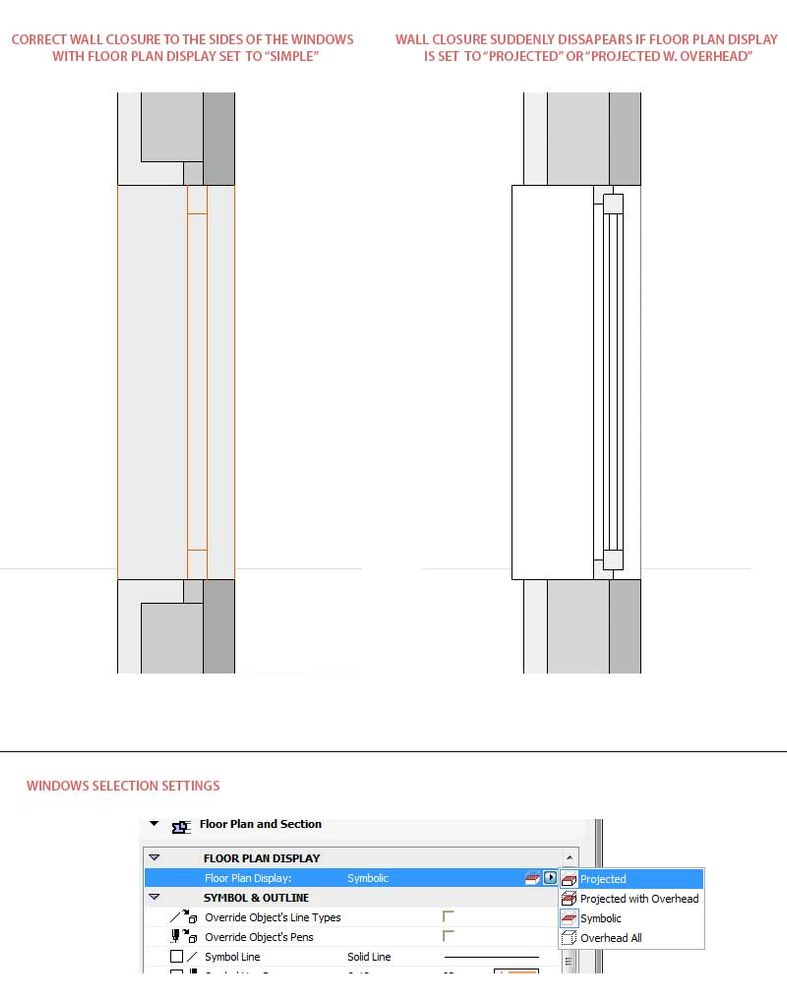
I have a weird problem with wall closures that is driving me nuts. As soon as I switch the floor plan display from simple to projected in the windows selection settings the wall closures around the window is disappearing.
Please see attached pictures for visualization of the problem.
Is this problem known? Is there a fix?
I am using Archicad 19.
1 Reply 1
 Laszlo Nagy
Community Admin
Options
- Mark as New
- Bookmark
- Subscribe
- Mute
- Subscribe to RSS Feed
- Permalink
- Report Inappropriate Content
2015-11-06 06:08 PM
2015-11-06
06:08 PM
I think this is because the Wall Closure is scripted in 2D only. This is what is displayed when the Symbolic option is selected.
However, when a "Projected" option is selected, ARCHICAD cuts the Wall and Windows 3D geometry with a horizontal plane and generates their 2D. In case of the Window, the Wall Closure geometry is not generated in 3D so it cannot be generated on the Floor Plan with the "Projected" option either.
However, when a "Projected" option is selected, ARCHICAD cuts the Wall and Windows 3D geometry with a horizontal plane and generates their 2D. In case of the Window, the Wall Closure geometry is not generated in 3D so it cannot be generated on the Floor Plan with the "Projected" option either.
Loving Archicad since 1995 - Find Archicad Tips at x.com/laszlonagy
AMD Ryzen9 5900X CPU, 64 GB RAM 3600 MHz, Nvidia GTX 1060 6GB, 500 GB NVMe SSD
2x28" (2560x1440), Windows 10 PRO ENG, Ac20-Ac29
AMD Ryzen9 5900X CPU, 64 GB RAM 3600 MHz, Nvidia GTX 1060 6GB, 500 GB NVMe SSD
2x28" (2560x1440), Windows 10 PRO ENG, Ac20-Ac29
Still looking?

Suggested topics
- Opening outlines not visible in “Structural Core Only” display mode in elevation view in Modeling
- Where are the new project set??? in General discussions
- Actual projected view of hotlinked elements - Floor cut plane does not affect ifc in Collaboration with other software
- Copy view settings (between projects) in General discussions
- Road disappears with mesh "top surface only" setting on in Modeling
