
Turn on suggestions
Auto-suggest helps you quickly narrow down your search results by suggesting possible matches as you type.
Showing results for
EN
Turn on suggestions
Auto-suggest helps you quickly narrow down your search results by suggesting possible matches as you type.
Showing results for
Options
- Subscribe to RSS Feed
- Mark Topic as New
- Mark Topic as Read
- Pin this post for me
- Bookmark
- Subscribe to Topic
- Mute
- Printer Friendly Page

Anonymous
Not applicable
Options
- Mark as New
- Bookmark
- Subscribe
- Mute
- Subscribe to RSS Feed
- Permalink
- Report Inappropriate Content
2016-12-10
08:13 PM
- last edited on
2023-05-23
02:19 PM
by
 Rubia Torres
White fills are grey
2016-12-10
08:13 PM
I desperately need some help!
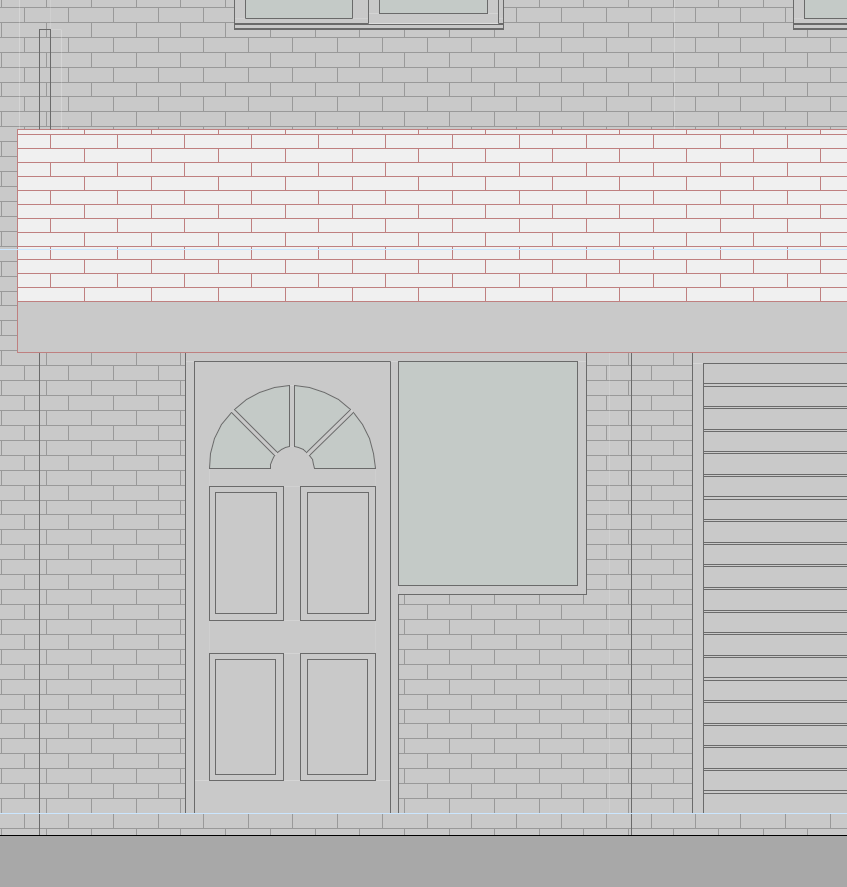
I need to set some fills to white so that they show as white in elevation, so I've changed the surface colour to white, but for some reason they're showing as grey. What have I missed?
Its not to do with Automatic Pen Color Visibility Adjustment for Model Views, I've checked than and it's not on. Also, as you can see from the attached, one fill (the roof) is showing as white, whereas the brickwork is showing as grey. The fill colour for both of these is exactly the same.
I've also tried physically printing it to see if it is an on screen issue, but it's printing exactly as is on screen......
2 Replies 2

Karl Ottenstein
Moderator Emeritus
Options
- Mark as New
- Bookmark
- Subscribe
- Mute
- Subscribe to RSS Feed
- Permalink
- Report Inappropriate Content
2016-12-10 11:01 PM
2016-12-10
11:01 PM
Surface color only has to do with 3D views. Fills in 2D views have a foreground and a background color.
But, in this case, it appears that your elevation has 'sun shadows' enabled - and a 25% gray (or similar) fill set as the sun shadow fill. Just disable sun shadows for your elevation... or if you want shadows, change the elevation's sun location to illuminate more of that elevation. These settings are all part of the elevation (or section) tool settings for the view you're showing.
But, in this case, it appears that your elevation has 'sun shadows' enabled - and a 25% gray (or similar) fill set as the sun shadow fill. Just disable sun shadows for your elevation... or if you want shadows, change the elevation's sun location to illuminate more of that elevation. These settings are all part of the elevation (or section) tool settings for the view you're showing.
Vote for Wish: Copy/Paste in 3D
AC 29 USA and earlier • hardware key • macOS Tahoe 26.7 MacBook Pro M2 Max 12CPU/30GPU cores, 32GB
AC 29 USA and earlier • hardware key • macOS Tahoe 26.7 MacBook Pro M2 Max 12CPU/30GPU cores, 32GB
Anonymous
Not applicable
Options
- Mark as New
- Bookmark
- Subscribe
- Mute
- Subscribe to RSS Feed
- Permalink
- Report Inappropriate Content
2016-12-11 08:59 AM
2016-12-11
08:59 AM
You're a superstar, thank you 
Still looking?

Suggested topics
- Section Views and Plan Views in Documentation
- Window Schedule - View from Opening Side Display Colors in Documentation
- Issue: Background Color on Subsequent Pages When Using “Split drawings across multiple layouts" in Project data & BIM
- custom fill orientation in Documentation
- Cover fills not showing in elevations in Documentation
