
Turn on suggestions
Auto-suggest helps you quickly narrow down your search results by suggesting possible matches as you type.
Showing results for
EN
Turn on suggestions
Auto-suggest helps you quickly narrow down your search results by suggesting possible matches as you type.
Showing results for
Options
- Subscribe to RSS Feed
- Mark Topic as New
- Mark Topic as Read
- Pin this post for me
- Bookmark
- Subscribe to Topic
- Mute
- Printer Friendly Page

Ustunes
Contributor
Options
- Mark as New
- Bookmark
- Subscribe
- Mute
- Subscribe to RSS Feed
- Permalink
- Report Inappropriate Content
2022-08-15 11:51 PM
Why winder stairs dont work properly?
2022-08-15
11:51 PM
Hi guys.. I'm new at Archicad, but I'm used to working 3d softwares.. I have a few question about winder stairs in Archicad..
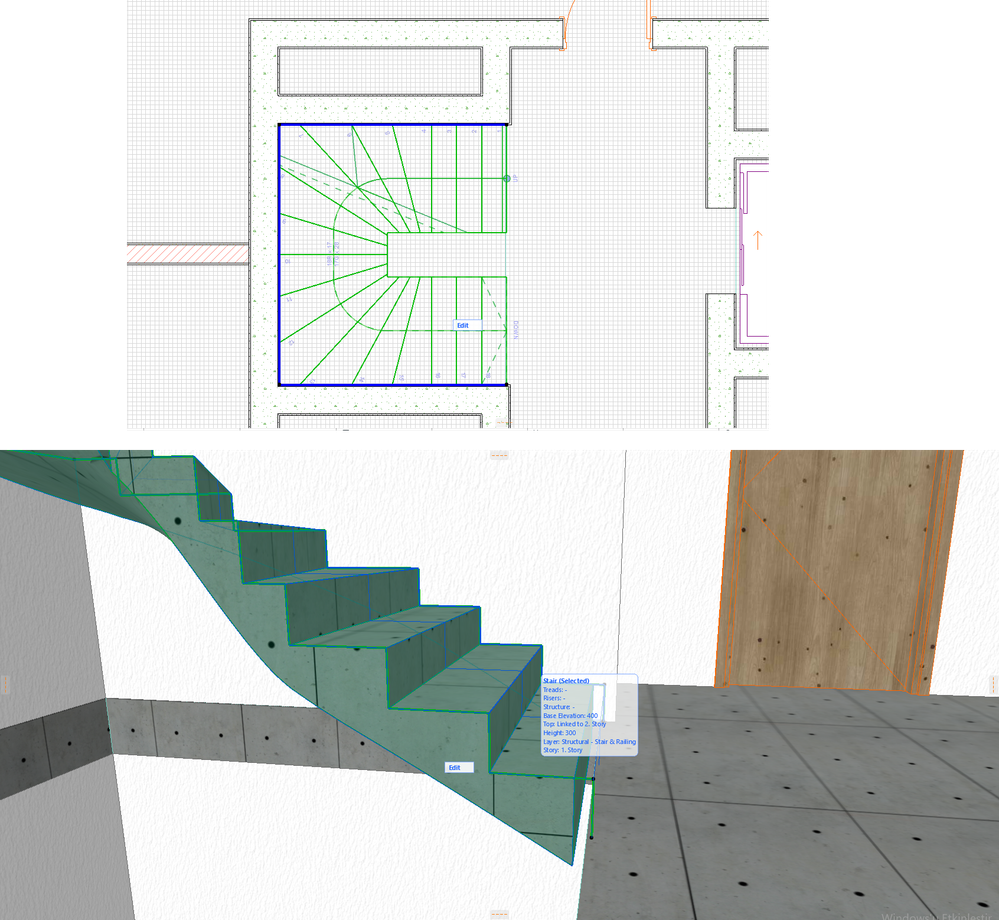
I cant correctly create any U-shape winder stairs. Generally, my solution I do is quite simple.. I draw a stair in any boundry i defined, and then I click any edge of baseline of stair > auto-opened pop-up menu> select segment type > winder with equal goings.. So, Archicad offers any proposal for me. I select any of them.. Unfortunately, this solution dont work very well. Firstly my control on stair option obviously very limited; Secondly, I have many errors in 3d & sections.. I need help for U-shaped winder stairs..
Read-Only
6 Replies 6

Barry Kelly
Moderator
Options
- Mark as New
- Bookmark
- Subscribe
- Mute
- Subscribe to RSS Feed
- Permalink
- Report Inappropriate Content
2022-08-16 03:39 AM
2022-08-16
03:39 AM
If you are worried about the curvy underside of the stair, unfortunately this is just how it is with winder stairs.
Landings can have a flat underside but not winders.
Here is one of a few posts where it has been mentioned.
With corner winders you can split the structure or model separate parts of the stair.
I am not sure how you would flatten the underside of a stair as you have shown it if that is what you are wanting to do.
Barry.
One of the forum moderators.
Versions 6.5 to 27
i7-10700 @ 2.9Ghz, 32GB ram, GeForce RTX 2060 (6GB), Windows 10
Lenovo Thinkpad - i7-1270P 2.20 GHz, 32GB RAM, Nvidia T550, Windows 11
Versions 6.5 to 27
i7-10700 @ 2.9Ghz, 32GB ram, GeForce RTX 2060 (6GB), Windows 10
Lenovo Thinkpad - i7-1270P 2.20 GHz, 32GB RAM, Nvidia T550, Windows 11
Ustunes
Contributor
Options
- Mark as New
- Bookmark
- Subscribe
- Mute
- Subscribe to RSS Feed
- Permalink
- Report Inappropriate Content
2022-08-16 10:00 AM
2022-08-16
10:00 AM
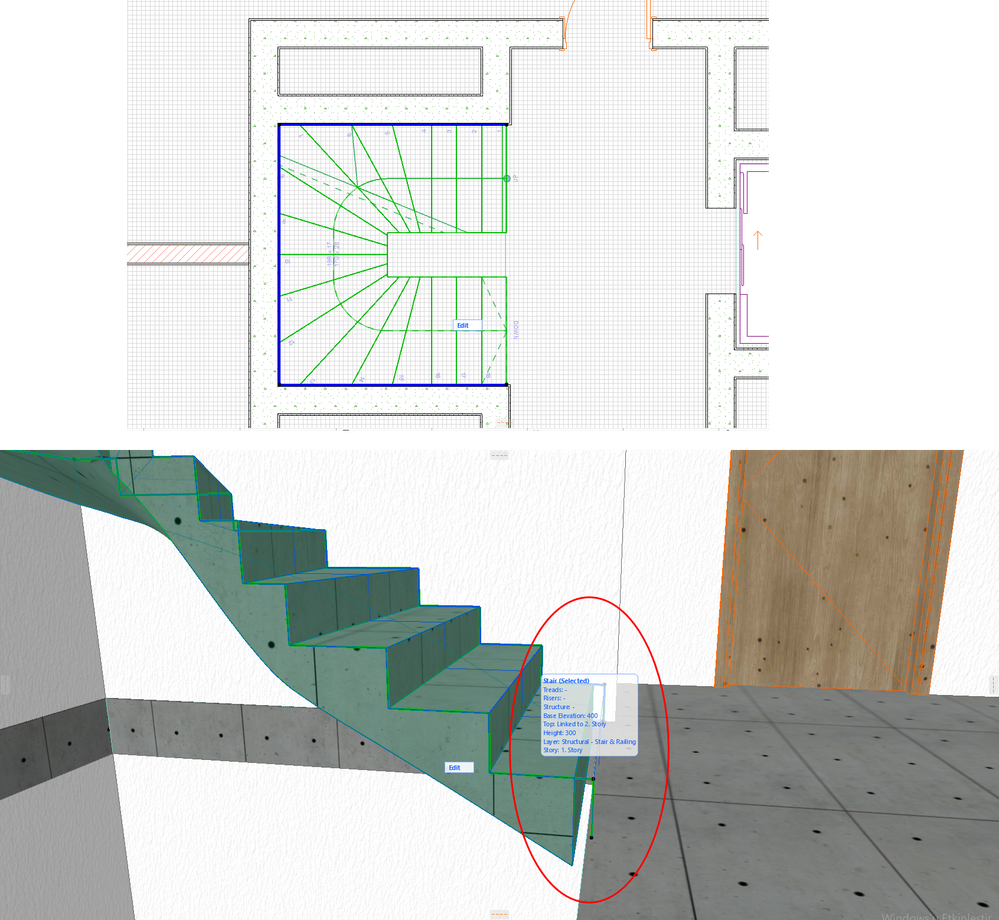
Thanks for replying, Unfortunately, my problem isnt underside of the stairs, my problem is undefined volids in my stair in 3d. There is a mass but its unseen on there. The blue contour line define all solidity for stair, but in 3d I cant see there (only void btw slab&stair) unlike 2d plan view.
Note:I marked it in additional screenview with red circle.
Barry Kelly
Moderator
Options
- Mark as New
- Bookmark
- Subscribe
- Mute
- Subscribe to RSS Feed
- Permalink
- Report Inappropriate Content
2022-08-16 10:57 AM
2022-08-16
10:57 AM
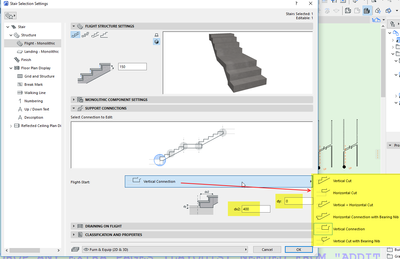
Check the connection for the bottom of the flight
There are many different types of connections and you may have an offset active.
Barry.
One of the forum moderators.
Versions 6.5 to 27
i7-10700 @ 2.9Ghz, 32GB ram, GeForce RTX 2060 (6GB), Windows 10
Lenovo Thinkpad - i7-1270P 2.20 GHz, 32GB RAM, Nvidia T550, Windows 11
Versions 6.5 to 27
i7-10700 @ 2.9Ghz, 32GB ram, GeForce RTX 2060 (6GB), Windows 10
Lenovo Thinkpad - i7-1270P 2.20 GHz, 32GB RAM, Nvidia T550, Windows 11
Ustunes
Contributor
Options
- Mark as New
- Bookmark
- Subscribe
- Mute
- Subscribe to RSS Feed
- Permalink
- Report Inappropriate Content
2022-08-16 12:23 PM
2022-08-16
12:23 PM
Thanks a lot sir, I have fixed the problem with your mentorship. However, I recognize that I couldnt modify any option with Ctrl+T_ToolSettingsForStairs, If I wanna change anything. My solution works on only redraw stair from scratch. I have an another modifiying problem with Ctrl+T_StairToolSettings. For instance, I try to adjust FloorPlanDisplayLayouts, but it doesnt work.
Note: I try to adjust FloorPlanDisplayLayouts, but dont work in Video I recorded.
Barry Kelly
Moderator
Options
- Mark as New
- Bookmark
- Subscribe
- Mute
- Subscribe to RSS Feed
- Permalink
- Report Inappropriate Content
2022-08-17 04:20 AM
2022-08-17
04:20 AM
I am not sure why CTRL+T is not working for you unless the shortcut has been amended in your Work Environment.
You should be able to open the settings through the button on the info box.

Barry.
One of the forum moderators.
Versions 6.5 to 27
i7-10700 @ 2.9Ghz, 32GB ram, GeForce RTX 2060 (6GB), Windows 10
Lenovo Thinkpad - i7-1270P 2.20 GHz, 32GB RAM, Nvidia T550, Windows 11
Versions 6.5 to 27
i7-10700 @ 2.9Ghz, 32GB ram, GeForce RTX 2060 (6GB), Windows 10
Lenovo Thinkpad - i7-1270P 2.20 GHz, 32GB RAM, Nvidia T550, Windows 11
Ustunes
Contributor
Options
- Mark as New
- Bookmark
- Subscribe
- Mute
- Subscribe to RSS Feed
- Permalink
- Report Inappropriate Content
2022-08-17 12:19 PM
2022-08-17
12:19 PM
I fix it as I transfer all my drawings to another new Archicad page with Command_Copy. However, sometimesarchicad still dont react for the changes I did in ToolSettings(Ctrl+T). I dont know why.. I'll carry on & inform you.. Thanks a lot..

Still looking?

Suggested topics
- Winder stair drag in Modeling
- Stair Tool fails to generate U-shaped winder stair with a narrow (10cm) inner gap (Archicad 29) in Modeling
- Winder Stairs in AC29 in Modeling
- Why does it take hours to try and do a SIMPLE handrail etc. in Modeling
- Stair with opposite turn winders at top and bottom in Modeling
