
Turn on suggestions
Auto-suggest helps you quickly narrow down your search results by suggesting possible matches as you type.
Showing results for
EN
Turn on suggestions
Auto-suggest helps you quickly narrow down your search results by suggesting possible matches as you type.
Showing results for
- English
- :
- Forum
- :
- Our Community
- :
- Help Those Help You - Add a Signature
Options
- Subscribe to RSS Feed
- Mark Topic as New
- Mark Topic as Read
- Pin this post for me
- Bookmark
- Subscribe to Topic
- Mute
- Printer Friendly Page

Lingwisyer
Guru
Options
- Mark as New
- Bookmark
- Subscribe
- Mute
- Subscribe to RSS Feed
- Permalink
- Report Inappropriate Content
2022-12-05
08:29 AM
- last edited on
2023-07-04
04:07 PM
by
 Rubia Torres
Help Those Help You - Add a Signature
2022-12-05
08:29 AM
https://community.Graphisoft.com/t5/help/faqpage/title/q45
Hi All,
Some issues you may post about on this forum are Archicad version specific. This includes regional variations in the base program as well as any attached libraries. Other issues may be operating system specific.
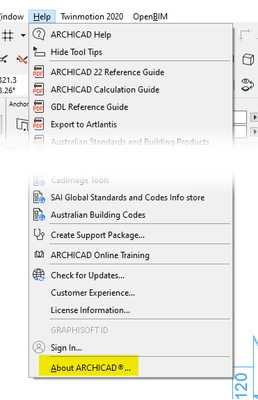
So, to help all those who may help you, please add a Signature to your profile containing your Archicad Version and Operating System. Some general computer specifications if you know them can also sometimes be helpful. You can find information about your copy of Archicad via in program help menu.
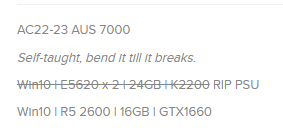
Below is mine as an example. It shows the versions of AC that I am using, AC22 and AC23, as well as my regional version, AUS, and last program update, 7000. Following that it states that I am running Windows 10 as well as some basic computer specs.
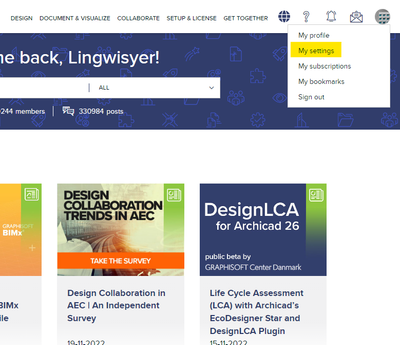
In order to add / edit a signature click on your Profile Icon in the top right and go to My Settings.
On the Personal Information Tab you will find the text box highlighted in red where you can insert your signature. This box can be stretched out via the bottom right corner of it.
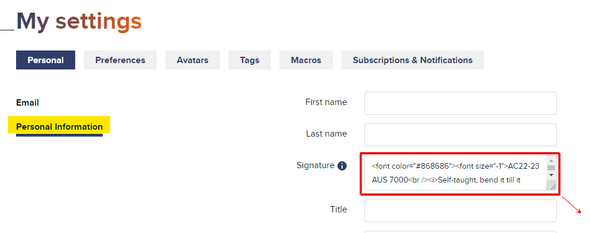
As a suggestion, use the font color and font size flags to make your signature less obtrusive.
<font color="#868686"><font size="-1">
[Instert Signature Here]
</font></font>
Ling.
| AC22-29 AUS 3200 | Help Those Help You - Add a Signature |
| Self-taught, bend it till it breaks | Creating a Thread |
| Win11 | i9 10850K | 64GB | RX6600 | Win11 | 7800X3D | 32GB | RTX5070TI |
Labels:
- Labels:
-
Other
-
Technical Questions
2 Replies 2

Borgo1971
Booster
Options
- Mark as New
- Bookmark
- Subscribe
- Mute
- Subscribe to RSS Feed
- Permalink
- Report Inappropriate Content
2023-02-23 10:40 AM
2023-02-23
10:40 AM
Hi. Where could we find signatures formatting sintax (other then copying form example above)?
since ArchiCAD 4 now 27 on
MacPro 7,1 12x3,6GHz 64GB ram, powered by macOS 13.6.7
MBP 16" 2019 i9 8x2,33GHz 16GB ram, powered by macOS 13.6.7
 Noemi Balogh
Community Admin
Options
- Mark as New
- Bookmark
- Subscribe
- Mute
- Subscribe to RSS Feed
- Permalink
- Report Inappropriate Content
2023-02-23 11:20 AM
2023-02-23
11:20 AM
There are some online sources where you can see side by side the formatted text and its HTML counterpart, like this: https://htmled.it/
On the other hand we (the Community team) might put together some examples available on the site if there is a need.
Noémi Balogh
Staff Community Expert, Admin

Didn't find the answer?
Check other topics in this Forum
Back to ForumRead the latest accepted solutions!
Accepted SolutionsStart a new conversation!

