
Turn on suggestions
Auto-suggest helps you quickly narrow down your search results by suggesting possible matches as you type.
Showing results for
EN
Turn on suggestions
Auto-suggest helps you quickly narrow down your search results by suggesting possible matches as you type.
Showing results for
- English
- :
- Forum
- :
- Parametric design
- :
- Re: Outputting values of element settings in Grass...
Options
- Subscribe to RSS Feed
- Mark Topic as New
- Mark Topic as Read
- Pin this post for me
- Bookmark
- Subscribe to Topic
- Mute
- Printer Friendly Page

derekjackson
Expert
Options
- Mark as New
- Bookmark
- Subscribe
- Mute
- Subscribe to RSS Feed
- Permalink
- Report Inappropriate Content
2023-11-02 12:24 PM
Outputting values of element settings in Grasshopper
2023-11-02
12:24 PM
Hi, is there a way to output to a text panel the data in some element settings?
Say if I used a Favourite for a Wall in GH, passed it to the Wall Settings component, but want to check what Profile it's using? I tried attaching a Panel, but it just returned NULL - I was hoping for the name of the Complex Profile.
http://www.lsiarchitects.co.uk
http://derekjackson.artstation.com
AC19 / 21 / 23 / 27
Windows 7 Intel Xeon 18Gb
http://derekjackson.artstation.com
AC19 / 21 / 23 / 27
Windows 7 Intel Xeon 18Gb
Solved! Go to Solution.
Solved
Labels:
- Labels:
-
Rhino & Grasshopper
1 Solution
Accepted Solutions

Nurbs
Advocate
Options
- Mark as New
- Bookmark
- Subscribe
- Mute
- Subscribe to RSS Feed
- Permalink
- Report Inappropriate Content
2023-11-03 06:45 PM
2023-11-03
06:45 PM
Hi,
The Favorite Node is a "special" one as described in the manual:
Unlike the other input components, the Favorites Input Component is attached not to the Settings
Component, but directly to the Document or Design Component (“Settings” parameter) which
generates the element. By attaching the Favorite Component (instead of a Settings component),
you are thereby defining all parameters of the generated element in one step.
To get the information which you want connect your Favorite to a Wall Node and extract the settings from there:
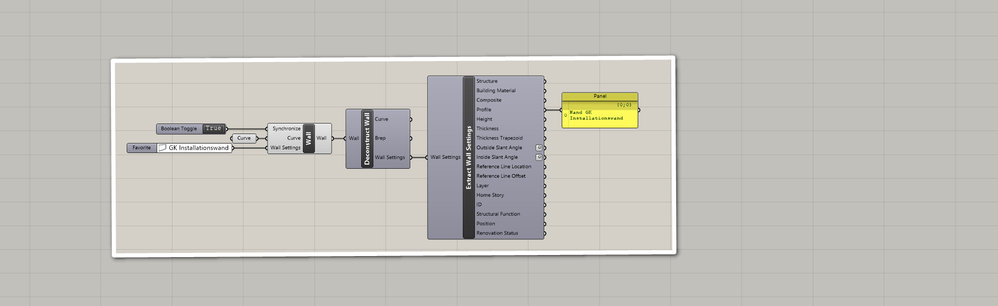
AC16 - AC29, Rhino 5-8. Alienware WIN 11
Solution
2 Replies 2
Nurbs
Advocate
Options
- Mark as New
- Bookmark
- Subscribe
- Mute
- Subscribe to RSS Feed
- Permalink
- Report Inappropriate Content
2023-11-03 06:45 PM
2023-11-03
06:45 PM
Hi,
The Favorite Node is a "special" one as described in the manual:
Unlike the other input components, the Favorites Input Component is attached not to the Settings
Component, but directly to the Document or Design Component (“Settings” parameter) which
generates the element. By attaching the Favorite Component (instead of a Settings component),
you are thereby defining all parameters of the generated element in one step.
To get the information which you want connect your Favorite to a Wall Node and extract the settings from there:
AC16 - AC29, Rhino 5-8. Alienware WIN 11
Solution
derekjackson
Expert
Options
- Mark as New
- Bookmark
- Subscribe
- Mute
- Subscribe to RSS Feed
- Permalink
- Report Inappropriate Content
2023-11-06 10:19 AM
2023-11-06
10:19 AM
Thanks!
http://www.lsiarchitects.co.uk
http://derekjackson.artstation.com
AC19 / 21 / 23 / 27
Windows 7 Intel Xeon 18Gb
http://derekjackson.artstation.com
AC19 / 21 / 23 / 27
Windows 7 Intel Xeon 18Gb

Didn't find the answer?
Check other topics in this Forum
Back to ForumRead the latest accepted solutions!
Accepted SolutionsStart a new conversation!
Suggested topics
- Wall reference line location and Reference GDL door in Grasshopper in Parametric design
- Issues found while working with Grasshopper Connection and Archicad in Parametric design
- Extract Custom Parameters from Object Using Archicad Grasshopper Connection in Parametric design
- Select individual surfaces of walls by material in Grasshopper in Parametric design
- Outputting values of element settings in Grasshopper in Parametric design
