
Turn on suggestions
Auto-suggest helps you quickly narrow down your search results by suggesting possible matches as you type.
Showing results for
EN
Turn on suggestions
Auto-suggest helps you quickly narrow down your search results by suggesting possible matches as you type.
Showing results for
- English
- :
- Forum
- :
- Project data & BIM
- :
- It's the same window in the schedule, some with di...
Options
- Subscribe to RSS Feed
- Mark Topic as New
- Mark Topic as Read
- Pin this post for me
- Bookmark
- Subscribe to Topic
- Mute
- Printer Friendly Page

LeeJaeYoung
Virtuoso
Options
- Mark as New
- Bookmark
- Subscribe
- Mute
- Subscribe to RSS Feed
- Permalink
- Report Inappropriate Content
2023-05-04 10:41 AM
It's the same window in the schedule, some with dimensions and some with no dimensions.
2023-05-04
10:41 AM
How do I get dimensions to appear?
It's the same window in the schedule, some with dimensions and some with no dimensions.

AC27 on window 11
2 Replies 2

Barry Kelly
Moderator
Options
- Mark as New
- Bookmark
- Subscribe
- Mute
- Subscribe to RSS Feed
- Permalink
- Report Inappropriate Content
2023-05-04 10:53 AM - edited 2023-05-04 10:54 AM
2023-05-04
10:53 AM
I don't know if this will work.
But select any window elevation cell and turn the 'Add Automatic Dimensions' button off/on.
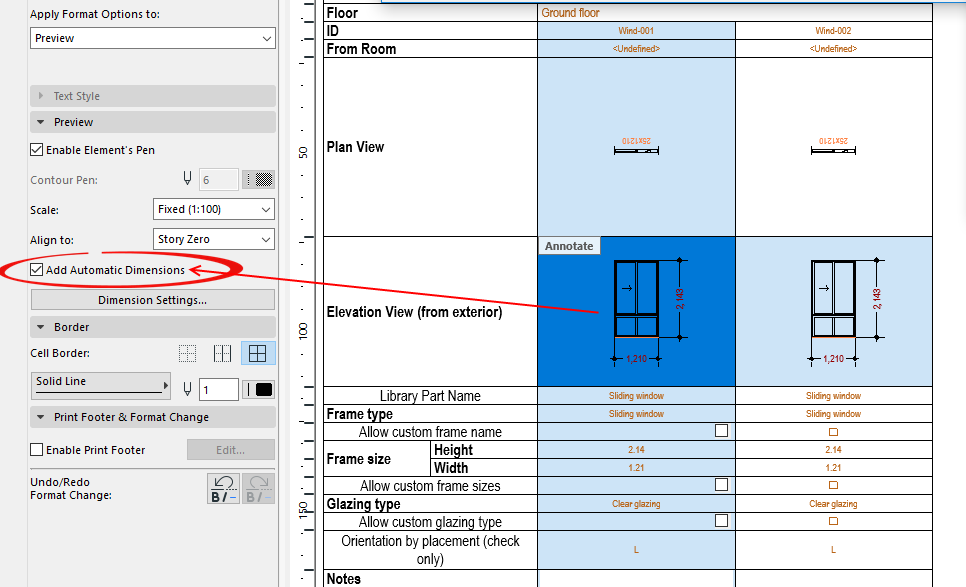
Barry.
One of the forum moderators.
Versions 6.5 to 27
i7-10700 @ 2.9Ghz, 32GB ram, GeForce RTX 2060 (6GB), Windows 10
Lenovo Thinkpad - i7-1270P 2.20 GHz, 32GB RAM, Nvidia T550, Windows 11
Versions 6.5 to 27
i7-10700 @ 2.9Ghz, 32GB ram, GeForce RTX 2060 (6GB), Windows 10
Lenovo Thinkpad - i7-1270P 2.20 GHz, 32GB RAM, Nvidia T550, Windows 11
LeeJaeYoung
Virtuoso
Options
- Mark as New
- Bookmark
- Subscribe
- Mute
- Subscribe to RSS Feed
- Permalink
- Report Inappropriate Content
2023-05-04 11:30 AM
2023-05-04
11:30 AM
^^
^^
When I create a new schedule, all dimensions appear again.
I guess I'm a genius.
Because archicad works by making errors.
I guess it's because I went down a road that others don't go.
(It is natural for beginners to walk alone.)
AC27 on window 11

Didn't find the answer?
Check other topics in this Forum
Back to ForumRead the latest accepted solutions!
Accepted SolutionsStart a new conversation!

Suggested topics
- TIP: Visual Check for custom Dimension Texts in Documentation
- elevation dimension in rcp in Modeling
- dimensions acting funny in Documentation
- Doors and Windows Schedule Automatic Dimension Button not Responding in Project data & BIM
- CI Tools Detail Element Tool – How do I increase the overall length of a 2D flashing? in Modeling
