
Turn on suggestions
Auto-suggest helps you quickly narrow down your search results by suggesting possible matches as you type.
Showing results for
EN
Turn on suggestions
Auto-suggest helps you quickly narrow down your search results by suggesting possible matches as you type.
Showing results for
- English
- :
- Forum
- :
- Project data & BIM
- :
- Re: Manually edit transmittal date?
Options
- Subscribe to RSS Feed
- Mark Topic as New
- Mark Topic as Read
- Pin this post for me
- Bookmark
- Subscribe to Topic
- Mute
- Printer Friendly Page

afv
Contributor
Options
- Mark as New
- Bookmark
- Subscribe
- Mute
- Subscribe to RSS Feed
- Permalink
- Report Inappropriate Content
2021-09-10
09:34 PM
- last edited on
2022-10-04
02:17 PM
by
 Oleksandra Vakariuk
Manually edit transmittal date?
2021-09-10
09:34 PM
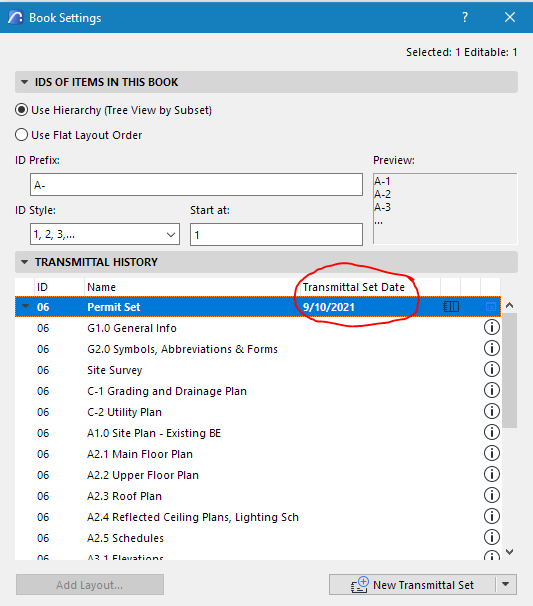
I'm in Archicad 25. Transmittal sets show the date when you close the set. I need to show a future date in the title block but there's not an obvious way to override the date. This seems like a common need, most people want to get their sets done before the deadline! Any ideas how to do this? Thanks.
Read-Only
Labels:
- Labels:
-
Revision Management
3 Replies 3

Barry Kelly
Moderator
Options
- Mark as New
- Bookmark
- Subscribe
- Mute
- Subscribe to RSS Feed
- Permalink
- Report Inappropriate Content
2021-09-11 11:55 AM
2021-09-11
11:55 AM
I don't know if there is a solution to your problem.
But I am curious.
Does it matter if the transmittal date is before your deadline?
The transmittal date is the date that you have completed that part of the project.
I can't see why you would want to fake the date - that defeats the purpose of having an automated system?
Barry.
One of the forum moderators.
Versions 6.5 to 27
i7-10700 @ 2.9Ghz, 32GB ram, GeForce RTX 2060 (6GB), Windows 10
Lenovo Thinkpad - i7-1270P 2.20 GHz, 32GB RAM, Nvidia T550, Windows 11
Versions 6.5 to 27
i7-10700 @ 2.9Ghz, 32GB ram, GeForce RTX 2060 (6GB), Windows 10
Lenovo Thinkpad - i7-1270P 2.20 GHz, 32GB RAM, Nvidia T550, Windows 11

Eduardo Rolon
Moderator
Options
- Mark as New
- Bookmark
- Subscribe
- Mute
- Subscribe to RSS Feed
- Permalink
- Report Inappropriate Content
2021-09-11 03:32 PM
2021-09-11
03:32 PM
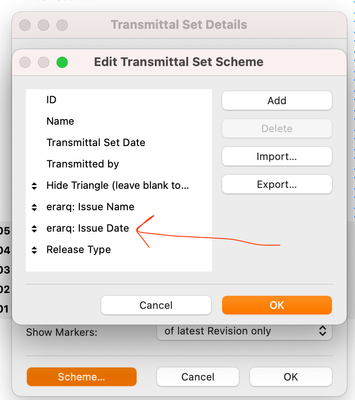
My solution is to create a new Date item in the Transmittal scheme and use that as the official date.
Eduardo Rolón AIA NCARB
AC29 US/INT -> AC08
AC29 US/INT -> AC08
Mac Studio M4 Max 64GB ram, OS X 10.XX latest

Erwin Edel
Rockstar
Options
- Mark as New
- Bookmark
- Subscribe
- Mute
- Subscribe to RSS Feed
- Permalink
- Report Inappropriate Content
2021-09-14 09:21 AM
2021-09-14
09:21 AM
Was going to suggest the same thing! This is the best solution, in my opinion.
Erwin Edel, Project Lead, Leloup Architecten
www.leloup.nl
ArchiCAD 9-29NED FULL
Windows 11 Pro for Workstations
Adobe Design Premium CS5
www.leloup.nl
ArchiCAD 9-29NED FULL
Windows 11 Pro for Workstations
Adobe Design Premium CS5

Didn't find the answer?
Check other topics in this Forum
Back to ForumRead the latest accepted solutions!
Accepted SolutionsStart a new conversation!

Suggested topics
- Status and Revision on Revision History in Documentation
- Archicad 29 crashes when updating drawings linked to another Teamwork project in Teamwork & BIMcloud
- Updated Change Markers in Libraries & objects
- Revision ID "00" showing "01" on Layouts & Publisher instead in Documentation
- Dating Revision Without Change in Project data & BIM
