
Turn on suggestions
Auto-suggest helps you quickly narrow down your search results by suggesting possible matches as you type.
Showing results for
EN
Turn on suggestions
Auto-suggest helps you quickly narrow down your search results by suggesting possible matches as you type.
Showing results for
- English
- :
- Forum
- :
- Project data & BIM
- :
- Zone Selection Settings is greyed out
Options
- Subscribe to RSS Feed
- Mark Topic as New
- Mark Topic as Read
- Pin this post for me
- Bookmark
- Subscribe to Topic
- Mute
- Printer Friendly Page

Yh1CKAEN
Contributor
Options
- Mark as New
- Bookmark
- Subscribe
- Mute
- Subscribe to RSS Feed
- Permalink
- Report Inappropriate Content
2022-11-03
03:18 AM
- last edited on
2025-01-30
12:29 PM
by
 Aruzhan Ilaikova
Zone Selection Settings is greyed out
2022-11-03
03:18 AM
Hi all,
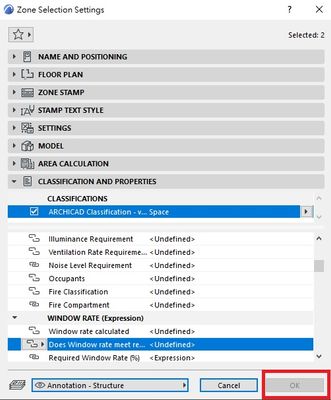
I tried to use zone selection settings to update parameter of the element I had selected. However I found that the "OK" button was greyed out so I could not able to save any changes. May anyone suggest a way to unlock it? Thanks.
2 Replies 2

Barry Kelly
Moderator
Options
- Mark as New
- Bookmark
- Subscribe
- Mute
- Subscribe to RSS Feed
- Permalink
- Report Inappropriate Content
2022-11-03 03:22 AM
2022-11-03
03:22 AM
You have 2 zones selected.
Is one of them locked, or maybe the layer they are in is locked?
Barry.
One of the forum moderators.
Versions 6.5 to 27
i7-10700 @ 2.9Ghz, 32GB ram, GeForce RTX 2060 (6GB), Windows 10
Lenovo Thinkpad - i7-1270P 2.20 GHz, 32GB RAM, Nvidia T550, Windows 11
Versions 6.5 to 27
i7-10700 @ 2.9Ghz, 32GB ram, GeForce RTX 2060 (6GB), Windows 10
Lenovo Thinkpad - i7-1270P 2.20 GHz, 32GB RAM, Nvidia T550, Windows 11
Yh1CKAEN
Contributor
Options
- Mark as New
- Bookmark
- Subscribe
- Mute
- Subscribe to RSS Feed
- Permalink
- Report Inappropriate Content
2022-11-03 04:08 AM
2022-11-03
04:08 AM
Hi all,
Found out the root cause is the layer they are in is locked. After the layer is unlocked in Layer Settings it's ok to change parameters in the element now. Thanks.

Didn't find the answer?
Check other topics in this Forum
Back to ForumRead the latest accepted solutions!
Accepted SolutionsStart a new conversation!

