
Turn on suggestions
Auto-suggest helps you quickly narrow down your search results by suggesting possible matches as you type.
Showing results for
EN
Turn on suggestions
Auto-suggest helps you quickly narrow down your search results by suggesting possible matches as you type.
Showing results for
- English
- :
- Forum
- :
- Visualization
- :
- Twinmotion Sectional Render
Options
- Subscribe to RSS Feed
- Mark Topic as New
- Mark Topic as Read
- Pin this post for me
- Bookmark
- Subscribe to Topic
- Mute
- Printer Friendly Page

JackIPL
Contributor
Options
- Mark as New
- Bookmark
- Subscribe
- Mute
- Subscribe to RSS Feed
- Permalink
- Report Inappropriate Content
2022-04-05
05:24 PM
- last edited on
2023-05-11
02:56 PM
by
 Noemi Balogh
Twinmotion Sectional Render
2022-04-05
05:24 PM
Hi,
Just wondering if anyone knows a solution,
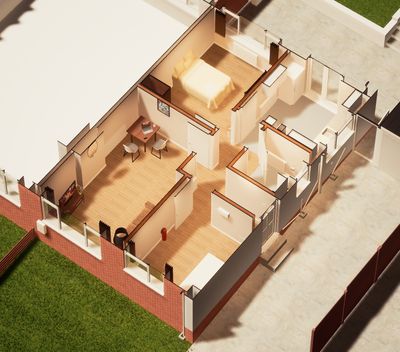
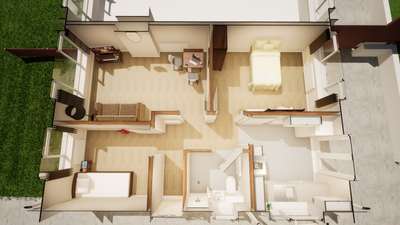
I am creating sectional cut through renders on twinmotion (few examples attached) - As you can see however, the section cuts through and for some reason messes with the wall build up. notably the external walls being changed into a very thin wall. (hope this makes sense!)
- these are composite walls (all importing using DataSmith from Archicad 25.
When creating a cut through 3D section in Archicad it "blanks" the tops of walls with a grey fill - this is the style I wish to go for if possible, however generated within twinmotion.
JB - AC25 - Windows 10 -
Solved! Go to Solution.
1 Solution
Accepted Solutions

MMontgomery
Enthusiast
Options
- Mark as New
- Bookmark
- Subscribe
- Mute
- Subscribe to RSS Feed
- Permalink
- Report Inappropriate Content
2022-04-05 07:07 PM
2022-04-05
07:07 PM
You might have materials that are single sided in Twinmotion causing them to disappear when looking at them from one direction. Try eye-dropping the material and setting it to two-sided in the material settings.
AC 6-29 - Ryzen9 9950X / 96GB RAM / RTX 5090 / Win 11 Pro
2 Replies 2
MMontgomery
Enthusiast
Options
- Mark as New
- Bookmark
- Subscribe
- Mute
- Subscribe to RSS Feed
- Permalink
- Report Inappropriate Content
2022-04-05 07:07 PM
2022-04-05
07:07 PM
You might have materials that are single sided in Twinmotion causing them to disappear when looking at them from one direction. Try eye-dropping the material and setting it to two-sided in the material settings.
AC 6-29 - Ryzen9 9950X / 96GB RAM / RTX 5090 / Win 11 Pro

SenecaDesignLLC
Ace
Options
- Mark as New
- Bookmark
- Subscribe
- Mute
- Subscribe to RSS Feed
- Permalink
- Report Inappropriate Content
2022-04-06 01:14 AM - edited 2022-04-06 01:15 AM
2022-04-06
01:14 AM
You could try using solid elements and Archicad and then export to twinmotion so that twin motion isn't the one doing the cut, that might get you the gray that you're after.

Didn't find the answer?
Check other topics in this Forum
Back to ForumRead the latest accepted solutions!
Accepted SolutionsStart a new conversation!

Suggested topics
- Archicad - Blender Connection in Collaboration with other software
- Pushing the limits of a Raw render in Twinmotion - or am I ? in Visualization
- Can twinmotion 19 be used to render archucad23 project in Visualization
- archicad to twinmotion render each face different material in Visualization
- Oculus Quest 3 Support in BIMx
