
Turn on suggestions
Auto-suggest helps you quickly narrow down your search results by suggesting possible matches as you type.
Showing results for
EN
Turn on suggestions
Auto-suggest helps you quickly narrow down your search results by suggesting possible matches as you type.
Showing results for
- English
- :
- Forum
- :
- Visualization
- :
- Re: Windows Beyond showing up dark
Options
- Subscribe to RSS Feed
- Mark Topic as New
- Mark Topic as Read
- Pin this post for me
- Bookmark
- Subscribe to Topic
- Mute
- Printer Friendly Page

Chris Grantham
Advocate
Options
- Mark as New
- Bookmark
- Subscribe
- Mute
- Subscribe to RSS Feed
- Permalink
- Report Inappropriate Content
2008-12-03
12:03 AM
- last edited on
2023-05-11
01:41 PM
by
 Noemi Balogh
Windows Beyond showing up dark
2008-12-03
12:03 AM
-Chris

16" MacBook Pro M1 Max
Mac OS 26
ArchiCAD 27 Build 6010
Mac OS 26
ArchiCAD 27 Build 6010
2 Replies 2
Chris Grantham
Advocate
Options
- Mark as New
- Bookmark
- Subscribe
- Mute
- Subscribe to RSS Feed
- Permalink
- Report Inappropriate Content
2008-12-03 12:09 AM
2008-12-03
12:09 AM
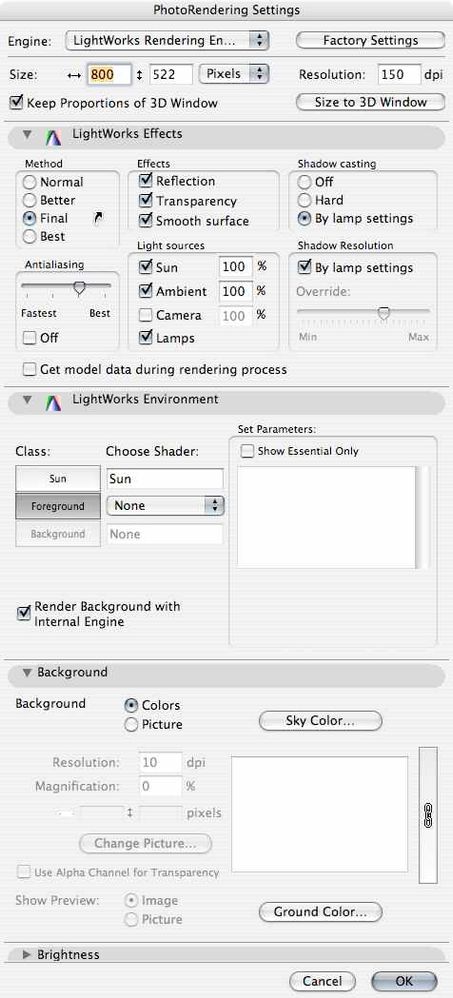
Here are my settings:
16" MacBook Pro M1 Max
Mac OS 26
ArchiCAD 27 Build 6010
Mac OS 26
ArchiCAD 27 Build 6010

Dwight
Newcomer
Options
- Mark as New
- Bookmark
- Subscribe
- Mute
- Subscribe to RSS Feed
- Permalink
- Report Inappropriate Content
2008-12-03 01:02 AM
2008-12-03
01:02 AM
"Final" rendering setting required for that many layers of glass.
Dwight Atkinson

Didn't find the answer?
Check other topics in this Forum
Back to ForumRead the latest accepted solutions!
Accepted SolutionsStart a new conversation!

Suggested topics
- BIMCloud Basic - Thanks Graphisoft! (I guess . . . ) in Teamwork & BIMcloud
- if else if in expressions in General discussions
- Mastering AI in Project data & BIM
- Archicad Doors and Windows with IfcOpeningElement in Project data & BIM
- Rounded Wall Corner displays correctly in Floor Plan but glitches in 3D Document in Modeling
