cancel
Showing results for 
Search instead for 
Did you mean: 
EN
cancel
Showing results for 
Search instead for 
Did you mean: 

Wall Junctions - Stop the Headaches

Patrick M
Ace

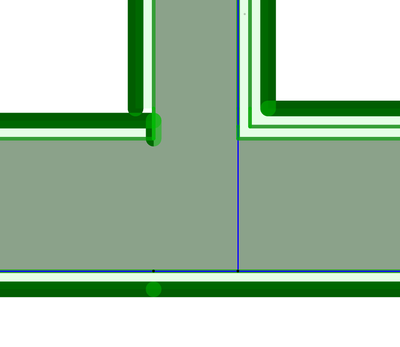
every project seems to be a trouble shooting adventure, where these are some of the "best possible results" for wall junctions. short of a complex profile column at every other wall juction, we just have to settle for 'good enough'.
Wishlist item: make it easy and automated to clean up wall junctions in plan!
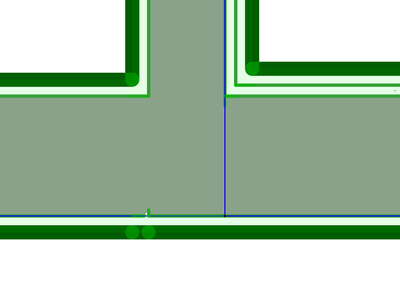
Screenshot 2025-10-15 at 1.26.16 PM.png

Screenshot 2025-10-15 at 1.26.44 PM.png

Screenshot 2025-10-15 at 1.34.13 PM.png


13 Comments
EmmanuelF
Booster

A simple solution would be to add the option of connecting by layer/material... 

GG_rakurs
Enthusiast

It is just awful right now. So many difficult workarounds that almost always leave some mess behind them...


Off the top of my head, troubles start when you have:

- Three different walls connecting

- Walls with differing heights connecting

- Colinear walls with differing widths

- Complex profiles connecting (either walls or beams)


It is nearly impossible to have graphically a clean plan with, for example, all skin lines thin with only outside line thick. Something will always go where it shouldn't.

Patrick M
Ace

TBH, the wall tool already seems to TRY to resolve this, by coping bMat layers, rather than mitering; which is why seeing triangulation and mitered crops in plan view is so infuriating. No amount of juggling bMat priorities, wall junction order, core/finish/other is going to fix it; unless walls are truly never going to miter any connections in plan/section/elevation views in totality


SeaGeoff
Ace

At a minimum we need a manual join option that lets users connect selected skins, and a no-join option that eliminates joining between selected elements while not affecting other junctions.

Space_Agency
Enthusiast

Agreed. What @SeaGeoff  said would be at least a reasonable option until the heart of the problem can be solved. 

EmmanuelF
Booster

Or have the option to join layer by layer like other programmes in the group...

Sa_Chugg
Contributor

Totally agree, this is a major flaw with ArchiCAD - things look right in 3D but never seem quite right in either plan or elevation.

Revit offer a wall join tool that allows you to select how walls meet (ButtMiter, or Square.), something like that could be useful.


I also think it's an over-site how much the 'internal' or 'external' side of the wall dictates the junction because internal walls are often used in different arrangements and a new wall type shouldn't be required for every instance that a wall changes which face is 'external'. 


Patrick M
Ace

a client is asking about their sections... I'm at a loss... no way to turn intersecting walls to a thinner pen... so frustrating. This isn't even demanding; this is just sloppy drafting being crammed down our throats. Bold cutline, thin line for everything inside the cut line... and we have our cut line intruding the section elements all over the place!
I feel like this is one of those things, it really feels like archicad should have a solution for this. Have I been missing something all these years?

Screenshot 2026-02-23 at 3.09.38 PM.png

Screenshot 2026-02-23 at 3.10.27 PM.png

Screenshot 2026-02-23 at 3.11.13 PM.png

Screenshot 2026-02-23 at 3.13.35 PM.png

Screenshot 2026-02-23 at 3.13.43 PM.png

Patrick M
Ace

keep em rolling... this is the top question across my desk in 2026... "

Screenshot 2026-02-24 at 1.44.50 PM.png

why don't line weights clean up?"

Patrick M
Ace

turns out, its not just walls... building material inconsistencies are everywhere:

Status
Open

with 45/200 Votes 4.444444444444%

Wish details