
Turn on suggestions
Auto-suggest helps you quickly narrow down your search results by suggesting possible matches as you type.
Showing results for
EN
Turn on suggestions
Auto-suggest helps you quickly narrow down your search results by suggesting possible matches as you type.
Showing results for
Options
- Subscribe to RSS Feed
- Mark Topic as New
- Mark Topic as Read
- Pin this post for me
- Bookmark
- Subscribe to Topic
- Mute
- Printer Friendly Page

svpribyl
Enthusiast
Options
- Mark as New
- Bookmark
- Subscribe
- Mute
- Subscribe to RSS Feed
- Permalink
- Report Inappropriate Content
2020-01-09
10:34 PM
- last edited on
2025-03-26
04:02 PM
by
 Gordana Radonic
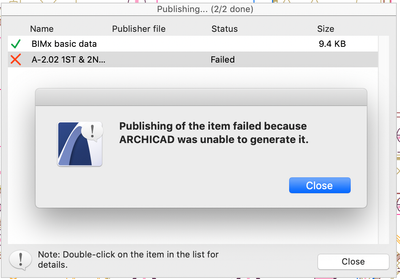
Publishing layout failed because Archicad was not able to generate it
2020-01-09
10:34 PM
I'm getting this message when I try to publish two layouts that have been updated. They have previously been published. I deleted them from the publisher set and added them again, but I still get the same message. I tried publishing them one at a time, and they fail. I restarted the computer but it doesn't help.
Any suggestions would be appreciated.
Any suggestions would be appreciated.
Steve Pribyl
MAC OS Sequoia 15.5
ArchiCAD 28
MAC OS Sequoia 15.5
ArchiCAD 28
Labels:
- Labels:
-
BIMx Publishing
14 Replies 14

Options
- Mark as New
- Bookmark
- Subscribe
- Mute
- Subscribe to RSS Feed
- Permalink
- Report Inappropriate Content
2020-01-10 12:03 PM
2020-01-10
12:03 PM
Hello Steve Pribyl,
I invite you to check :
- your layout
- your library
- your linked drawings
- your publication file location
- if your publication file is not already open
I invite you to check :
- your layout
- your library
- your linked drawings
- your publication file location
- if your publication file is not already open
mikas
Advisor
Options
- Mark as New
- Bookmark
- Subscribe
- Mute
- Subscribe to RSS Feed
- Permalink
- Report Inappropriate Content
2020-01-10 12:35 PM
2020-01-10
12:35 PM
Go find and delete the published files in Finder, and then try to publish them again.
AC28, Rhino8+Grasshopper, TwinMotion • Mac Pro 6,1 E5-1650v2-3,5GHz/128GB/eGPU:6800XT/11.6.5 • HP Z4/Xeon W-2195/256GB/RTX4080FE 16GB/W11ProWS

Aaron Bourgoin
Rockstar
Options
- Mark as New
- Bookmark
- Subscribe
- Mute
- Subscribe to RSS Feed
- Permalink
- Report Inappropriate Content
2020-01-10 03:24 PM
2020-01-10
03:24 PM
if the PDF created previously is open, this may cause the next publishing task to fail.'
Think Like a Spec Writer
MacBook M4Pro - 24Gb RAM
AC4.55 through 29 / AC29.2.1 USA
Rhino 8.35 Mac
MacOS Tahoe 26.6.2
MacBook M4Pro - 24Gb RAM
AC4.55 through 29 / AC29.2.1 USA
Rhino 8.35 Mac
MacOS Tahoe 26.6.2
svpribyl
Enthusiast
Options
- Mark as New
- Bookmark
- Subscribe
- Mute
- Subscribe to RSS Feed
- Permalink
- Report Inappropriate Content
2020-01-11 01:26 AM
2020-01-11
01:26 AM
To clarify, this is being published via "Upload bimx hyper-model"
I deleted the bimx model from the cloud/server and re-published it, but the same two layouts were not published.
I deleted the bimx model from the cloud/server and re-published it, but the same two layouts were not published.
Steve Pribyl
MAC OS Sequoia 15.5
ArchiCAD 28
MAC OS Sequoia 15.5
ArchiCAD 28
svpribyl
Enthusiast
Options
- Mark as New
- Bookmark
- Subscribe
- Mute
- Subscribe to RSS Feed
- Permalink
- Report Inappropriate Content
2020-01-13 11:14 PM
2020-01-13
11:14 PM
For another test, I deleted the bimx file and just tried publishing the 2 layouts and they still fail. However, I tried publishing the two layouts to pdf files (save files) and they publish fine.
Steve Pribyl
MAC OS Sequoia 15.5
ArchiCAD 28
MAC OS Sequoia 15.5
ArchiCAD 28

 Minh Nguyen
Graphisoft Alumni
Options
- Mark as New
- Bookmark
- Subscribe
- Mute
- Subscribe to RSS Feed
- Permalink
- Report Inappropriate Content
2020-02-06 09:56 AM
2020-02-06
09:56 AM
Hi Steve,
Thank you for posting this into the forums and making it available to anyone who is interested in this topic!
This error message is not very common, actually. The few cases that we had this error is when there are some special characters in the ID of the layout. My first suggestion is to rename the layout to an easy one (like
But after this test, if the layouts still fail to publish to BIMx, we will need to get the problematic file for further investigation. If you are willing to share the file with us, please reply either here within the post directly or through a PM and I will provide you a secure GRAPHISOFT link where you can upload your file to.
Looking forward to hearing from you!
Best regards,
Minh
Thank you for posting this into the forums and making it available to anyone who is interested in this topic!
This error message is not very common, actually. The few cases that we had this error is when there are some special characters in the ID of the layout. My first suggestion is to rename the layout to an easy one (like
But after this test, if the layouts still fail to publish to BIMx, we will need to get the problematic file for further investigation. If you are willing to share the file with us, please reply either here within the post directly or through a PM and I will provide you a secure GRAPHISOFT link where you can upload your file to.
Looking forward to hearing from you!
Best regards,
Minh
Minh Nguyen
Technical Support Engineer
GRAPHISOFT

camille
Contributor
Options
- Mark as New
- Bookmark
- Subscribe
- Mute
- Subscribe to RSS Feed
- Permalink
- Report Inappropriate Content
2022-08-18 02:19 AM
2022-08-18
02:19 AM
Hello Minh,
I am getting the same error message.
View Name: "failed because Archicad was unable to generate it"
Saving BIMx Info: "failed because Archicad was unable to generate it" AND "missing schedules - BIMx info"
BIMx Package: "failed because Archicad was unable to generate it"
Best,
Camille She
Windows 10 Pro
Archicad 25 Solo

rachelpbdg
Newcomer
Options
- Mark as New
- Bookmark
- Subscribe
- Mute
- Subscribe to RSS Feed
- Permalink
- Report Inappropriate Content
2023-04-20 04:30 PM
2023-04-20
04:30 PM
Hi Minh--
I'm having the same issues and followed the trouble shooting laid out above. Can you share a link with me to upload the file to so we can figure out what the problem is?

karsonardo
Participant
Options
- Mark as New
- Bookmark
- Subscribe
- Mute
- Subscribe to RSS Feed
- Permalink
- Report Inappropriate Content
2024-01-26 11:20 AM - edited 2024-01-30 09:49 AM
2024-01-26
11:20 AM
@svpribyl wrote:I'm getting this message when I try to publish two layouts that have been updated. They have previously been published. I deleted them from the publisher set and added them again, but I still get the same message. I tried publishing them one at a time, and they fail. I restarted the computer but it doesn't help.
Any suggestions would be appreciated.
I'm facing an issue while attempting to publish layouts that have been recently updated. These layouts were previously published without any problems, but after making necessary edits, An error during the publishing process. I have already tried removing the layouts from the publisher set, adding them again, publishing them individually, and even restarting my computer.

Didn't find the answer?
Check other topics in this Forum
Back to ForumRead the latest accepted solutions!
Accepted SolutionsStart a new conversation!
Suggested topics
- BIMx does not save plans in BIMx
- Ci Tools Keynotes | Archicad Keynotes | Properties | Attributes in Project data & BIM
- Publisher: Use Layout ID as exported filename in Documentation
- DWG Publisher doesn't resolve AutoText (AutoText is on a Worksheet, placed on Master Layout) in Documentation
- Silpu Render for Archicad: photoreal AI renders from your live view, in about a minute (free to try) in General discussions
