
Turn on suggestions
Auto-suggest helps you quickly narrow down your search results by suggesting possible matches as you type.
Showing results for
EN
Turn on suggestions
Auto-suggest helps you quickly narrow down your search results by suggesting possible matches as you type.
Showing results for
Options
- Subscribe to RSS Feed
- Mark Topic as New
- Mark Topic as Read
- Pin this post for me
- Bookmark
- Subscribe to Topic
- Mute
- Printer Friendly Page

svpribyl
Enthusiast
Options
- Mark as New
- Bookmark
- Subscribe
- Mute
- Subscribe to RSS Feed
- Permalink
- Report Inappropriate Content
2020-01-09
10:34 PM
- last edited on
2025-03-26
04:02 PM
by
 Gordana Radonic
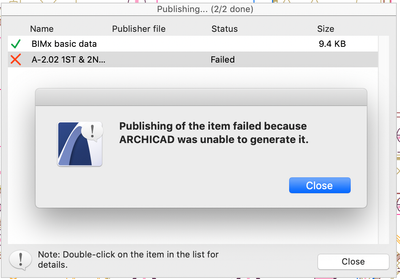
Publishing layout failed because Archicad was not able to generate it
2020-01-09
10:34 PM
I'm getting this message when I try to publish two layouts that have been updated. They have previously been published. I deleted them from the publisher set and added them again, but I still get the same message. I tried publishing them one at a time, and they fail. I restarted the computer but it doesn't help.
Any suggestions would be appreciated.
Any suggestions would be appreciated.
Steve Pribyl
MAC OS Sequoia 15.5
ArchiCAD 28
MAC OS Sequoia 15.5
ArchiCAD 28
Labels:
- Labels:
-
BIMx Publishing
14 Replies 14
 Oleksandra Vakariuk
Graphisoft
Options
- Mark as New
- Bookmark
- Subscribe
- Mute
- Subscribe to RSS Feed
- Permalink
- Report Inappropriate Content
2024-01-29 09:33 AM
2024-01-29
09:33 AM
Hi @karsonardo,
Sorry to hear you're experiencing an issue.
Could you please send the problematic project in PLA format to [email protected] so we can investigate this issue?
Kind regards,
Oleksandra Vakariuk
Technical Support Engineer
duduardo
Contributor
Options
- Mark as New
- Bookmark
- Subscribe
- Mute
- Subscribe to RSS Feed
- Permalink
- Report Inappropriate Content
2024-04-26 09:04 AM
2024-04-26
09:04 AM
Great!! This so simple yet I didn't think of it.
thanks 😄

verdi
Newcomer
Options
- Mark as New
- Bookmark
- Subscribe
- Mute
- Subscribe to RSS Feed
- Permalink
- Report Inappropriate Content
2024-11-23 04:17 AM
2024-11-23
04:17 AM
Hi,
I'm having this issue too, has anyone figured out the fix?
Thanks

Barry Kelly
Moderator
Options
- Mark as New
- Bookmark
- Subscribe
- Mute
- Subscribe to RSS Feed
- Permalink
- Report Inappropriate Content
2024-11-24 02:45 AM
2024-11-24
02:45 AM
@verdi wrote:
I'm having this issue too, has anyone figured out the fix?
Have you tried all of the suggestions mentioned previously in this post?
Is please post a screen shot of the publishing dialogue as in the first post (showing the entire file name).
Barry
One of the forum moderators.
Versions 6.5 to 27
i7-10700 @ 2.9Ghz, 32GB ram, GeForce RTX 2060 (6GB), Windows 10
Lenovo Thinkpad - i7-1270P 2.20 GHz, 32GB RAM, Nvidia T550, Windows 11
Versions 6.5 to 27
i7-10700 @ 2.9Ghz, 32GB ram, GeForce RTX 2060 (6GB), Windows 10
Lenovo Thinkpad - i7-1270P 2.20 GHz, 32GB RAM, Nvidia T550, Windows 11

MendoPermacultu
Booster
Options
- Mark as New
- Bookmark
- Subscribe
- Mute
- Subscribe to RSS Feed
- Permalink
- Report Inappropriate Content
2026-04-21 01:04 AM
2026-04-21
01:04 AM
I am having the same issue when trying to publish to .dwg from the Publisher. Error message: "Publishing of the item failed because Archicad was unable to generate it." I have tried all of the suggestions mentioned previously in the post.

Also cannot "Save As" to .dwg or .dxf. I get the message, "Cannot write output file". I get this message from any view I use, particularly story windows, or worksheets. I get the same error whether I select "Marquee area" or "Entire drawing" when asked "Which elements do you want to save?"


I am working in AC 29.1.0 (4006) USA FULL. I am working on the file in Teamwork, but I have tried saving to a .pln on my desktop, still the same issues as above. I have restarted ArchiCAD, and my computer.
Does this sound like an error with the file? It is an embarassingly large file size.
AC 28amp;
2021 MacBook Pro 16" 32GB Apple M1 Max
MacOS Sonoma 14.6
2021 MacBook Pro 16" 32GB Apple M1 Max
MacOS Sonoma 14.6

- « Previous
-
- 1
- 2
- Next »
- « Previous
-
- 1
- 2
- Next »
Didn't find the answer?
Check other topics in this Forum
Back to ForumRead the latest accepted solutions!
Accepted SolutionsStart a new conversation!

Suggested topics
- BIMx does not save plans in BIMx
- Ci Tools Keynotes | Archicad Keynotes | Properties | Attributes in Project data & BIM
- Publisher: Use Layout ID as exported filename in Documentation
- DWG Publisher doesn't resolve AutoText (AutoText is on a Worksheet, placed on Master Layout) in Documentation
- Silpu Render for Archicad: photoreal AI renders from your live view, in about a minute (free to try) in General discussions
