
Turn on suggestions
Auto-suggest helps you quickly narrow down your search results by suggesting possible matches as you type.
Showing results for
EN
Turn on suggestions
Auto-suggest helps you quickly narrow down your search results by suggesting possible matches as you type.
Showing results for
- English
- :
- Forum
- :
- Collaboration with other software
- :
- Column visibility in 3D when walls are made not vi...
Options
- Subscribe to RSS Feed
- Mark Topic as New
- Mark Topic as Read
- Pin this post for me
- Bookmark
- Subscribe to Topic
- Mute
- Printer Friendly Page

PJD
Contributor
Options
- Mark as New
- Bookmark
- Subscribe
- Mute
- Subscribe to RSS Feed
- Permalink
- Report Inappropriate Content
2023-09-29 05:37 PM
Column visibility in 3D when walls are made not visible
2023-09-29
05:37 PM
I have a timberframe screen room in my project. I am trying to display only the timberframe (columns, beams and rafters) in 3D. When I turn on only the Timberframe layer the walls that are framing in the columns, although not visible, look like they have cut the timbers so that I don't see the full timber columns.
How can I get the columns to show as a full column?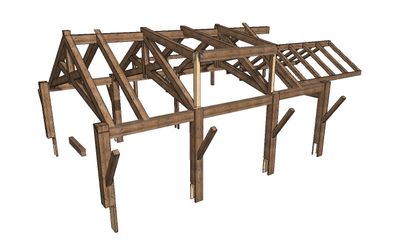
Solved! Go to Solution.
1 Solution
Accepted Solutions

Barry Kelly
Moderator
Options
- Mark as New
- Bookmark
- Subscribe
- Mute
- Subscribe to RSS Feed
- Permalink
- Report Inappropriate Content
2023-10-01 12:28 PM
2023-10-01
12:28 PM
Layers have a layer group number.
If the layers have the same number, then certain elements will automatically cut other elements.
This group number is saved in the layer combination.
So, it the layer combination that turns the wall layer of, make sure the wall layer has a different number to the column layer.
In the layer combinations where both layers are on, if they have the same number they will trim, if not they won't.
So it is up to you and your settings in the layer combinations if you want them to trim or not.
Barry.
One of the forum moderators.
Versions 6.5 to 27
i7-10700 @ 2.9Ghz, 32GB ram, GeForce RTX 2060 (6GB), Windows 10
Lenovo Thinkpad - i7-1270P 2.20 GHz, 32GB RAM, Nvidia T550, Windows 11
Versions 6.5 to 27
i7-10700 @ 2.9Ghz, 32GB ram, GeForce RTX 2060 (6GB), Windows 10
Lenovo Thinkpad - i7-1270P 2.20 GHz, 32GB RAM, Nvidia T550, Windows 11
Solution
3 Replies 3
PJD
Contributor
Options
- Mark as New
- Bookmark
- Subscribe
- Mute
- Subscribe to RSS Feed
- Permalink
- Report Inappropriate Content
2023-09-29 05:37 PM
2023-09-29
05:37 PM
I am using V26
Barry Kelly
Moderator
Options
- Mark as New
- Bookmark
- Subscribe
- Mute
- Subscribe to RSS Feed
- Permalink
- Report Inappropriate Content
2023-10-01 12:28 PM
2023-10-01
12:28 PM
Layers have a layer group number.
If the layers have the same number, then certain elements will automatically cut other elements.
This group number is saved in the layer combination.
So, it the layer combination that turns the wall layer of, make sure the wall layer has a different number to the column layer.
In the layer combinations where both layers are on, if they have the same number they will trim, if not they won't.
So it is up to you and your settings in the layer combinations if you want them to trim or not.
Barry.
One of the forum moderators.
Versions 6.5 to 27
i7-10700 @ 2.9Ghz, 32GB ram, GeForce RTX 2060 (6GB), Windows 10
Lenovo Thinkpad - i7-1270P 2.20 GHz, 32GB RAM, Nvidia T550, Windows 11
Versions 6.5 to 27
i7-10700 @ 2.9Ghz, 32GB ram, GeForce RTX 2060 (6GB), Windows 10
Lenovo Thinkpad - i7-1270P 2.20 GHz, 32GB RAM, Nvidia T550, Windows 11
Solution
PJD
Contributor
Options
- Mark as New
- Bookmark
- Subscribe
- Mute
- Subscribe to RSS Feed
- Permalink
- Report Inappropriate Content
2023-10-02 03:10 PM
2023-10-02
03:10 PM
Thanks Barry. I knew it would be a simple solution.
Appreciate your time.
Phill

Still looking?

Suggested topics
- Walls visible in cross sections are disappearing in interior elevations in Modeling
- Opening outlines not visible in “Structural Core Only” display mode in elevation view in Modeling
- Using Design Options to control 2D Documentation visibility for different disciplines in Documentation
- CI Tools Boundary not visible in sections in Libraries & objects
- Up/Down Text in the Stair tool in Modeling
